What RescueTime is actually good at
RescueTime is an automatic time tracker that has been running quietly on people's computers for more than fifteen years. Install it, sign in, and it records which apps and websites your day went to without a single timer to start. It sorts that time into categories, reports how much of it was focused work, and on paid plans adds goals, alerts and Focus Sessions, which block distracting sites, apps, email and chat while you work.
Its reach is the other half of the case. RescueTime runs on macOS 11 or later, Windows, iOS and Android, with a web dashboard over all of them, so a person who works on a Windows PC and a Mac can see one picture (users report that iOS data stays separate from desktop data). Solo+ adds timesheets and billable projects; the Team plans add shared reports for a group.
On rescuetime.com the paid plans are Solo at $9 a month or $84 a year, Solo+ at $15 a month or $144 a year, Team at $12 per user a month and Team+ at $18 per user a month, each with a 14-day trial. A free Lite plan offers basic tracking and reporting. Every plan needs an account, and the data is synced to RescueTime's servers.
If you track time across several devices, want blocking in the same tool as the measuring, or need a team view, RescueTime does all three, and no RescueTime alternative for Mac on this page will talk you out of it.
Why people go looking anyway
The reasons people leave RescueTime are consistent, and most of them are about the model rather than the tracking.
The subscription. $84 a year is reasonable for what it does, and it is also $84 every year for something many people want to check once a day. A lapsed plan falls back to Lite, which has no Focus Sessions.
The cloud. Your activity is recorded on your Mac and then uploaded. RescueTime says it collects no keystrokes, screenshots or page contents and does not sell the data, and that is a real commitment. Still, a complete log of every app and site you used is exactly the record some people do not want on anyone's server, and privacy is a recurring reason in requests for a replacement, from AlternativeTo comments to a Beeminder forum thread.
Billing and trial friction. On Trustpilot, where RescueTime has a 2.3 rating from a small number of reviews, the recurring complaint is being charged after a trial or after months of not using it.
Mac-specific gaps. Mac users report that blocking is easy to get around, that browser detail needs an extension in Firefox, and that pages in Arc were not tracked at one point. None of these is universal, but they come up.
What macOS already does for free
Screen Time in System Settings tracks apps and websites on the Mac, can combine the statistics of all your devices into one view, and sets schedules and time allowances. It is free and already on. Where it stops is detail: its report is a day or a week of time per app and site, which answers how much but rarely what for.
ActivityWatch is not built in, but it is the free open-source tracker most often recommended next to RescueTime. It runs on macOS, Windows, Linux and Android and keeps its data on your machine.
Tally: the same question, answered on your Mac
Tally is a menu bar app that answers the question RescueTime answers - where did today go - with no account, no server and no subscription. It is $13.99 once, with a 30-day trial that needs no card and no email, and it runs on macOS 14 or later, on Apple silicon and Intel. Everything below is in the shipping version, and it sits beside the rest of the productivity apps for Mac we would install.
No account, and nothing leaves the Mac
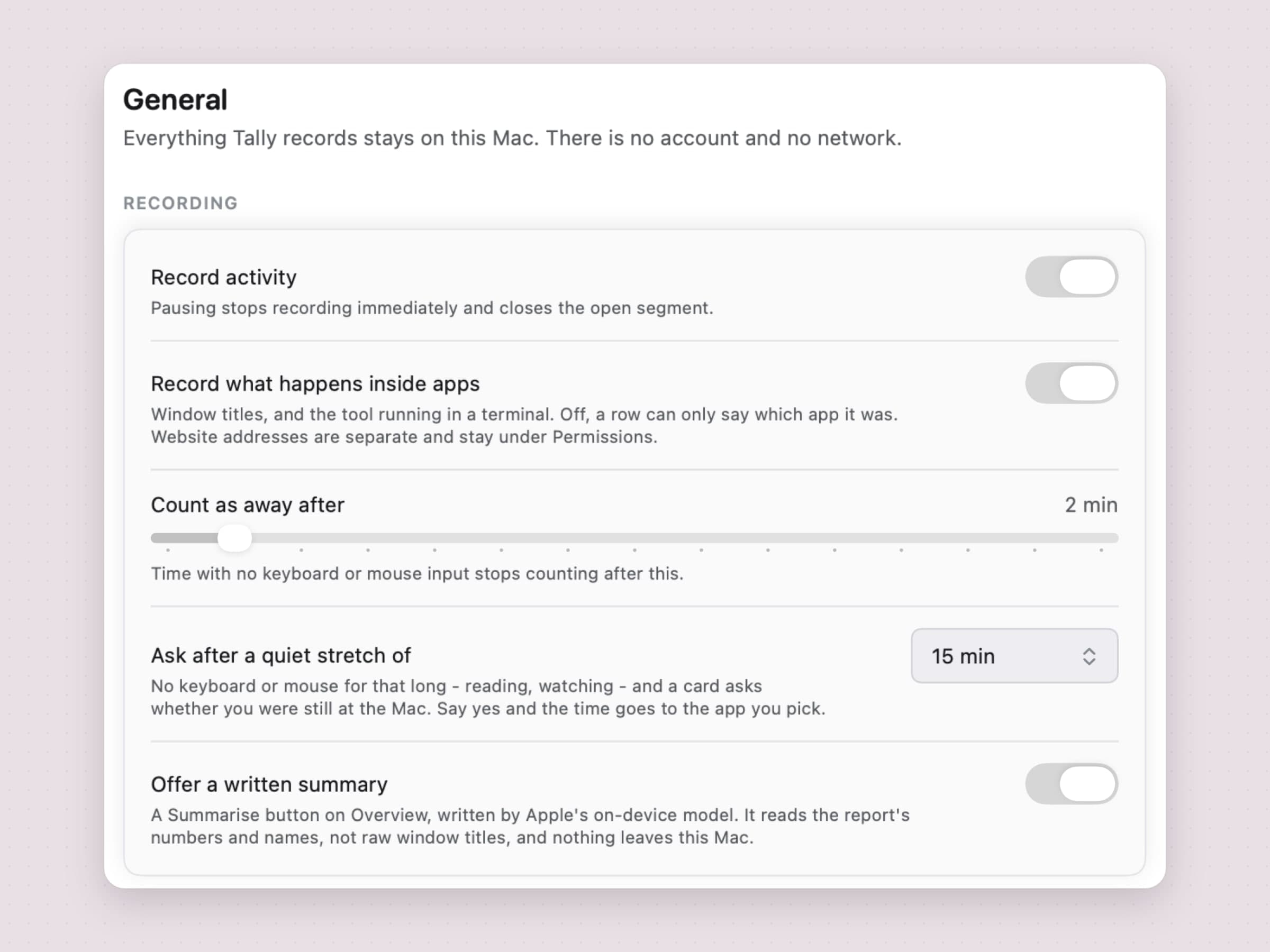
Tally stores what it records in a file on your Mac and nowhere else. There is no sign-up, no sync and no web dashboard, and your usage data never touches a network. For websites the release build keeps the domain, never the full address. One switch, Record what happens inside apps, turns off window titles and the tool running in a terminal; sites are recorded separately, under Permissions.
On macOS 26 with Apple Intelligence turned on, Offer a written summary adds a Summarise button that writes a paragraph about your day with Apple's on-device model, the same approach as the other on-device AI apps for Mac. It reads the report's numbers and names, not raw window titles, and nothing about that leaves the Mac either.
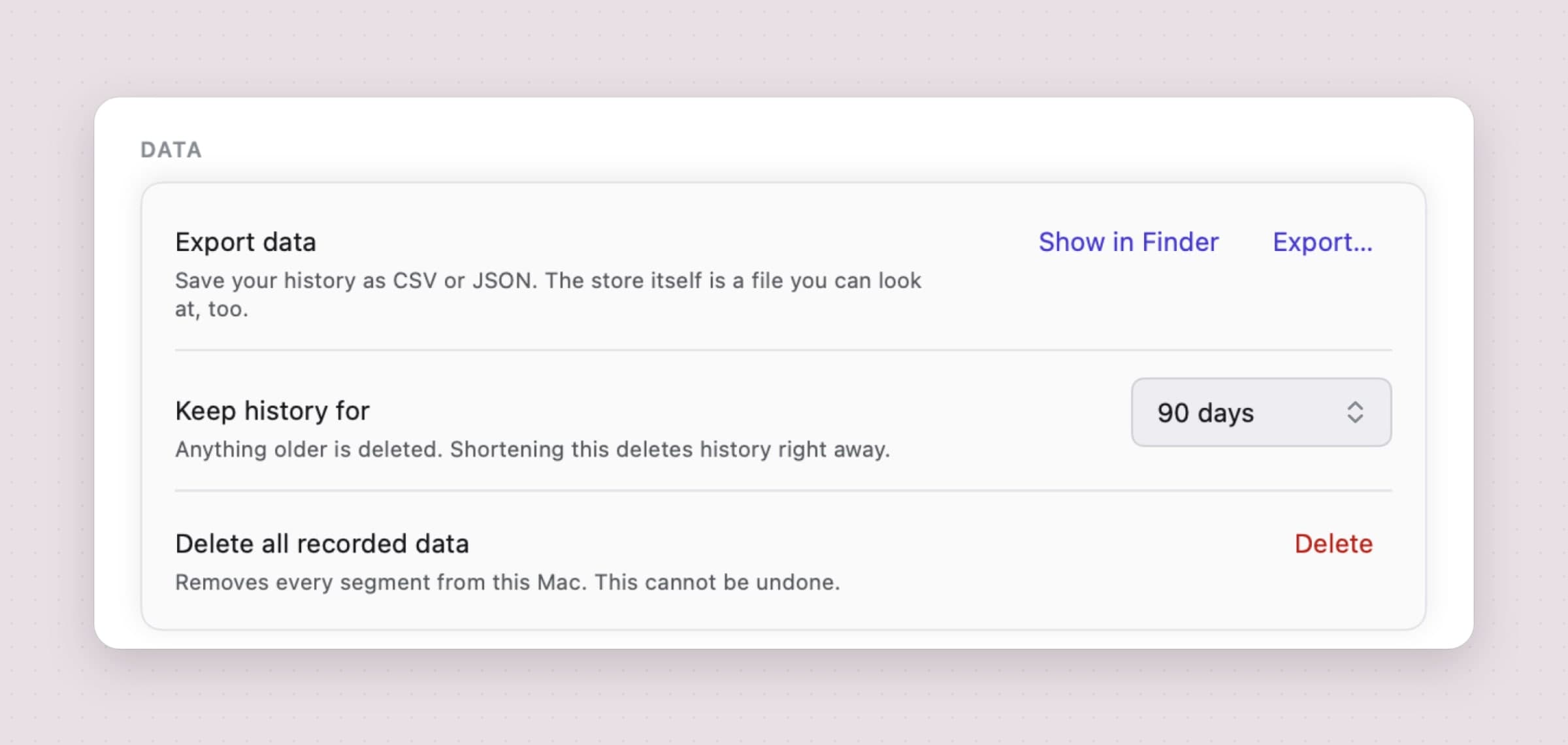
The data stays yours in the practical sense too. Export writes the period on screen, the last 30 days or everything as CSV or JSON. Keep history for offers 30, 90 or 365 days or forever, with 90 the default. Delete all recorded data removes every segment in one step.
The honest limit: Tally measures this Mac only. There is no phone app, no second computer and no merged view; if that is the point for you, RescueTime's reach is the reason to stay.
What it never records is a list you control
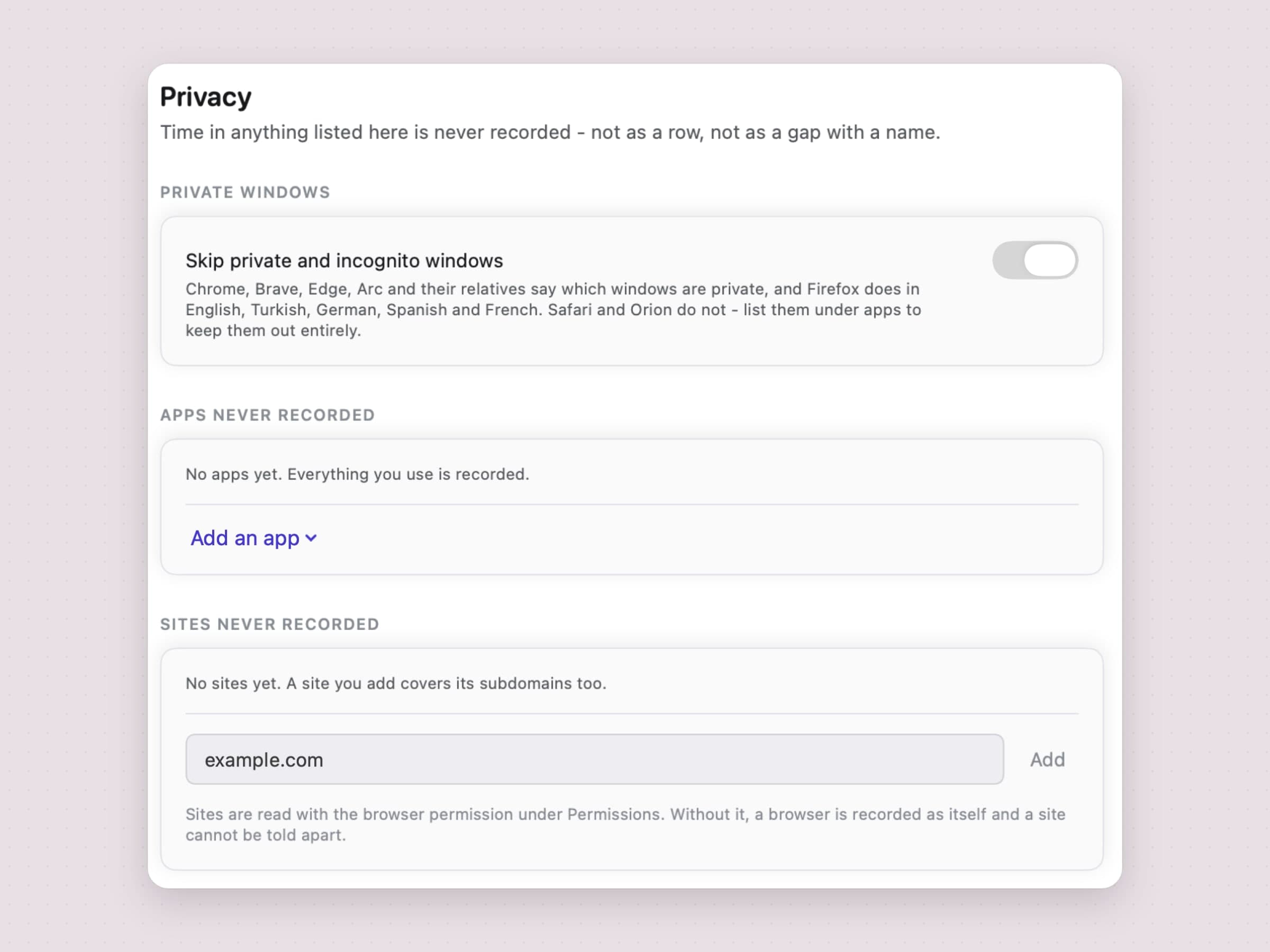
Privacy settings hold three lists. Skip private and incognito windows keeps private browsing out: Chrome, Brave, Edge, Arc and their relatives say which windows are private, and Firefox does in English, Turkish, German, Spanish and French. Safari and Orion do not, so a private Safari window is recorded unless Safari itself is on Apps never recorded. Apps never recorded and Sites never recorded take anything you name, and a site covers its subdomains. Add something that already has history and Tally asks whether to delete the past time too.
Tally also works with no permissions at all. Out of the box it records per-app totals; Accessibility adds window titles, and Automation adds the site open in Safari, Chrome, Brave, Edge, Vivaldi, Opera or Arc. Firefox needs no Automation grant, because it exposes the address through accessibility.
The day keeps its gaps
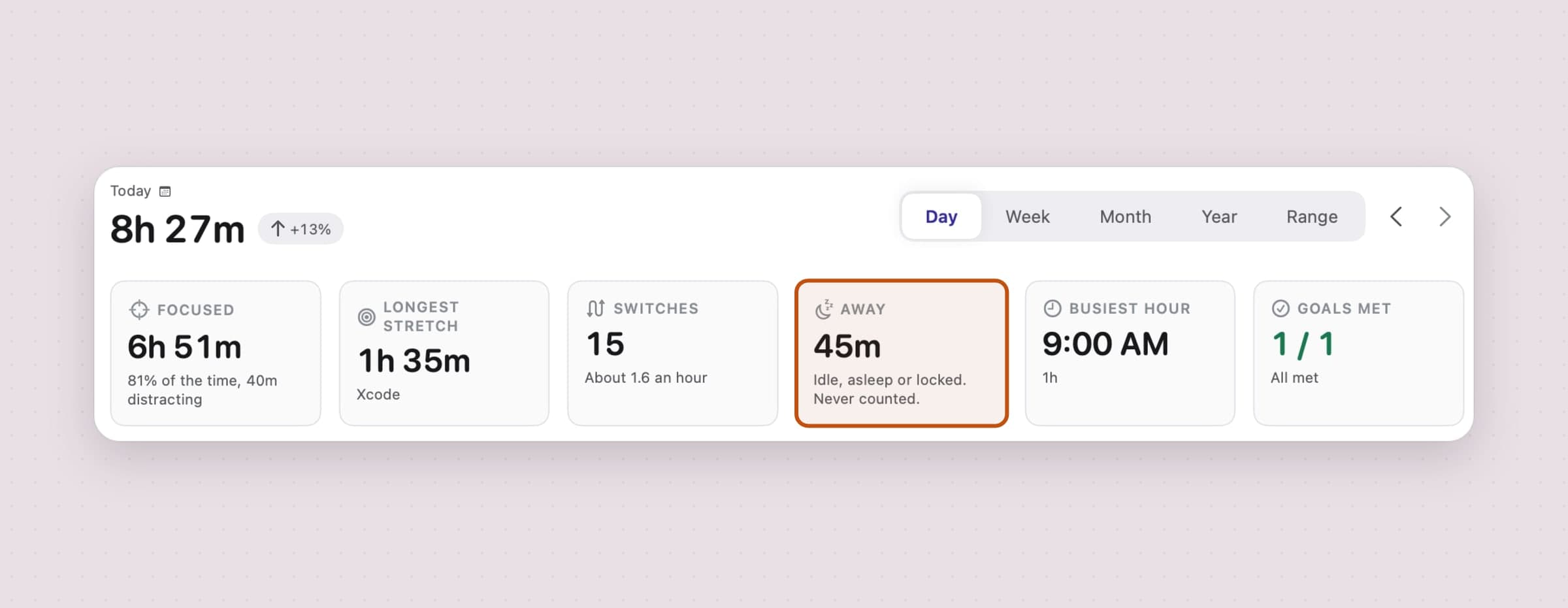
A tracker is only worth reading if it does not count the hour you spent making coffee. After two minutes with no keyboard or mouse input and nothing playing, a threshold you can move from one to fifteen, Tally stops the segment back at your last input rather than at the moment it noticed. Sleep and the lock screen end a segment the same way, an app you passed through for under three seconds is discarded, and a single segment claiming more than eight hours is cut rather than believed.
Reading is not idleness either (playing video already counts as presence), so Ask after a quiet stretch of puts the question to you instead: after 10 to 60 minutes with no input, a card asks whether you were still at the Mac, and a yes gives the time to the app you pick.
Categories by kind, focus by your own labels
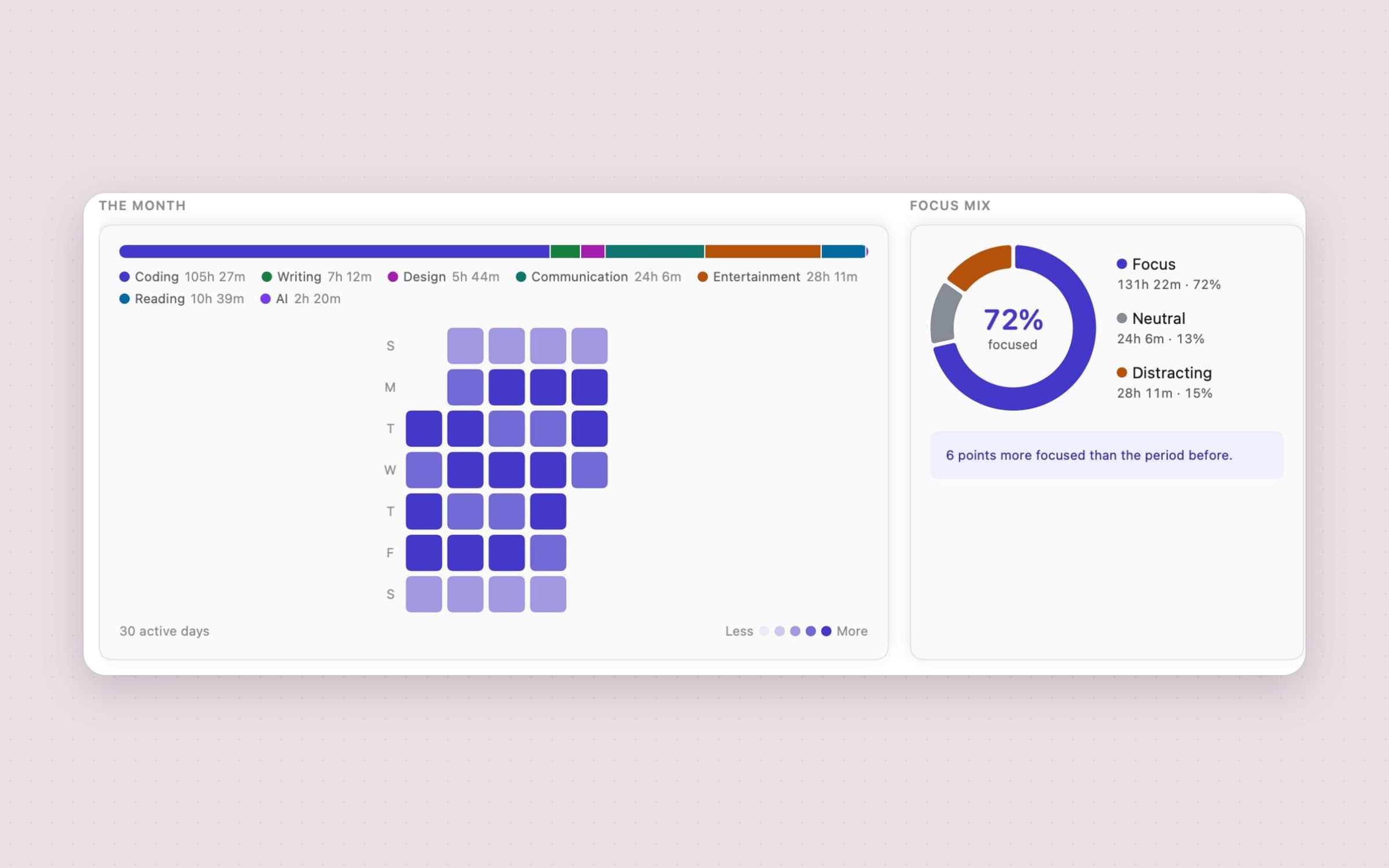
Tally sorts time into ten categories - Coding, Writing, Design, Communication, Social, Entertainment, Reading, AI, Utilities and Other - by the kind of activity, never its purpose, and you can rename, recolour and add your own. Each category is labelled focus, neutral or distracting, and that label is all the focus figures read. There is no productivity grade.
Fixing a wrong category is one click on the row, and it is retroactive: categories are worked out when the report is read, never stamped onto the records, so one correction also fixes last month. A rule about a site always outranks a rule about the browser it ran in.
Limits that warn, and never block
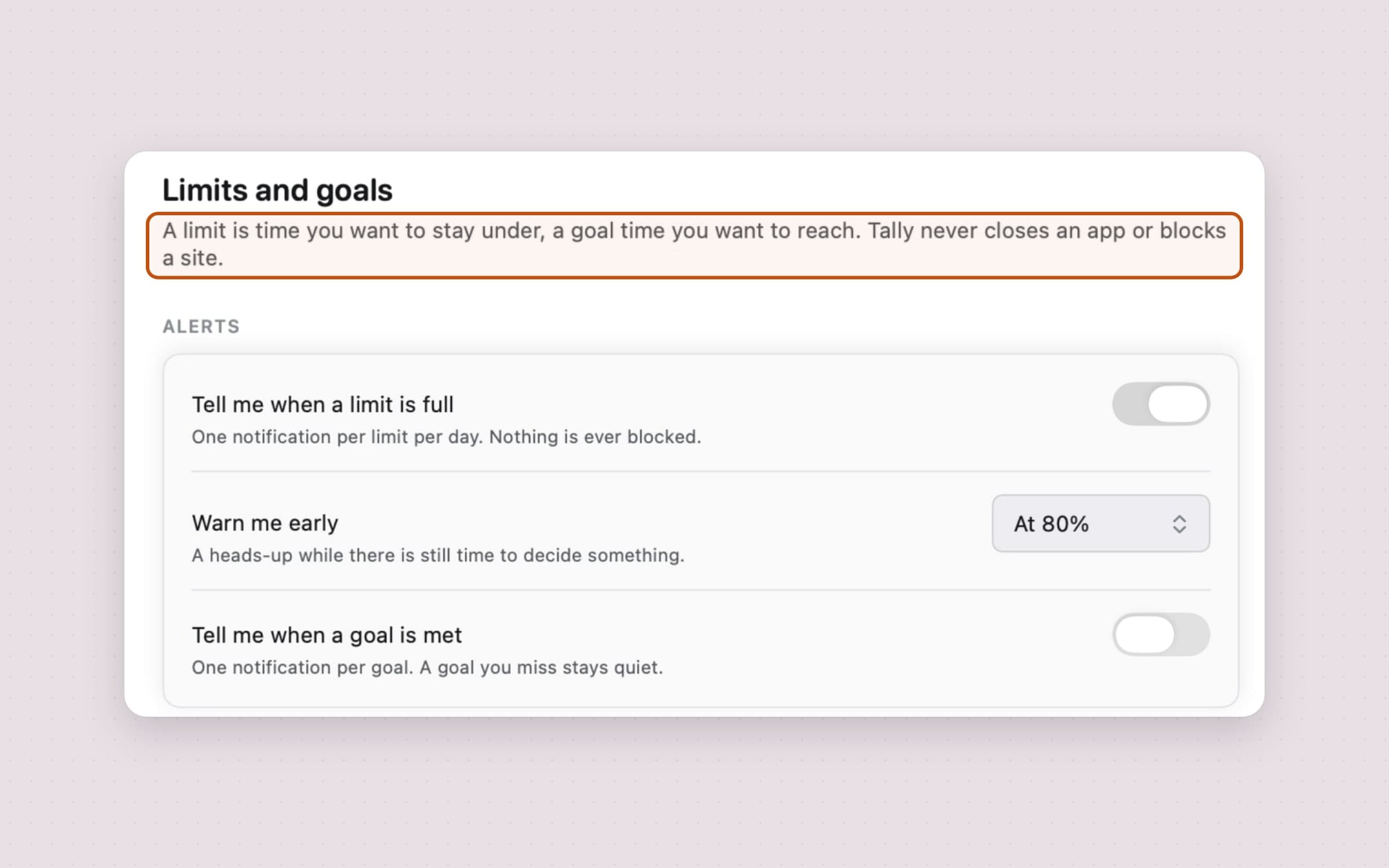
A limit can be on a site, a category, an app or the whole day, over a day or a week, and a goal works the other way round - at least two hours of Coding. An early warning at 80% (movable, or off) comes while there is still something to decide, and each limit says so once per day or week.
Nothing is ever blocked. That is the clearest difference from RescueTime's Focus Sessions, and it is deliberate: a tracker that starts punishing is one people stop running. If blocking is what you need, pair Tally with a blocker such as NoMore, covered in how to block websites on a Mac.
The rest is where you already look: a live badge in the menu bar, like the other menu bar apps for Mac, a popover with the day's total, timeline and top apps, desktop widgets in three sizes with a pause button, and Shortcuts actions to get tracked time or top apps, pause and resume recording, and open the report. A digest arrives on Monday at 09:00 and stays silent after a week with fewer than three active days. The whole app is covered feature by feature in the app usage tracker for Mac.
RescueTime vs Tally, feature by feature
| RescueTime | Tally | |
|---|---|---|
| Price | Solo $9 a month or $84 a year; free Lite plan | $13.99 once, 30-day trial |
| Account | Required | None |
| Where the data lives | Synced to RescueTime's servers | Only on your Mac |
| Devices | Mac, Windows, iOS, Android, web dashboard | This Mac only |
| Automatic app and site tracking | Yes | Yes, with per-site detail in Safari, Chrome, Firefox, Arc and other major browsers |
| Works with no permissions | Needs Accessibility on a Mac | Yes, app totals with nothing granted |
| Categories | Automatic, with productivity reports | Ten by kind, your own focus labels, fixes apply retroactively |
| Blocking | Focus Sessions on paid plans | None by design; limits warn only |
| Timesheets and teams | Solo+, Team and Team+ | No |
| Free trial | 14 days on paid plans | 30 days, no card and no email |
| Purchase model | Subscription only, no one-time purchase | One-time purchase |
| Export | Report CSV export and an API | CSV or JSON |
RescueTime wins three rows outright: devices, blocking, timesheets and teams. Tally wins on where the data lives, the price over time, and how honest the numbers are about the time you were not there.
Other alternatives worth knowing
Timing is the deep Mac-only option, built around projects and documents, with billing status on its higher plans, a 30-day trial and a Professional plan at $10 a month. If you bill clients by the hour, it does far more than either app on this page.
Rize adds AI categorization by client and project on top of automatic tracking, at $12.99 a month or $9.99 a month billed annually, with no free tier and data in the cloud.
ActivityWatch is free and open source, keeps its data local and runs on macOS, Windows, Linux and Android. It is the pick if price is the whole question and a plainer interface is fine.
Toggl Track and Clockify are manual timers rather than automatic trackers: you start a timer for a task. Both have free plans and are the usual choice for teams who log hours against projects; a menu bar task timer is the lighter version of the same idea.
When RescueTime is still the right choice
Stay with RescueTime if your working day spans a Windows PC and a Mac and you want them in one report. Stay if Focus Sessions are the part you actually use (the best focus apps for Mac compares that kind of blocking), since Tally will tell you a limit is full and never close anything. And stay if you need timesheets or a view across a team; neither is anything Tally tries to be.
If the free Lite plan already answers your question, there is no reason to pay for anything else either.
Switching from RescueTime
- Keep your history first. Before your plan lapses, export the reports you care about; RescueTime's reports export to CSV and its API returns CSV or JSON. Tally does not import them, so this is your archive.
- Install Tally and open it once. It starts recording per-app totals immediately, with nothing granted.
- Grant what you want, one layer at a time: Accessibility for window titles, Automation for sites in your browser.
- Turn on Open at login in Settings -> General, so no day goes missing.
- Set your focus labels under Categories, and fix a row or two in Breakdown after the first day.
- Recreate your goals as goals or limits in Limits and goals. For blocking, add a separate blocker.
- Cancel the RescueTime plan and uninstall it, including its browser extension.
Expect a day of data before day-on-day comparisons mean much, and two weeks before week-on-week ones do.
Side by side
| Tool | How it tracks | Where the data lives | Blocks distractions | Cost |
|---|---|---|---|---|
| Apple Screen Time | Automatic, apps and sites | Your devices, combined across them | Schedules, time allowances | Free |
| ActivityWatch | Automatic | On your machine | No | Free |
| RescueTime | Automatic, apps and sites | RescueTime's servers | Focus Sessions, paid | From $84 a year, or free Lite |
| Rize | Automatic, AI categories | Cloud | Not checked | $9.99 a month billed annually |
| Timing | Automatic, projects and documents | Mac, with sync | Not listed | $10 a month (Professional) |
| Tally | Automatic, apps, sites and window titles | Only on your Mac | No, limits warn only | $13.99 once |
Pick by what you would hate most. If it is your activity on a server, choose between ActivityWatch and Tally. If it is another subscription, the same two. If it is one report across a PC and a Mac, RescueTime. For the wider field, including Screen Time's limits, see the best screen time apps for Mac.
Prices and features checked on 29 October 2026.

