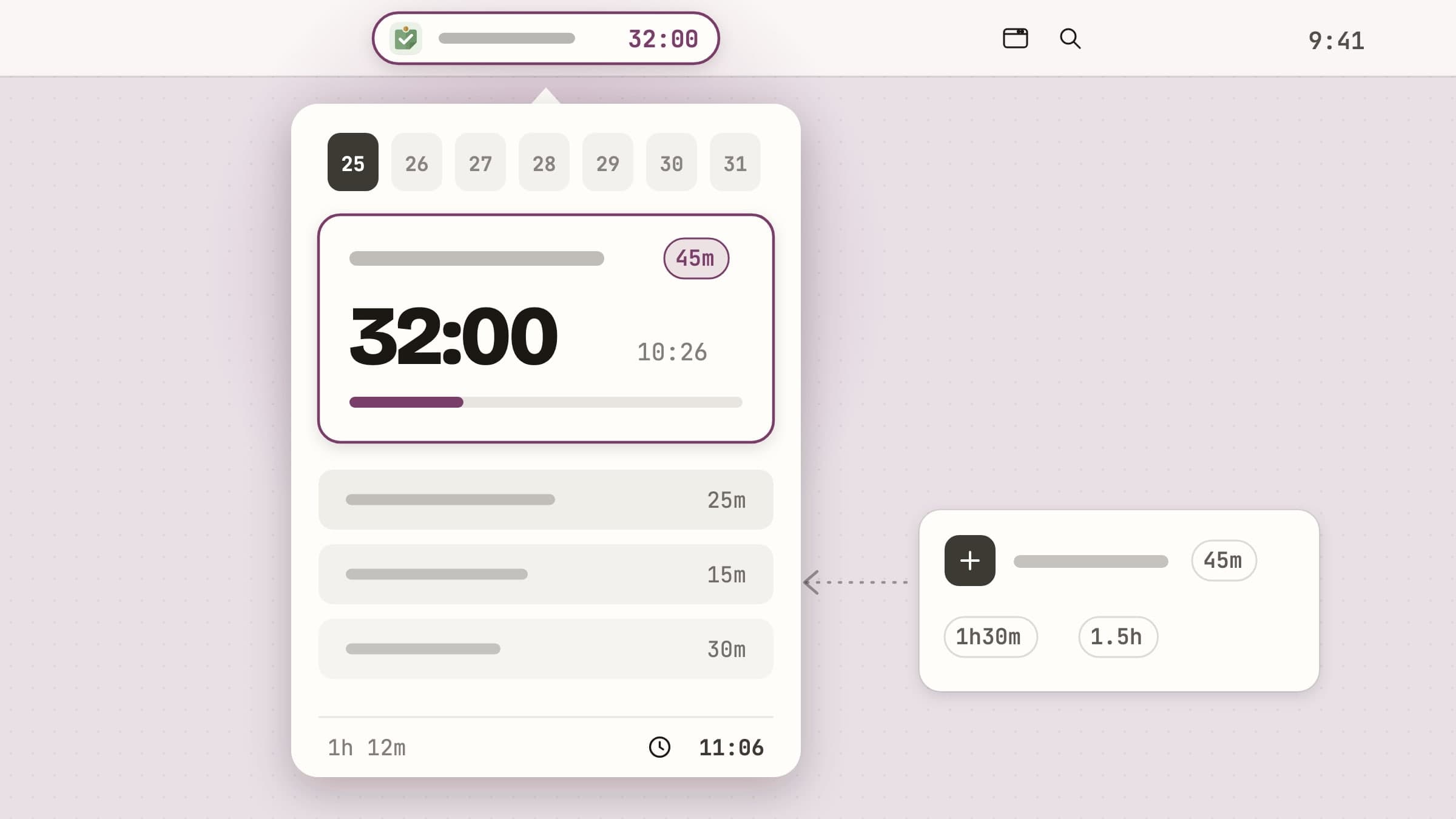
What a menu bar task timer is
A menu bar task timer is a small macOS app that keeps two things permanently visible next to the clock: the name of the task you are working on, and how much of its estimated time has gone. Nothing else.
That is a narrower job than a to-do app and a wider one than a stopwatch. A to-do app is optimized for capture and storage, which is why opening one at three in the afternoon means re-reading fourteen items and re-deciding what matters. A stopwatch counts minutes but has no idea what they are for. A task timer answers one question, continuously: what am I supposed to be doing, and for how much longer.
Anchored is the one this article walks through. Everything below is in the shipping version, and the screenshots are of the real app rather than mockups.
The label in the menu bar
The whole design rests on the label. Anchored puts the task title in the menu bar with a small ring beside it that fills as the estimate runs down. A ring reads at a glance without asking you to do arithmetic on a number, and the exact time left is one hover away in the tooltip.
The ring dims while the timer is paused. When the estimate runs out the label does not disappear or start beeping - the ring changes colour, so overrun is legible at a glance without being an alarm. With an empty queue it reads What's next?, which is a prompt rather than a blank.
Long titles are the obvious risk with an approach like this, so the truncation point is yours: a slider in Settings sets the maximum label length anywhere from 8 to 32 characters, and Minimal idle reduces the empty state to the anchor glyph alone.
The popover: one anchor, a queue, a day
Clicking the label - or pressing the global shortcut - opens a popover 388 points wide and 600 tall.
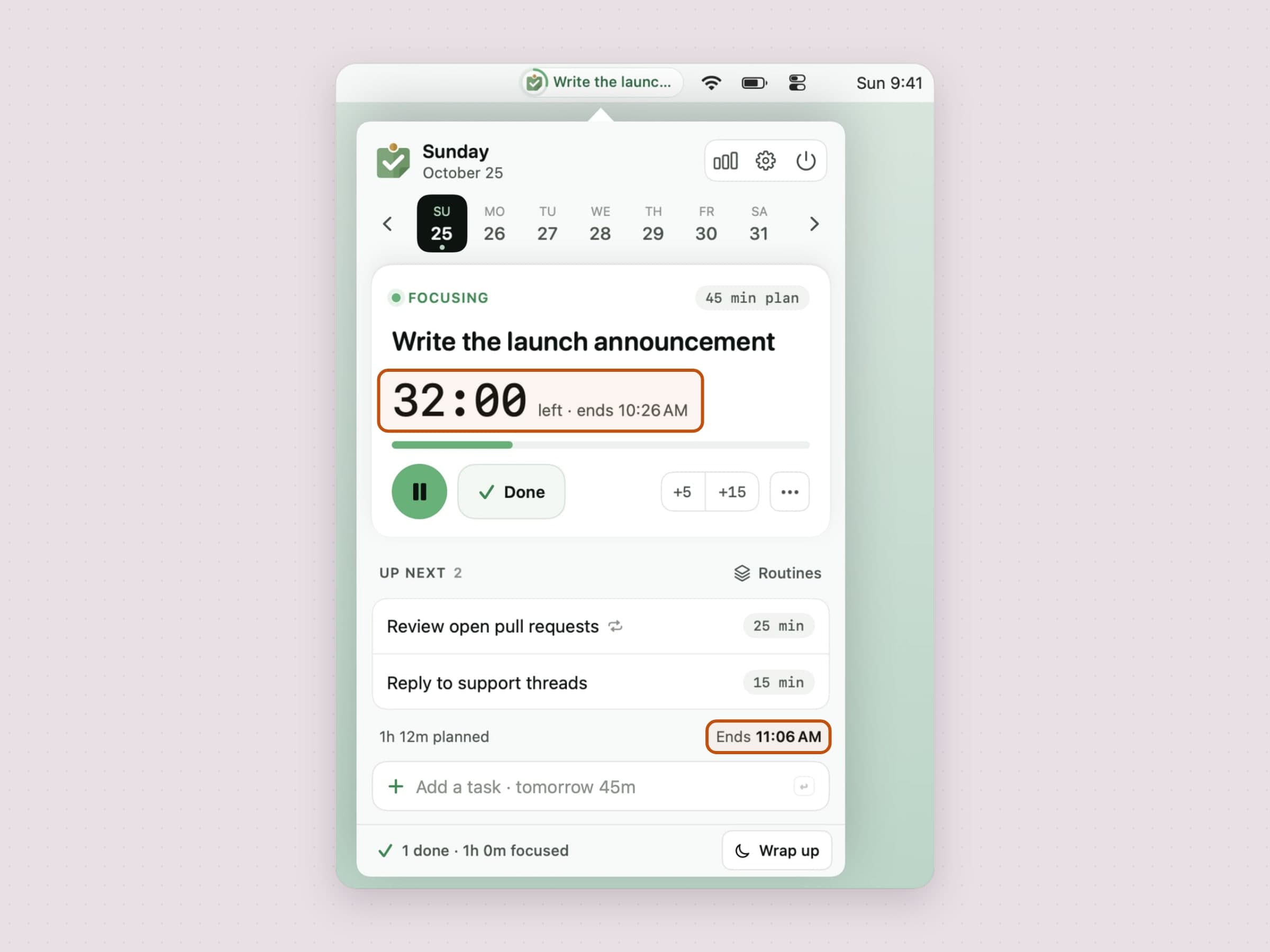
A header runs above all of it: the day's weekday and date on the left, and on the right a chart button that opens the Review window, a gear for settings and a quit button.
Under that is the week strip: seven days, a dot under each one that has work on it, and arrows that page a week at a time (Command Left and Command Right move a single day). It moves forwards as well as back, so the queue doubles as a lightweight planner, and a Today button appears in the header whenever you have wandered off. Past days show what actually got done; the one thing you can still change there is how long a finished task really took.
Below that is the anchor task, the one the menu bar is showing. The card carries a large clock with the time it will end beside it, a progress bar, pause and Done, and +5 and +15 for a session that needs a little longer. A small menu holds the rest: edit, move to the next day, delete. Pausing is lossless: elapsed time is folded into the task's total the moment you pause, so a stop for coffee does not corrupt the number.
Walking away is handled too, which matters more than it sounds: a timer left running through lunch used to bill you for lunch. Anchored watches for the Mac going idle or locking, and time you were demonstrably not there is not counted against the estimate. A short lock is treated as what it usually is - a coffee, not the end of the session - so the timer picks up by itself when you come back.
Under the anchor is Up next, the short queue of what follows. Rows drag to reorder, and hovering one reveals Start now and Move to next day; done and delete live on the right-click menu. Clicking a row opens an editor in place, with the rest of the popover still around it, for the title, the duration, a repeat and a note.
Under the queue, a single line adds it all up: 1h 12m planned · Ends 11:06 AM. Below that is an add field that takes the same shorthand as quick add, and the bottom band is a one-line daily summary - 1 done · 1h 0m focused - with a Wrap up button for the end of the day.
Work that did not get finished
Planning by day has an obvious failure mode. A task written on Tuesday and not finished stays on Tuesday, out of sight, and the day it belonged to is over.
So a bar sits at the top of today whenever an earlier day has unfinished work on it: 2 unfinished tasks from yesterday, with Bring to today and Archive beside it. It offers rather than acts. Rolling everything forward on its own would fill today's queue with something you did not choose, so the bar asks; dismissing it hides it until tomorrow. What you bring forward lands at the bottom of today's queue, behind whatever you did choose, and stays marked as carried over.
The single-task version of the same idea is Move to next day on a row's hover actions, and that is no longer a one-way door: a toast offers Undo for a few seconds afterwards, and the row keeps a way back from the day it landed on long after the toast is gone.
A day with an end
A queue tells you what is next; it does not tell you whether it fits. Set a workday end in Settings and the plan line under the queue grows a bar with a marker where your day stops: Ends 5:40 PM · Workday 6:00 PM. When the queue runs past it, the line turns into an amber box that says how many tasks will not fit and by how much, those rows' durations turn amber too, and one button moves the tail to tomorrow.
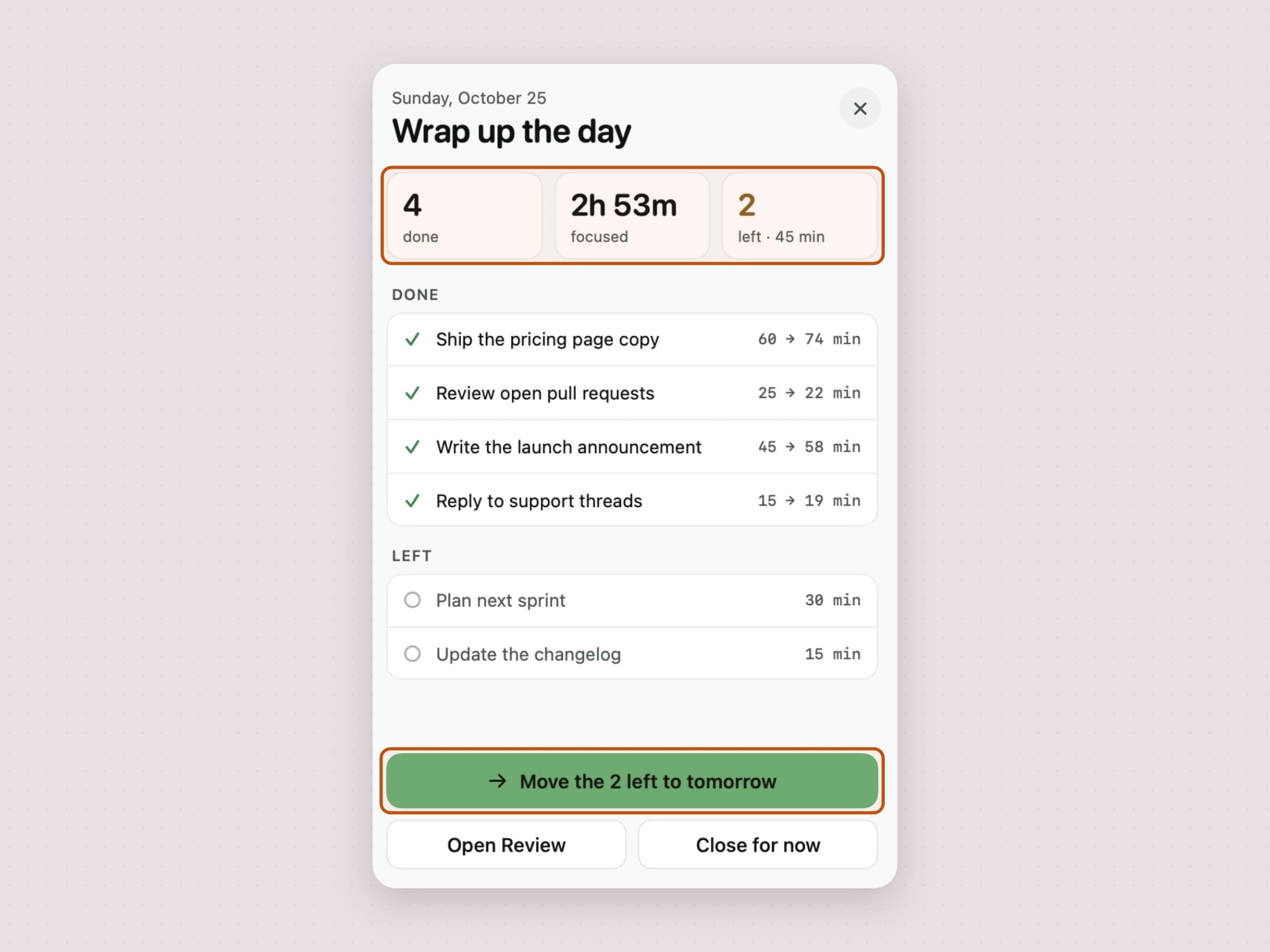
The other end of the same idea is the wrap-up. Wrap up in the summary band - or the workday end itself, once a day - opens a screen that closes the day: how many tasks got done, how long you focused, and what is left. Each finished task shows its estimate against what it took. One button moves everything left to tomorrow, another opens the Review window, and Close for now leaves things as they are.
Repeating tasks and routines
Some work comes back every day, and typing it in again every morning is exactly the kind of friction that makes people stop planning. Any task can be set to repeat from its editor - every day, weekdays or the days you pick - and it adds itself to those days with a small repeat mark on its row.
A routine is the same thing for a set of tasks. The Routines menu over the queue loads one in a click or saves today's queue as a new one, and a routine with a repeat adds itself on its days. Settings has a Routines tab for renaming them, adding or removing their tasks and choosing their days.
Quick add, and durations you can type
The queue is only useful if adding to it costs nothing, so Anchored ships a separate quick-add panel on a global shortcut. It is a floating, non-activating window: it appears over whatever you were doing, takes your typing, and hands focus straight back.
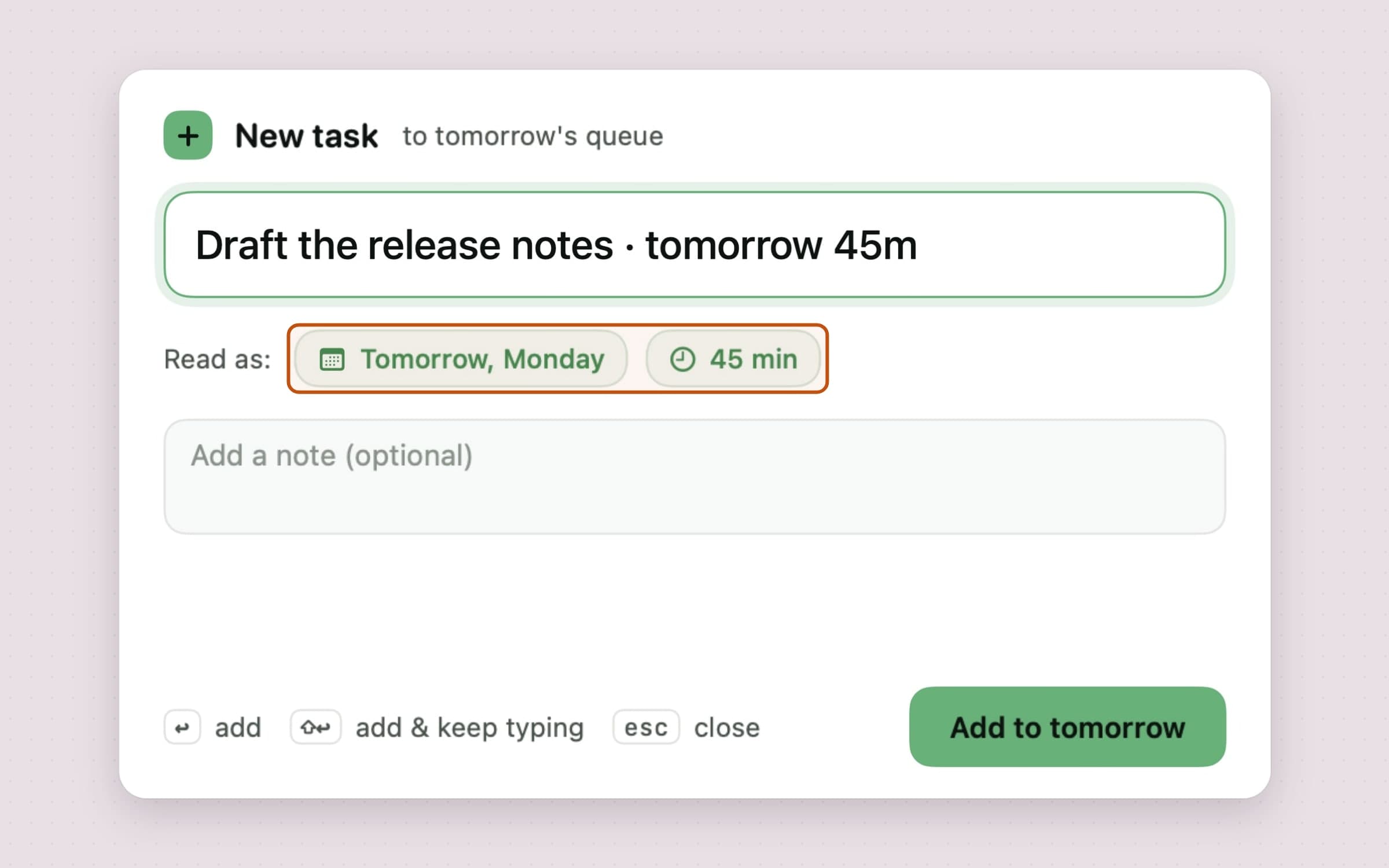
Enter adds the task and closes. Shift Enter adds it and keeps the field open, which is how you empty your head of five things in about fifteen seconds. Escape cancels.
Estimates are only worth writing down if writing them down is fast, so the parser
accepts the shapes people actually type: 25m, 1h, 1h30m, 1.5h, and ~25m
for "roughly". A day word after the separator sends the task to that day:
Draft the release notes · tomorrow 45m lands on tomorrow with 45 minutes, and
weekday names work too - in English, Turkish, German, Spanish and French, whatever
language the app is set to. What the panel read comes back as chips under the
field, so a misread is visible before you press enter, and the button names the
day: Add to tomorrow.
Case and spacing do not matter, and the duration chip has presets at 15, 25, 30, 45, 60 and 90 minutes. You can skip the duration entirely - a task without one is a perfectly valid queue entry that simply shows its title with no countdown beside it. The countdown starts when the task becomes the anchor, not when you wrote it down.
When the timer runs out
The end of an estimate is where most timers get annoying, so this is the part worth reading closely.
A notification fires with a body that just states the fact - "45 minutes done." - and carries two actions. Done completes the task and opens the popover on the next one. The second is an extension whose size you set yourself: +5, +10, +15 or +30 minutes, applied silently, with no window and no further interruption. Running over an estimate is normal, and the app treats it that way.
If the end should not come as a surprise, a soft warning can play 2 or 5 minutes before it, and the sound itself is yours to pick in Settings.
Choosing Done opens a full-takeover panel inside the popover: a checkmark, a recap of how long the task actually took, then the next task with Start and Skip buttons. It advances on its own after a beat and a half unless you hover, so the common case needs no clicks at all.
The widget: the same queue, on the desktop
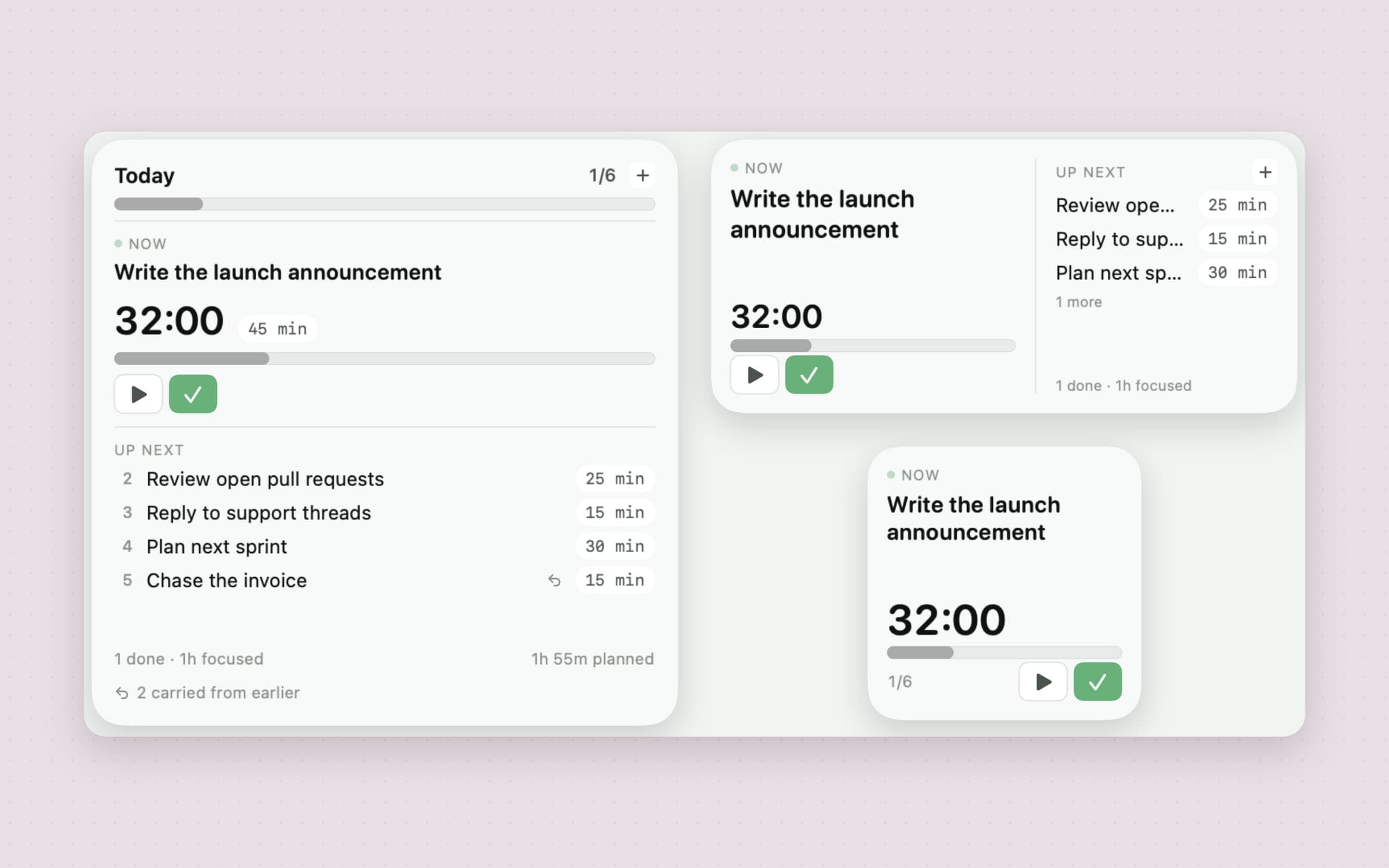
Anchored ships a desktop widget in all three sizes. The reason to have one is that it acts rather than reports.
Small answers a single question - what am I on, and how long is left - so it draws the anchor, its countdown and one start/pause button. Medium adds the queue behind it, which is the whole reason to put this on a desktop rather than glance at the menu bar. Large is the day: progress against everything written for it, the anchor with its estimate, the queue as deep as the card can hold, the running total, and a line for whatever was carried over from earlier.
The buttons are real ones. Done completes the anchor, and the next task takes its place on the card. Start and pause run the clock. +N minutes extends an estimate, like the +5 and +15 on the popover's card. None of them brings Anchored forward: the press is parked in a container both processes can read, the app applies it and republishes, and the card has already redrawn from the same parked press, so it lands instantly either way.
With Anchored closed, those same controls open the app instead of acting. Hiding them would be worse - a card that silently loses its buttons reads as broken - and a press left parked for an hour must not quietly complete a task tomorrow. Clicking the card itself opens the popover, except on a day with nothing written on it, where it opens quick add, which is the only thing anyone wants from an empty card.
What your estimates were worth
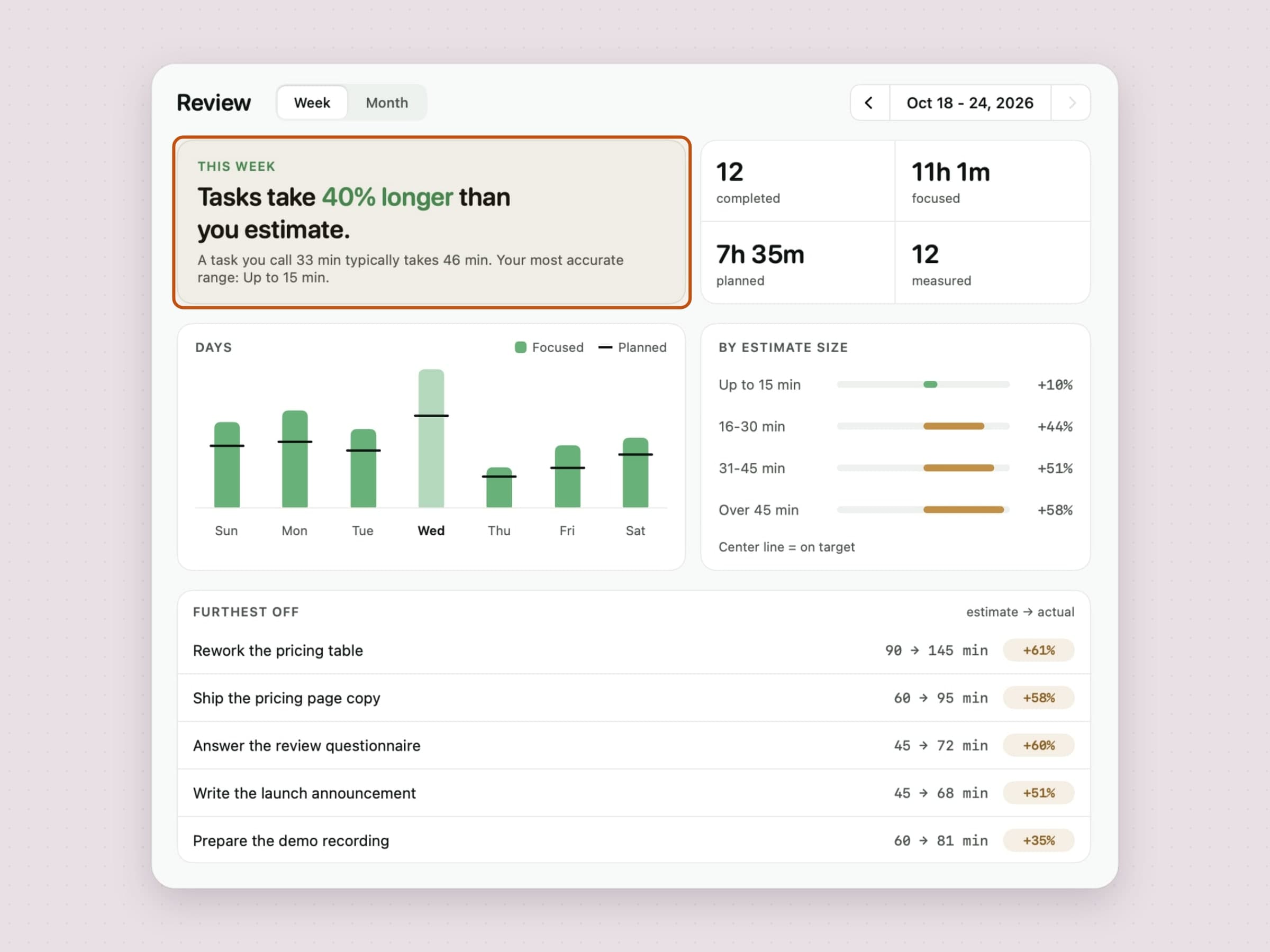
Anchored has stored both halves of this comparison from the first version - what you guessed when you typed "45m", and what the timer measured - and never showed them together. The Review window does, over a week or a month.
It opens on a sentence rather than a chart: Tasks take 40% longer than you estimate. People do not read a plot and derive a conclusion, they read the conclusion. Everything under it exists so that someone who disbelieves the sentence can go and check.
A day-by-day chart puts planned against focused, with a tick where the estimate sat. A breakdown by estimate size splits the verdict four ways - up to 15 minutes, up to 30, up to 45, over 45 - because most people are close on a fifteen-minute guess and hopeless on a two-hour one, and a single blended average hides exactly that. A furthest off list names the tasks that did the damage.
Only a task that was completed, carried an estimate and has a measured time counts towards the bias: finishing something without pressing play would otherwise read as "you finished instantly". If the timer missed the real number, you can correct a finished task's time by hand, and the corrected time counts. Under five measurable tasks the headline is withheld rather than guessed at, and a size bucket with fewer than three says too few instead of a number.
Built for the keyboard
Anchored is usable entirely from the keyboard, and the shortcut surface is small enough to memorize in a day.
Two shortcuts are global: Command Shift J toggles the popover and Command Shift A opens quick add. Both are rebindable, each has a Reset link, and the recorder checks for conflicts as you type - if you map two actions to the same combination it names both rather than silently letting one win. Six more are fixed and work inside the popover: Command D completes the current task, Command N adds one, Command Left and Command Right move a day, Command T jumps to today and Command R opens Review.
Worth knowing for anyone comparing menu bar utilities: the global shortcuts use Carbon hotkey registration, which means Anchored needs no Accessibility permission to make them work.
What it deliberately does not do
The absent features are as much of the design as the present ones.
There is no account and no sync. Nothing is uploaded, and there is no phone app waiting for you to sign up. The trade is real and worth stating plainly: your queue is on one Mac.
There is no backlog management - no projects, tags or filters competing with the tool you already use. Anchored expects your real list to live wherever it already lives and asks only that you promote one item into it each morning. Nothing rolls over on its own either: unfinished work is offered at the top of today and moved only when you say so, so a day you did not open does not quietly reorganise the next one.
It asks for exactly one system permission, notifications, and works without that too. No Accessibility, no Screen Recording, no file access. The app is sandboxed, signed and notarised, and the only network traffic goes to our own servers - license checks, updates, config, and anonymous usage and crash diagnostics. Automation is one App Intent, Add Task to Anchored, which runs from Shortcuts, Spotlight or by voice without launching the app.
What it costs, and what else to look at
Anchored runs on macOS 14 or later, on Apple Silicon and Intel, and takes about 15 MB. It is a one-time $3.99 purchase rather than a subscription, with a 30-day trial that needs no card and no email - the license is permanent. The full specification sits on the Anchored page.
A single-task timer solves exactly one of the several problems people call "I can't focus": choosing. If the problem is starting, a fixed interval is a better lever than an estimate, which is Pawodoro, covered in a menu bar Pomodoro timer for Mac. If it is drifting into other tabs, a blocker like NoMore is the answer. If it is never stopping, Recess interrupts on a schedule that has nothing to do with your work - and there is a longer treatment of that split in the best focus apps for Mac.