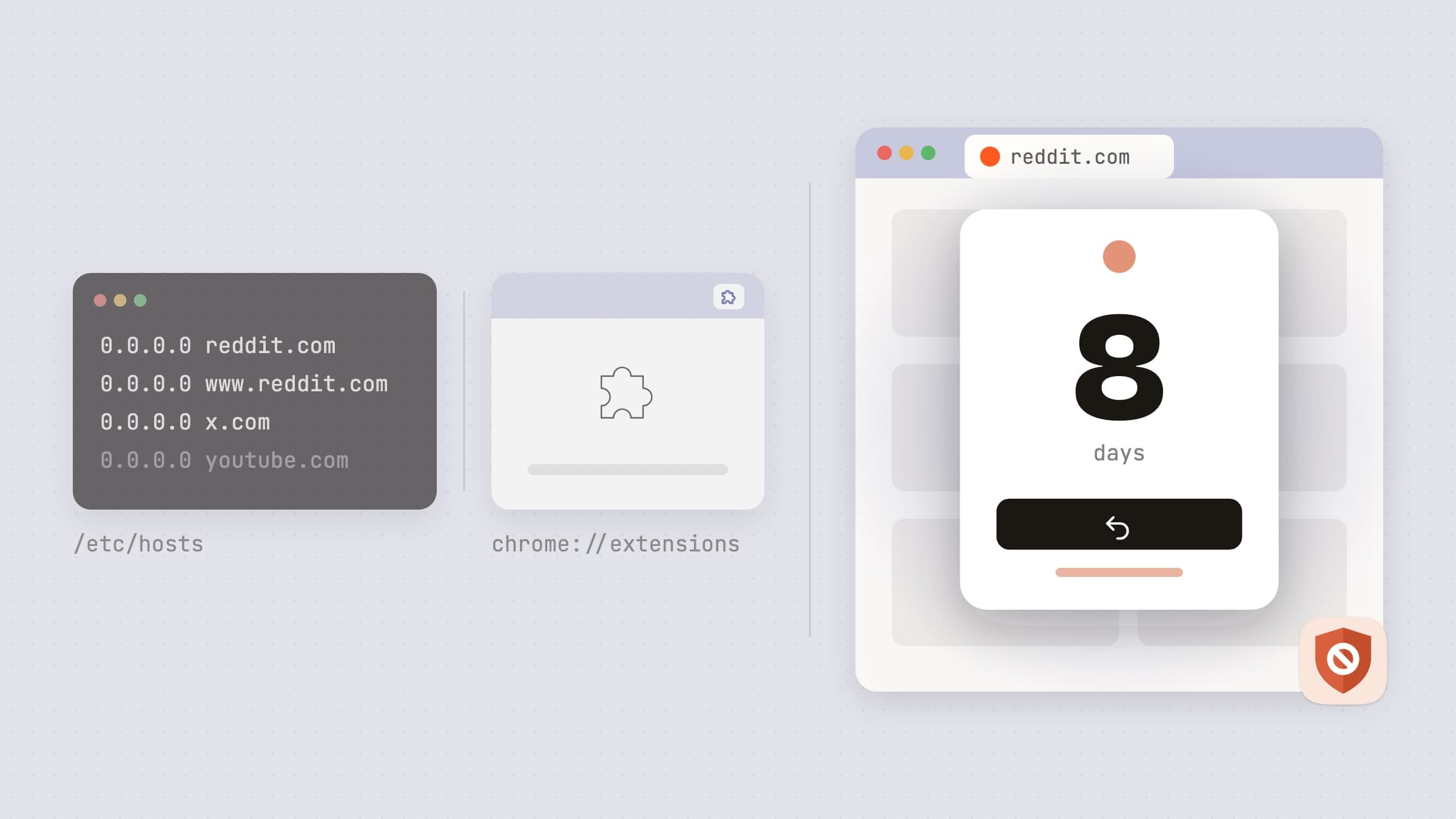
The three ways to block a site, and what each costs
Edit /etc/hosts. Free, and it breaks the site everywhere including the
places you needed it to work. It also takes about four seconds to undo, which is
roughly how long your resolve lasts.
A browser extension. Works well inside the browser it is installed in, and does nothing at all about the desktop chat client, the game, or the second browser you will open instead.
A native app that watches the frontmost window. It sees the browser tab and the application, so both routes go through the same list. This is what NoMore does, and everything below is in the shipping version.
How the detection works
NoMore watches two things: which application is frontmost, and - when that application is a browser - what its current tab is. It asks the browser directly, through the same scripting interface Safari, Chrome, Arc, Brave, Microsoft Edge, Vivaldi and Opera expose to macOS, and compares the answer against your list on your own machine.
There is no proxy, no DNS service and no VPN profile. Your browsing is not routed anywhere, and the app has no server-side record of what you open, because the comparison happens locally and the result never leaves.
macOS gates that scripting access behind an Automation permission, which is why setup asks for one per browser. That prompt is the price of seeing the tab at all; there is no way to read a browser's current URL on a modern Mac without it.
Firefox is the exception, and it is worth knowing which permission you are granting and why. Firefox publishes no AppleScript dictionary at all, so there is nothing to ask; its URL is read out of the Accessibility tree instead, and so is the step back. That is one app-wide grant rather than one per browser, and without it Firefox is the one browser NoMore cannot see into.
Detection is a poll rather than a hook: while a browser is frontmost, NoMore re-reads the current URL every couple of seconds. That is what catches you navigating inside a tab you already had open, rather than only the one you just opened.
What you actually put on the list
The unit is not "a blocked site". It is a streak - a thing you are trying to stop doing, which has a name, a start date, and a set of domains or applications that count as breaking it. You can add them one by one or start from a ready-made set - social media, video, news, shopping or games - and a streak can still be edited after it is created.
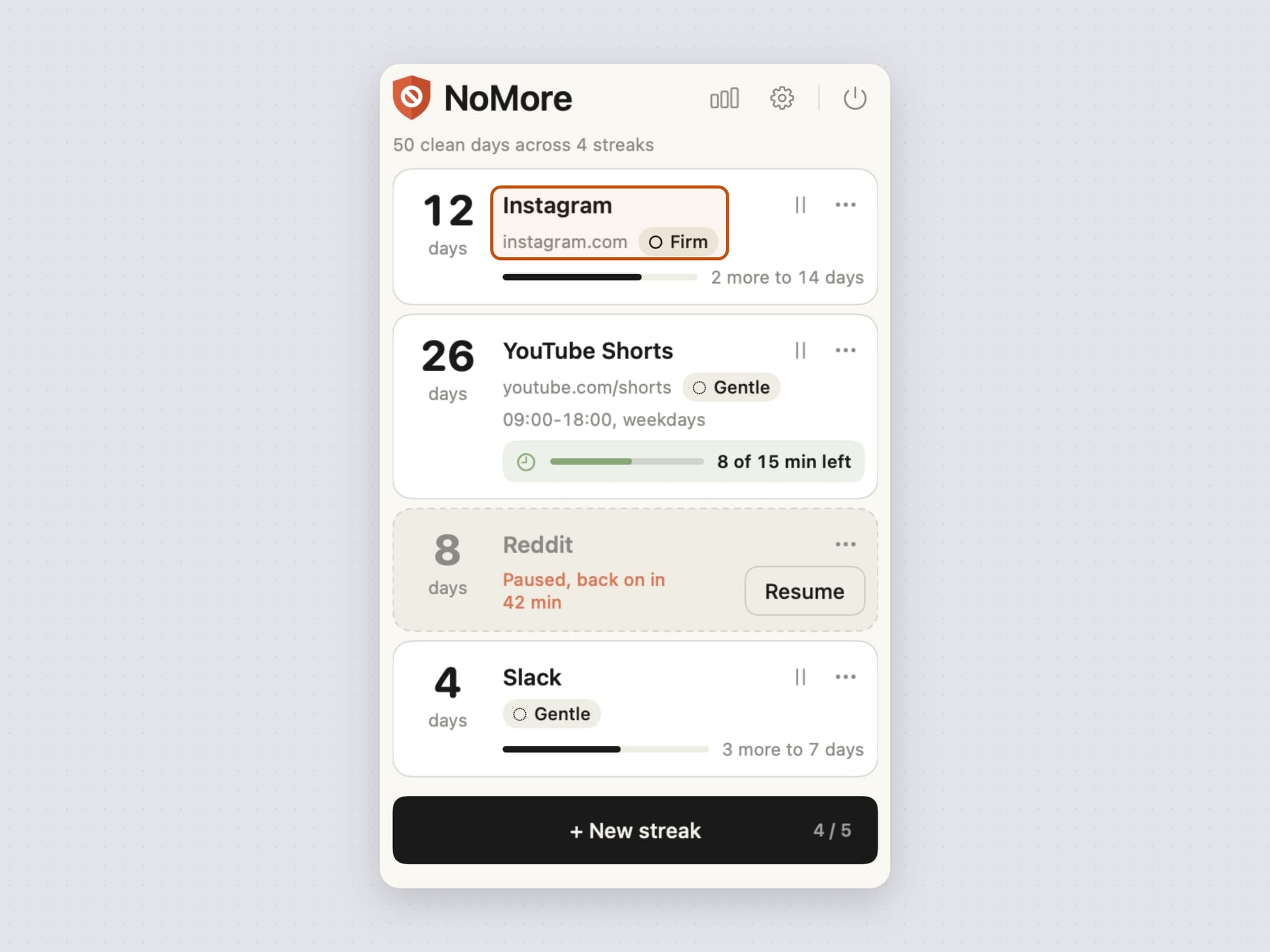
One streak might be a single domain. Another might be four news sites. A third might be an application with no website involved at all. Each carries its own strictness - gentle, firm or brutal - and its own day count, and milestone notifications fire at 7, 14, 30, 60, 90, 180 and 365 days.
A domain does not have to mean the whole site. An entry can carry a path -
youtube.com/shorts, reddit.com/r/nba - and then only that part is blocked
while the rest of the domain stays open. Matching is by whole path segment, so
/shorts covers /shorts/abc123 and never /shortsclips.
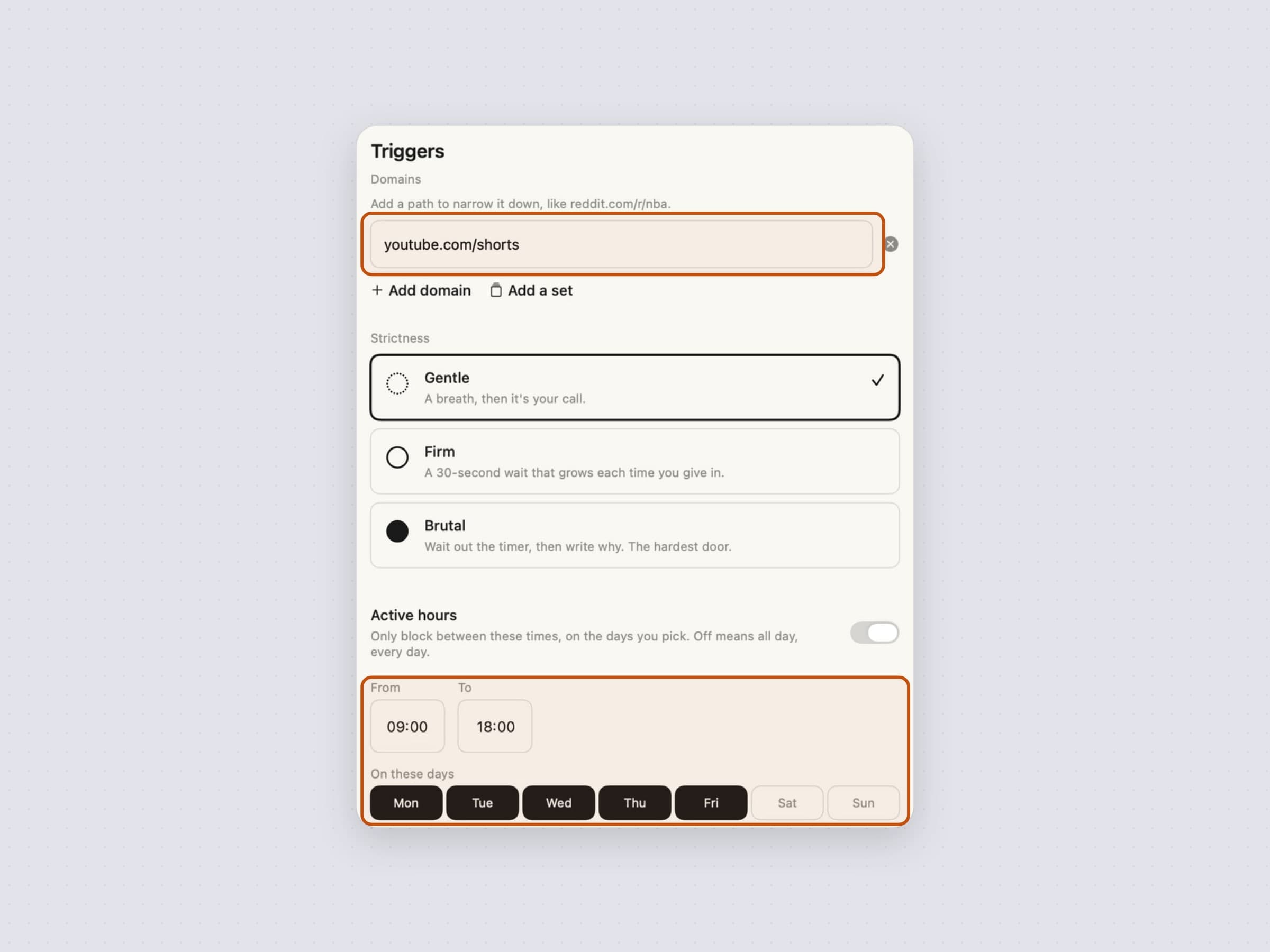
A streak can also be given active hours - a From, a To, and it blocks only between them, on the days you pick: weekdays only leaves the weekend free. It is off by default, which means around the clock, and an end earlier than the start is read as a window that runs through the night rather than a mistake, counted for the day it starts.
Framing it as a streak rather than a filter is the design decision the rest of the app follows from. A filter has a binary state. A streak has a length, and a length is a thing you do not want to lose.
What happens when you open one anyway
This is the interesting part, because the answer is not "you can't".
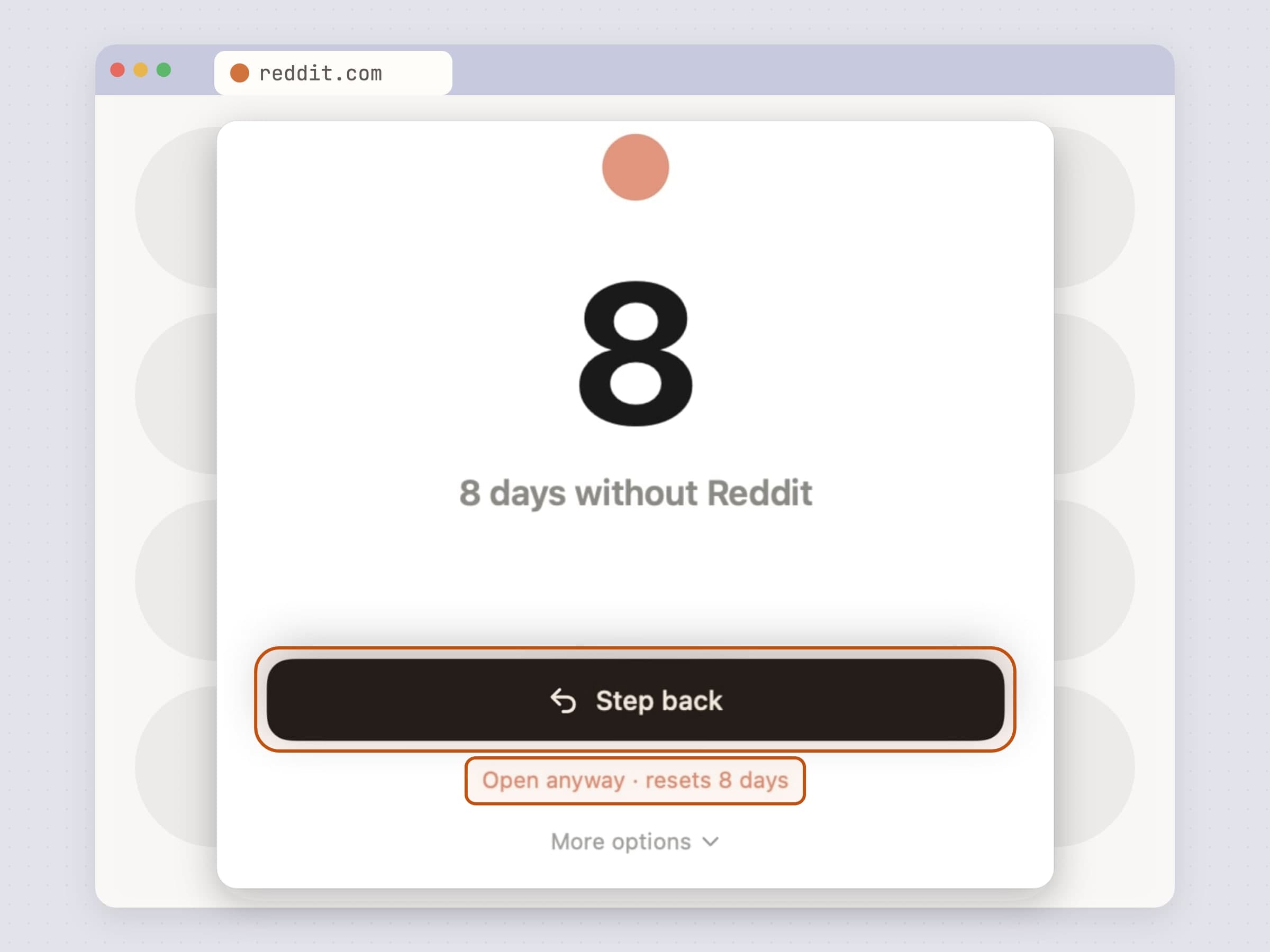
A blurred panel takes over in front of what you opened. It shows how many days the streak is at, and offers a deliberately lopsided choice: Step back is the large primary button, and open anyway is a small link that spells out what it will cost. Every other escape hatch - pause for an hour, the daily free pass, the external-link exception - sits behind a More options disclosure, so the main screen stays a calm two-way decision rather than a menu. On a streak with a daily allowance the panel only comes up once the day's minutes are used, and it says so.
The strictness setting changes what "open anyway" costs:
- Gentle takes the click. The panel was the friction.
- Firm starts a countdown you have to sit through, with a text field asking what you are going to do there. The countdown escalates within the same day - 30 seconds the first time, 60 the second, 120 from the third on - so a bad afternoon gets progressively more expensive rather than costing the same every time.
- Brutal asks you to type out a confession of a minimum length before the button unlocks at all.
Stepping back does something real: NoMore asks the browser to go back and then re-checks the URL to confirm the tab actually left. For an application it hides the app rather than quitting it. That is a decision rather than a limit: quitting something you are in the middle of using can cost you unsaved work, and the block is meant to stay soft enough that deliberately reopening the app ten minutes later is allowed.
Hiding has one wrinkle worth naming, because it looks like a bug: dismissing the panel hands focus back to whatever was frontmost before it, which is the app that was just hidden, so macOS un-hides it. A short watchdog re-hides it for about a second and a half to outlast that, then stops.
Bypasses, on purpose
Three exist on the panel, and they are all counted. Pause for an hour suspends a streak temporarily; it is also on each streak's card in the menu bar list, which shows the minutes left and lets you resume early. A daily free pass allows one deliberate visit. An external-link exception covers the case where a link someone sent you happens to land on a blocked domain.
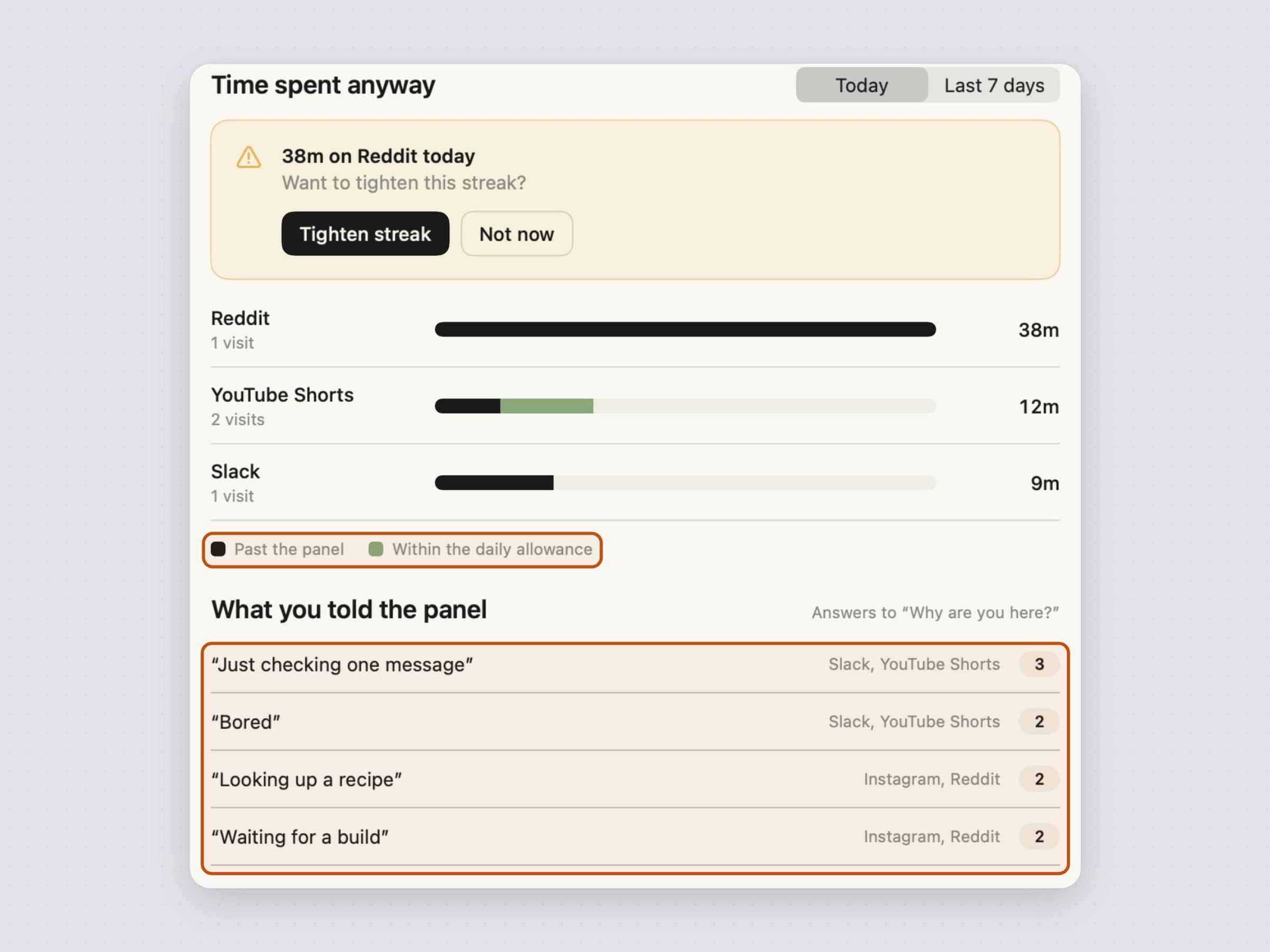
A daily allowance is the planned version of the same thing: 5, 15, 30 or 60 minutes a day that a streak lets through without the panel and without breaking. The menu bar list shows what is left, and Stats keeps that time apart from the time that went past the panel.
None of these are oversights. NoMore is friction, not a lock - and software that traps you out of your own machine gets uninstalled the first time it is inconvenient at the wrong moment, after which it protects nothing at all. A bypass you spend on purpose, that gets recorded, is a better outcome than a workaround you find in a rage.
What it records, and where it stays
Every trigger, every outcome and every "what are you going to do there" answer is written to a local store, and the stats screen turns that into which streaks are holding, how often you stepped back this week, the hour the urge hits hardest over the last 30 days, how much time went past the panel or into the allowance, and what you told the panel.
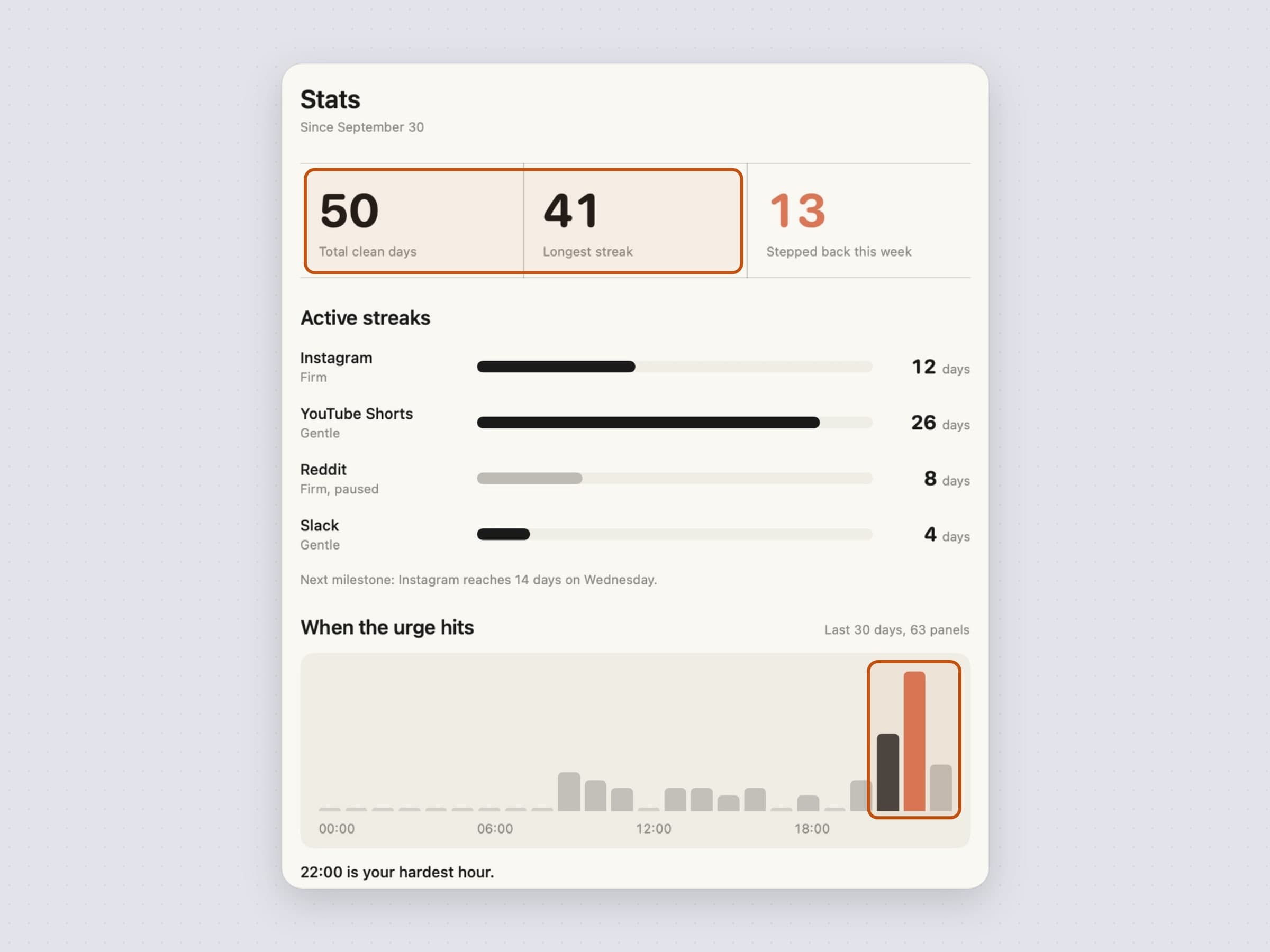
Once a week that record turns into a note rather than a screen you have to open: on Sunday evening NoMore lists your three longest runs and the one streak you walked away from most in the last seven days. It is a single notification, it says nothing when there is nothing to report, and it can be turned off in the app's General settings.
All of it is on your Mac. The only network traffic the app makes goes to our own servers - license validation, updates, config, and anonymous usage and crash diagnostics, none of which carries a URL you visited.
What it deliberately does not do
There is no DNS filter, no VPN profile and no proxy, which is the same sentence as "your browsing is not routed anywhere" read from the other side. That has a real cost and it is worth stating: NoMore checks the window you are looking at, so a blocked video already playing in a background window keeps playing. This is attention friction, not a network filter.
It cannot be locked. There is no password, no parental-controls mode and no way to stop yourself from quitting the app - and there is no version of this that imposes a list on somebody else's account. Every escape hatch is counted rather than closed, because the alternative is an app people delete in a bad moment and never install again.
Active hours are not a session you start and wait out. The default is all day, because what you are trying to stop doing is a thing you are trying to stop doing at three in the morning too; the window is there for the streaks where that is honestly not the case.
And it never reads a page. NoMore sees a URL and an application name, compares both against a list on your Mac, and forgets both. It has no idea what any page says.
What it costs, and what else to look at
NoMore runs on macOS 14 or later, on Apple Silicon and Intel, and takes about 25 MB. It is a one-time $4.99 purchase rather than a subscription, with a 30-day trial that needs no card and no email. The full specification is on the NoMore page.
Blocking solves drifting. It does not solve starting, and it does not solve choosing. If the problem is that the work never begins, a fixed interval is the lever - Pawodoro. If it is that you have four things and no decision, Anchored puts one of them in the menu bar for the day, feature by feature in a menu bar task timer for Mac. There is a comparison of the whole category in the best focus apps for Mac.