Why your Mac cannot answer a simple question
The question is "where did today actually go?", and the machine that watched all of it happen ought to be able to answer. On a Mac, out of the box, it mostly cannot. Apple ships no Screen Time API for third-party apps - the frameworks behind it on iOS never crossed over - and Apple's own Screen Time pane is not much of an answer either. It is buried in System Settings, it has no timeline, and it only breaks websites out for Safari. If your day happens in Chrome, it says "Google Chrome, five hours" and stops there.
Tally is a menu-bar app that does the measuring itself, from signals macOS does expose: which app is frontmost, whether anyone is at the keyboard, when the machine slept or locked. With permissions you choose to grant, it adds which document and which website. Everything it records stays on your Mac. Everything below is in the shipping version.
Useful before you grant anything
Most trackers in this category open with a permissions wall. Tally's first honest feature is that it works with nothing granted at all: install it, answer no prompts, and you still get accurate per-app totals - how long in the editor, how long in Slack, how long in the browser.
Each permission then adds one layer of detail, and the app is explicit about which buys what. Accessibility lets it read the focused window's title, which is how "Xcode, three hours" becomes the project you were in, and "Preview" becomes the PDF you were actually reading. Automation lets it ask the browser which site is open, so browser time stops piling up under one icon and lands on the sites it belongs to - Safari, Chrome, Brave, Edge, Vivaldi, Opera and Arc are all read this way.
Firefox is the odd one out, in a good way: Gecko browsers expose the page address through the accessibility tree, so Firefox needs no Automation grant at all. And if a permission is missing, the popover says so in a banner pinned above the list, where it cannot be scrolled out of sight.
The numbers subtract what you were not there for
A usage tracker is only worth reading if you can trust it when it disagrees with you, and that trust is lost the first time it counts an hour you spent making coffee. Most of Tally's engineering is in what it refuses to count.
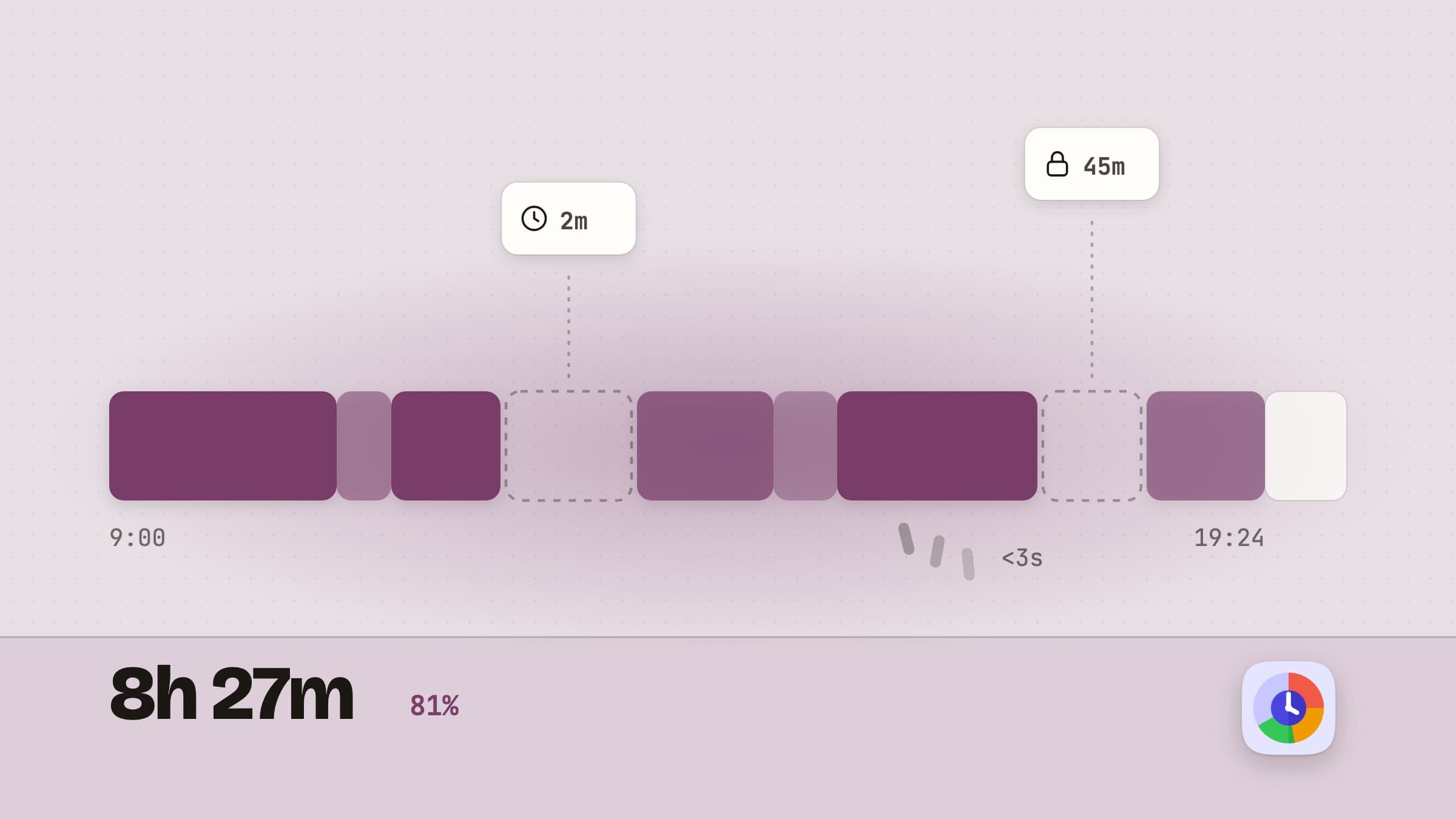
If no input arrives for two minutes - a threshold you can move between one and fifteen - the current segment is suspended, and it is suspended retroactively, back to your last keystroke or click rather than to the moment the idleness was noticed. Sleep and the lock screen end a segment the same way. An app you alt-tabbed through for under three seconds is discarded as noise. And a segment claiming to run longer than eight hours is cut rather than believed, on the theory that a number like that is not a fact, it is a bug.
The gaps this leaves in the timeline are deliberate. A day at a desk is not a solid bar, and a tracker that draws one is describing its own bookkeeping, not your day.
Ten seconds in the menu bar, a card on the desktop, the window behind both
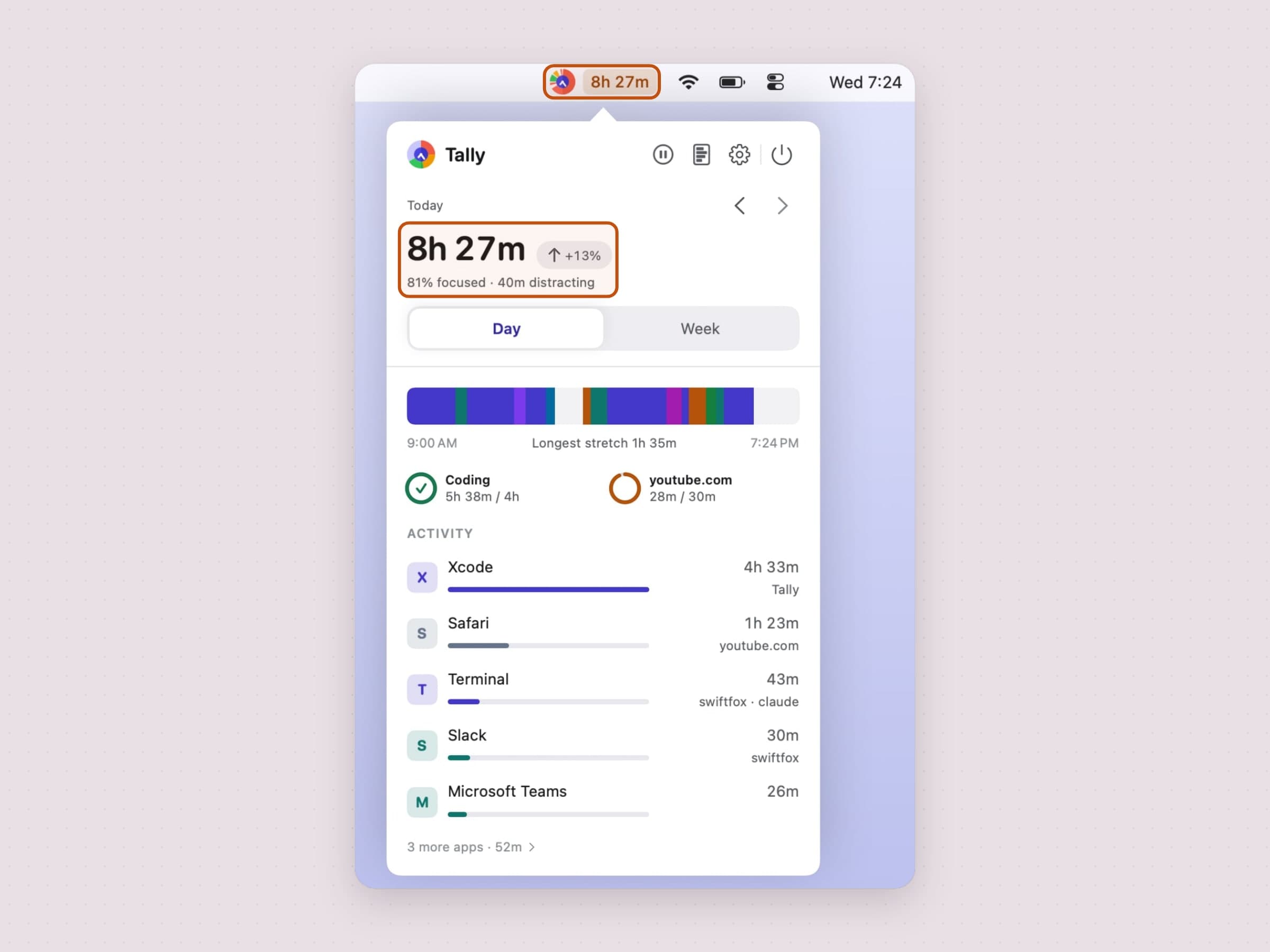
The badge in the menu bar says how the day is going before you click anything. It is the Tally logo, live: the ring fills with today's categories in the logo's own colours, and the clock hands in the middle show the real time. When the fullest limit you set gets close the badge picks up an amber dot, red once you are over; pause recording and the hands turn into pause bars and the ring goes grey. What it does not carry, unless you ask for it, is a number. A counter ticking in the corner of the screen is a nervous tic rather than a feature, and a number that appeared up there on an update would be a change made to everybody that nobody asked for. If you do want one, Settings offers four: today's total, what is in front of you and for how long, how full your fullest limit is, or how much of today was focus. Once a limit presses, the reading sits in an amber or red pill.
Click it and the popover answers the quick version of the question: the total, with a small badge saying how it compares to the period before, and one line on how much of it was focused and how much went to distracting categories. On a day comes the timeline, with your longest unbroken stretch under it. Goals sit in a row of small rings, and a limit joins them once it is close. Then the five biggest apps, each with a bar, a coloured initial for its category and its top site or project beside it; the rest is one line - how many more apps, and how long - that opens the full report. A Day / Week toggle widens the frame. There is no Month in the popover, on purpose - a month squeezed into a popover is a number without a shape.
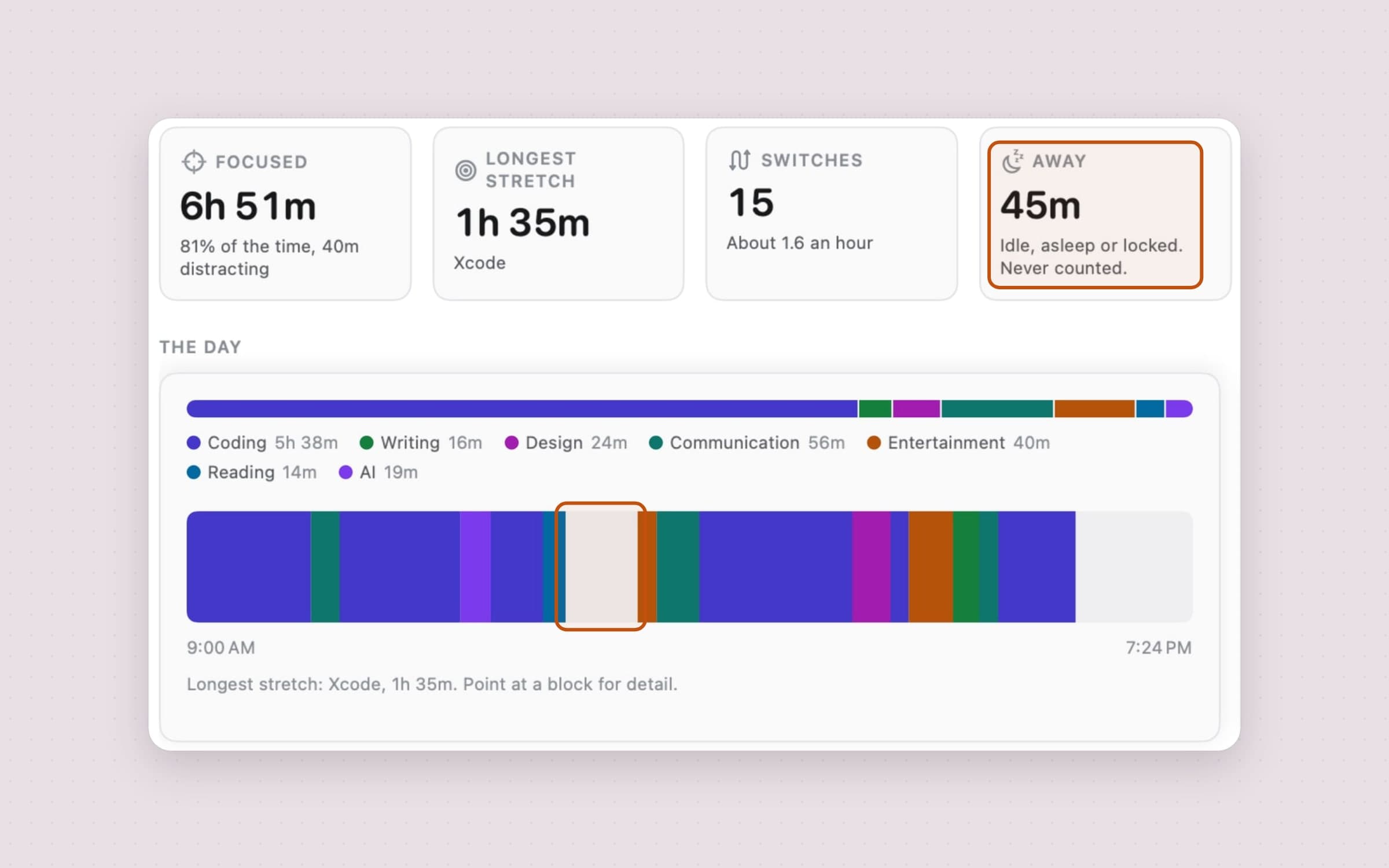
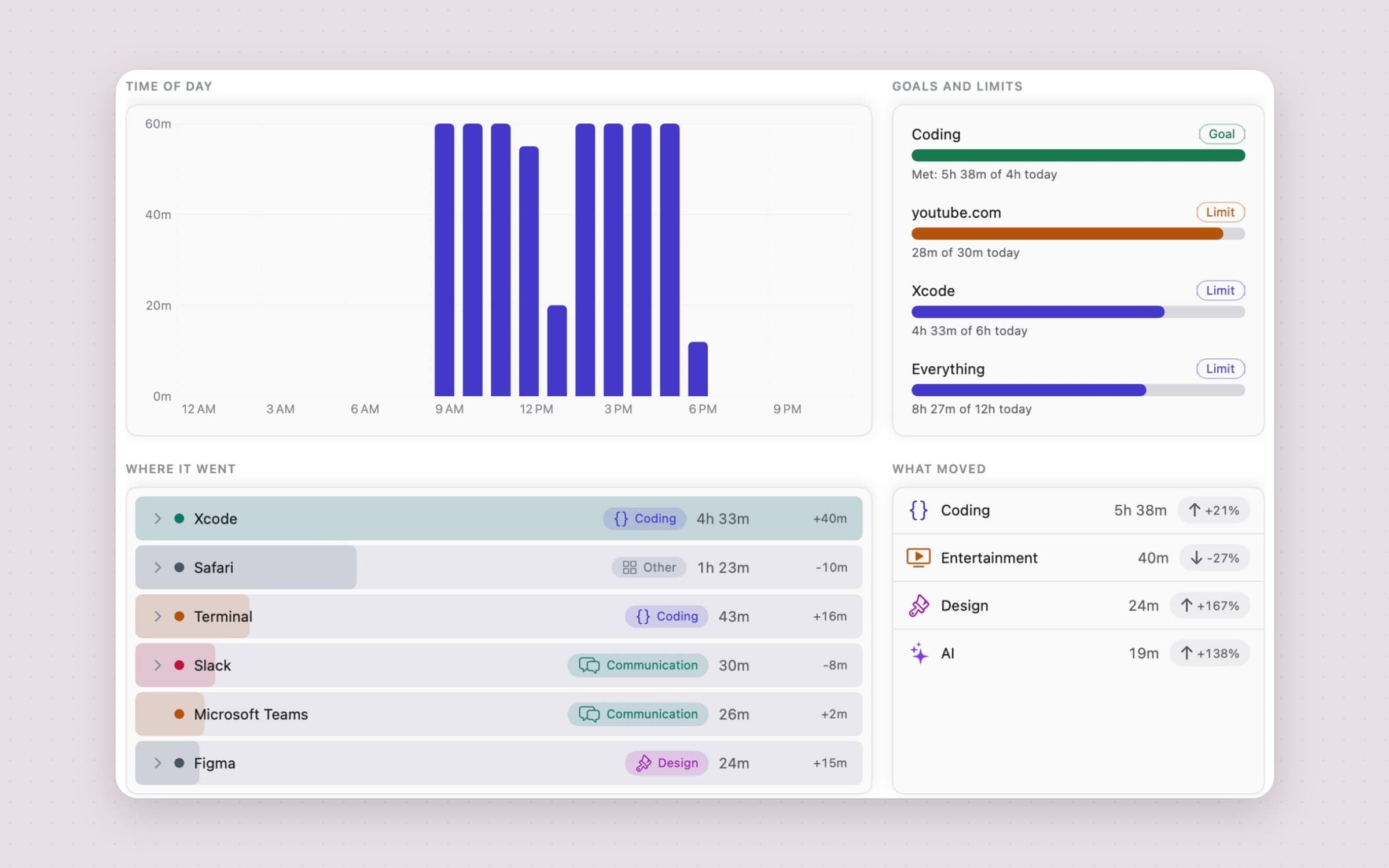
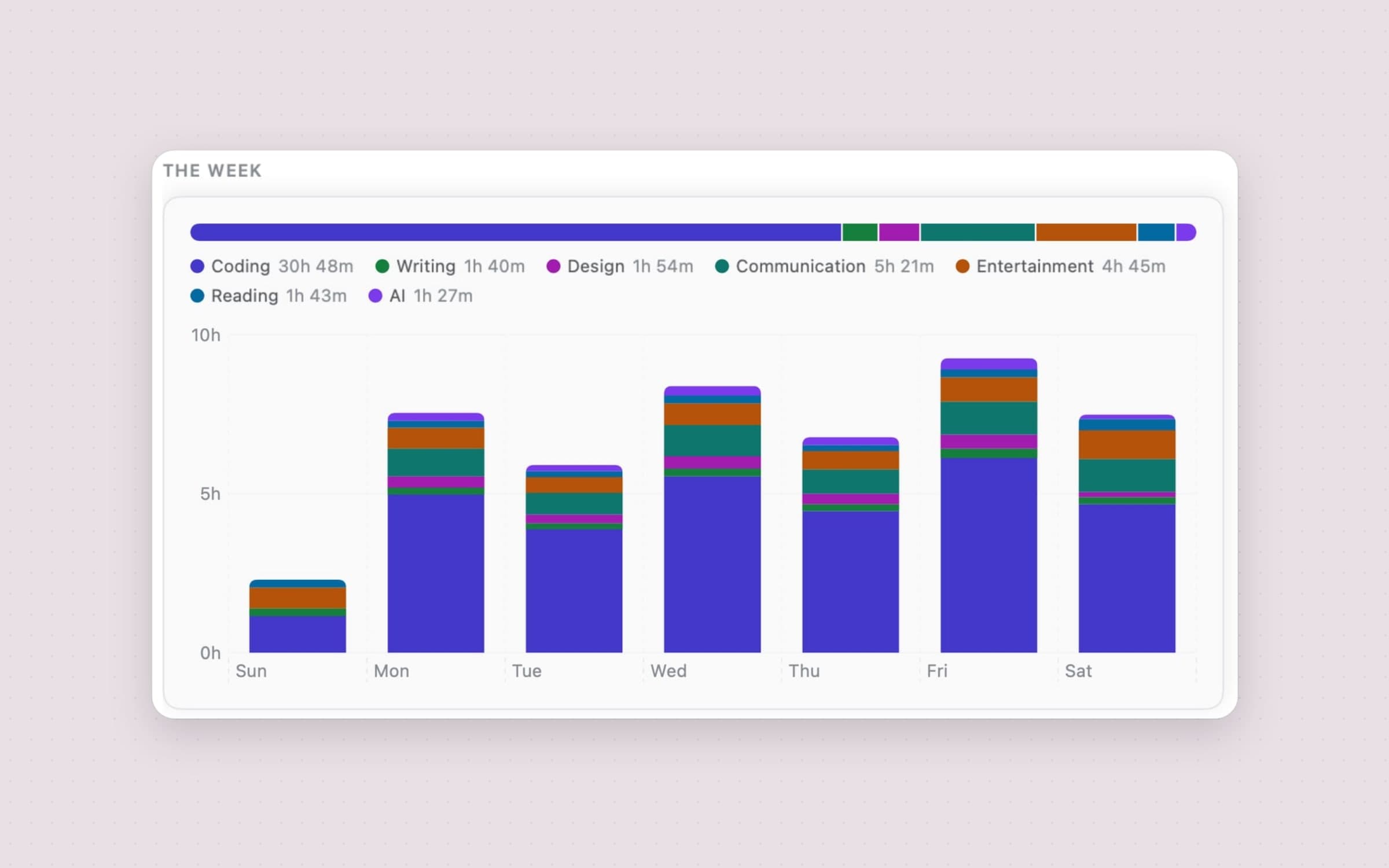
The window behind the report button, at the top of the popover, is where the shape lives. Overview opens on six cards - focused time, longest stretch, app switches, time away, busiest hour, and goals met once you have set a goal. Under them sits the period's shape beside a Focus mix ring, which says in one sentence whether you were more or less focused than the period before. A day is a timeline, a week is stacked daily bars, a month is a calendar grid with one square per day, and Year and a Range of days you pick are there too. Further down: time of day (an hourly rhythm for a day, a heatmap for anything longer), your goals and limits, where it went with each app's change on the previous period, and what moved. Trends goes deeper on what moved, and in Breakdown every app row expands into what happened inside it: the sites inside the browser, the projects inside the editor, the tool running inside the terminal. An Export button takes any of it out as CSV or JSON.
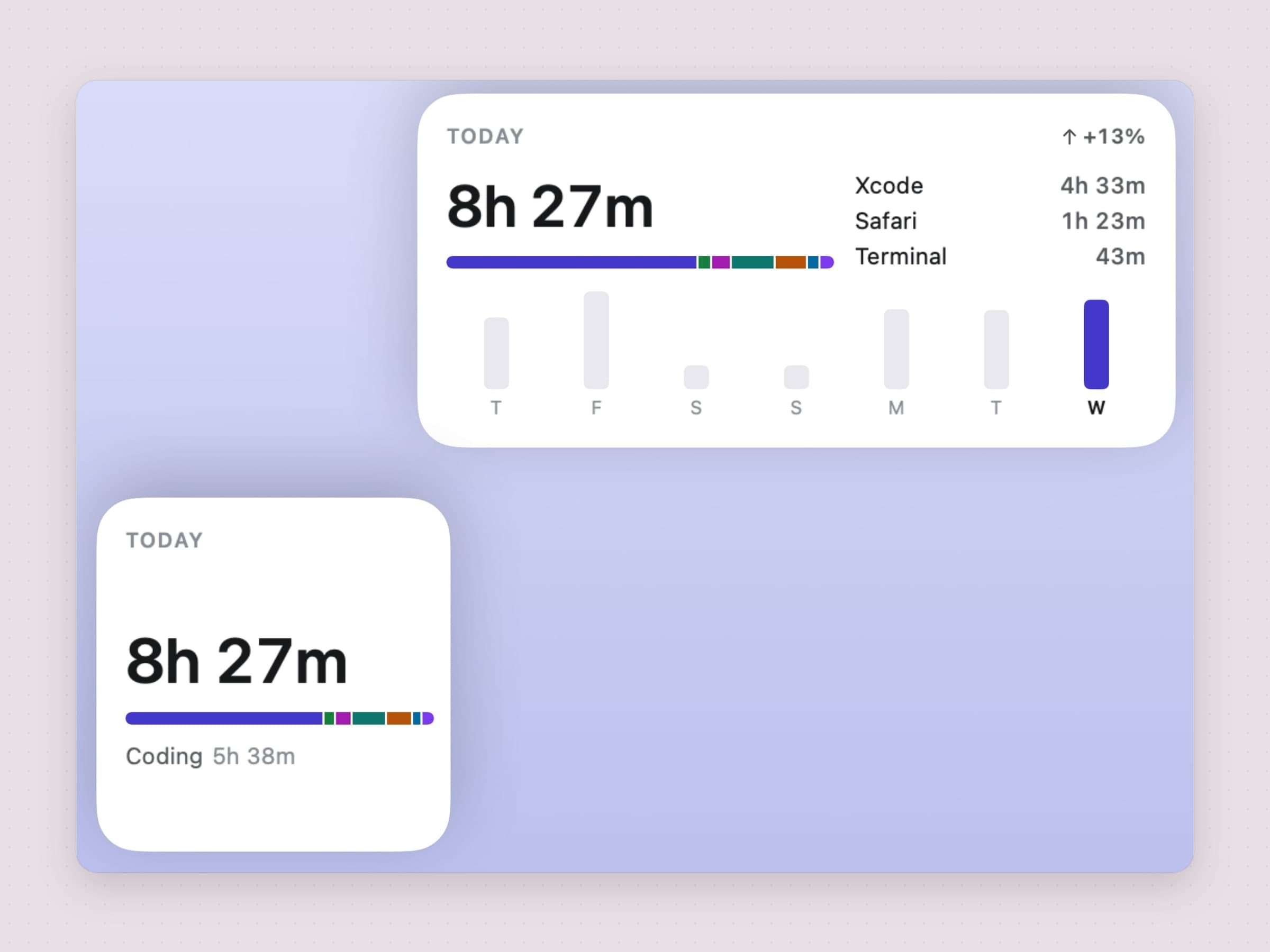
The third surface is a card on the desktop, in three sizes. The small one carries today's total and what most of it was; the medium one adds the apps it went to and the seven days behind today, so a quiet Wednesday is visible as a quiet Wednesday rather than as a number with nothing to compare it to; the large one lists five apps over a taller week. Each has a button to pause and resume recording, and clicking the card opens the full report. The card never touches the database, only a small file the app writes for it, at most once a minute and never when the card would look the same anyway.
Categories you fix once, retroactively
Raw app names are honest but unreadable; nobody plans their week in units of "Terminal". So Tally sorts time into ten built-in categories - Coding, Writing, Design, Communication, Social, Entertainment, Reading, AI, Utilities, Other - on one deliberate axis: the kind of activity, never its purpose. You can rename and recolour them, and add your own beside them. A taxonomy with "Work" in it undercounts work systematically, because an hour of work Slack files under communication and an hour of work reading files under reading. Kind is a question software can answer. Purpose is not.
Each category also counts as focus, neutral or distracting. The work categories - Coding, Writing, Design, Reading and AI - start as focus, Social and Entertainment as distracting, and you can change any of them. That label is all the focus line, the Focused card and the Focus mix read.
The out-of-the-box mapping covers a few hundred well-known apps and sites, and it will still be wrong about your tools somewhere. The fix is one click: every row in the Breakdown tab carries a tag button that reassigns it. Two details make this better than it sounds. A rule about a site always outranks a rule about an app, because a browser is a window onto categories, not a category of its own. And every correction is retroactive - categories are resolved when the numbers are read, never stamped onto the stored records - so one click also fixes March.
A ceiling you set for yourself
A report describes the day after it has gone. A limit is the same app speaking while there is still something to decide, and it is the one thing in here that is about the future rather than the past.
A ceiling can be about four things, because the questions people actually ask
are four different sizes: not more than half an hour on youtube.com (a site),
not more than an hour of Social (a category), not more than six hours in the
editor (an app), and not more than eight hours at this machine at all (the
whole day). Site limits match by suffix, so a limit on youtube.com also
covers music.youtube.com - anything else would be a trap, because you set a
limit on YouTube, not on one of its hostnames. A rule can also be a goal
instead - at least two hours of Coding - and either kind can count over a day
or a week. You add one in Settings, or by right-clicking the row in the report
you were already looking at.
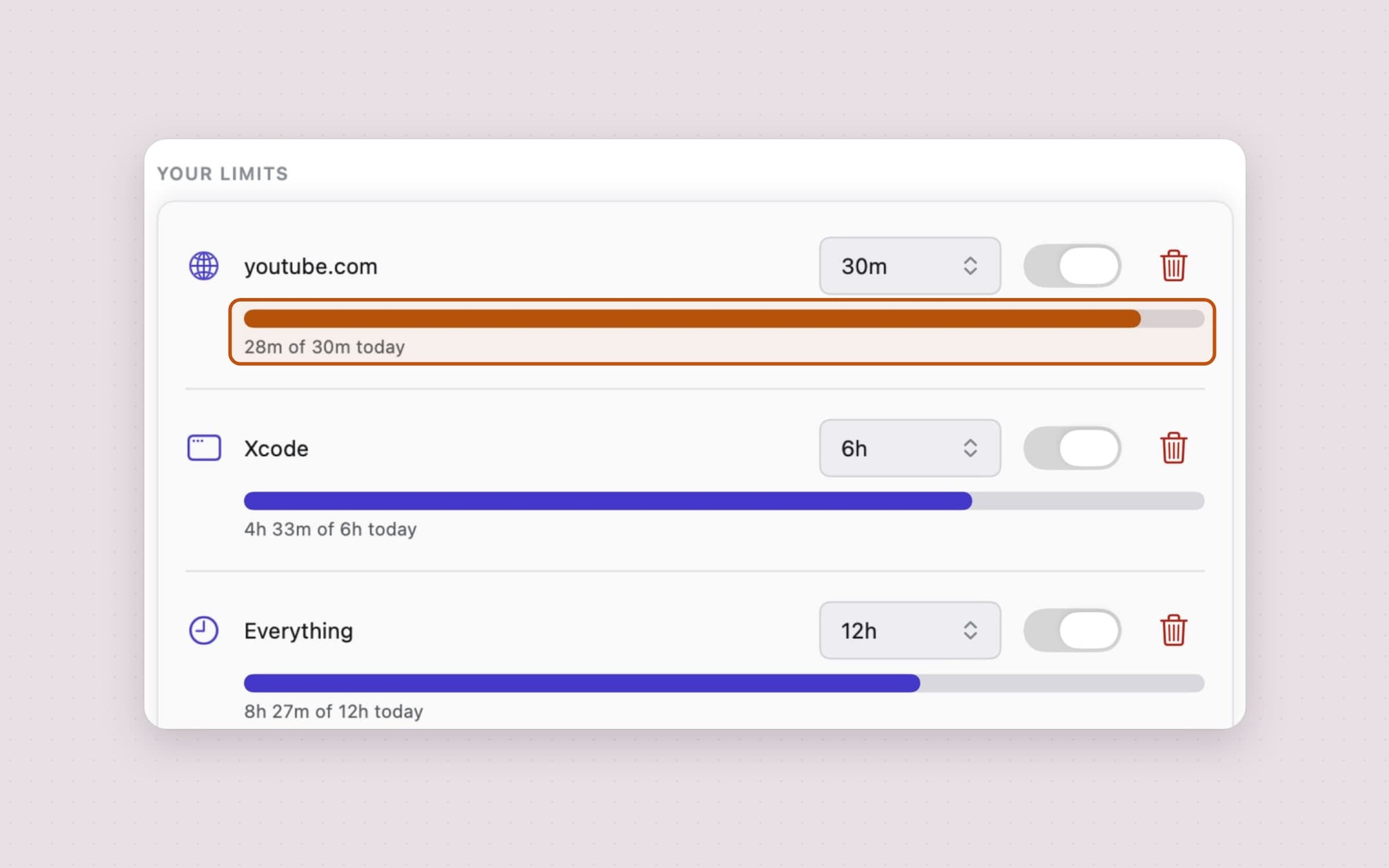
Every ceiling resets with its day or its week, and every one of them shows its progress under the control that sets it - a list of limits with no numbers beside them would send you back to the report to find out whether any of them mattered. The popover shows the fullest one, and only when it is close: a section that appeared every time you opened it would be one more thing to look past. Goals for the current day or week show there too, up to three rings, because a goal is something you come to check. There is an early warning at 80% by default, movable or switchable off, which exists because the useful moment is before the ceiling, not at it.
The open segment counts toward all of this. Segments only close when you switch away, so a limit reading the stored records alone would notice you had passed it after you left - the one moment the warning is no use.
Nothing is ever blocked. No app is closed, no site is hidden, and there is no "extend by fifteen minutes" button to negotiate with. That is a different product with a different set of promises, and a tracker that quietly grew teeth is a tracker people stop running.
One notification a week, and a word when a limit nears or fills
The weekly one is a digest on Monday at 09:00, saying what moved against the week before. The day and hour are configurable; the restraint is not. A change has to clear both ten percent and fifteen minutes before it is called a mover, and if the week had fewer than three active days the digest stays silent, because a summary built on two sessions is noise wearing a suit. The rule in the source code is worth quoting: say nothing rather than something wrong.
The other is a limit filling: a heads-up at 80% (on by default, movable or switchable off), then one when it reaches its ceiling - each said once per rule per day or week. A met goal can say so too, if you turn that on. All of them are posted the moment they happen rather than scheduled for later. That distinction is not pedantry: nothing is ever queued up to fire in the future, so quitting Tally leaves nothing behind to go off without it. If you want one more, a summary of the day can arrive in the evening; it is off until you turn it on. All of them can be turned off without turning off the measuring.
Where the data goes: nowhere
Everything Tally records is stored on your Mac. There is no account, no server and no sync - your usage data never touches a network. The desktop card is the only thing that reads any of it from outside the app, and it reads a small file in a shared container on the same machine, holding the numbers already on the card and nothing else. For websites, the release build keeps only the domain, never the full address. If window titles feel like more than you want on disk, one switch turns detail capture off and Tally records app totals only; and Settings deletes everything it has ever stored in one click. Retention is a choice too: 30, 90 or 365 days, or forever, with 90 the default.
The same design explains where you will not find it. Tally is a direct download rather than a Mac App Store app, because the sandbox forbids exactly the accessibility reading the whole product is built on.
What it deliberately does not do
It does not intervene. Tally has ceilings, but a ceiling only ever says something - it never closes an app, hides a site, dims a screen or offers you fifteen more minutes. There is no downtime schedule and no screen that tells you to stop. If stopping is the problem rather than seeing, that is a blocker's job.
It does not read anything but the title bar. With Accessibility on it takes the focused window's title; with Automation on it asks the browser which site is open. There is no keystroke logging, no screen capture, and nothing anywhere that looks at what a document actually says.
There is no productivity score. Nothing here hands you a grade or a number out of ten. The focus line only adds up the categories you labelled focus or distracting, and which is which is your call - the only judgement in the app is the one you make while looking at the report.
And it cannot fill in a gap. A day Tally was not running is a day it cannot account for, which is the whole argument for the Open at login switch.
What it costs, and what else to look at
Tally needs macOS 14 or later, runs on Apple Silicon and Intel, and takes about 11 MB. It is a one-time $4.99 purchase with a 30-day trial that needs no card and no email, and the license you get is permanent. The full specification is on the Tally page.
It also measures only this Mac. Phone time, tablet time and the other laptop are out of frame, and Tally would rather be complete about one machine than approximate about four.
If what the numbers tell you is that the afternoons dissolve, two neighbors point at the follow-up moves. Anchored is the deliberate half of time tracking - one task and its timer in the menu bar - covered feature by feature in a menu bar task timer for Mac. And when the biggest row in the report is a site you would rather not be ruled by, NoMore puts a decision in front of it rather than a timetable, in how to block websites on a Mac.