What OmniFocus is actually good at
OmniFocus, from The Omni Group in Seattle, is a full GTD task manager for Apple devices, and most OmniFocus alternatives for Mac are measured against it. It captures to an Inbox with a global Quick Entry shortcut, files actions into projects, folders and tags, and gives each action three kinds of date: Defer, when it becomes available, Planned, when you mean to work on it, and Due. Forecast sets dated work beside your calendar, Review puts every project back in front of you on a schedule, and Mail Drop turns an email into an action. The current Mac version is 4.9.3 from 8 October 2026, and since 4.9 it needs macOS 15.2 or later. Its home is omnigroup.com.
OmniFocus handles order inside a project. A project or action group can be sequential, so only its first unfinished action is available and the rest wait their turn, or parallel, groups can nest inside each other, and a project can also be a list of single actions. Pro adds custom perspectives, Focus mode and automation: AppleScript on the Mac and Omni Automation JavaScript plug-ins across platforms. Since 4.9 OmniFocus can also use Apple Intelligence for optional date parsing, still marked beta, and Omni Automation plug-ins can call Apple's on-device Foundation Models.
One license covers the Mac, iPhone, iPad, Apple Watch and Vision Pro, and sync runs through the free Omni Sync Server with end-to-end encryption, or through your own WebDAV server. A v4 Standard license is $74.99 once, Pro is $149.99 once, and the subscription is $99.99 a year with Pro everywhere plus the web app. The trial lasts 14 days, and Omni offers a 30-day money-back guarantee.
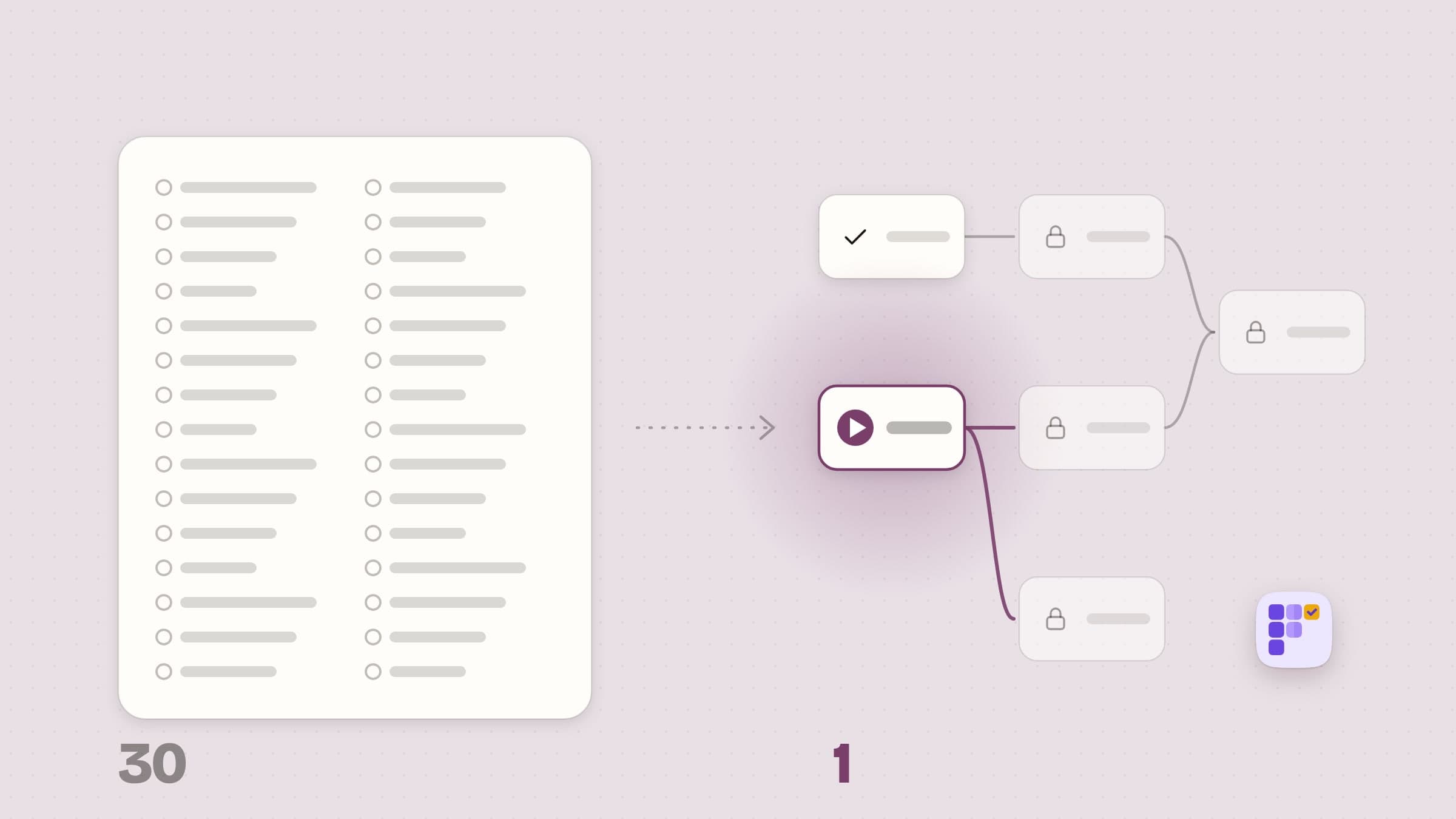
If you run a weekly review, live in perspectives and capture on your iPhone and Watch, OmniFocus is the system, and you should buy it. The alternatives below are for people whose trouble is a narrower one: seeing what has to happen before what, and what can start today.
Why people go looking anyway
The price, and the Pro split. OmniFocus is $74.99 for Standard, and the features power users come for, custom perspectives and automation, sit in the $149.99 Pro license or the $99.99 a year subscription. Web access for license owners is another $49.99 a year. On the Mac Power Users forum in 2023, one alternative was praised simply for being "subscription free".
The system can cost more time than it saves. A Mac Power Users thread from 2021 put it bluntly: "You will spend more time setting up what to do than you will doing," and the replies pointed the asker to Things, Todoist or Reminders. A 2023 thread on the same forum called OmniFocus busy and hard to break into.
Order stops at the edge of a project. OmniFocus orders work by making a project or action group sequential, and groups can nest, so order is an outline inside one project. Users who need a task to wait on work in another project, or on tasks in different branches of that outline, have asked for it on Omni's own forum since at least 2020, and got workarounds: a Waiting tag, a placeholder task, a script, or a pointer to OmniPlan.
It is Apple-only, and the floor keeps rising. "OmniFocus alternative for Windows", "for Android" and "for Linux" all show up in search suggestions, and outside Apple devices the only option is the paid web app. On the Mac, OmniFocus 4.9 raised the requirement to macOS 15.2 in September 2026. A user on the GTD forum whose older Macs could not run 4.8.3 in October 2025 moved to Things 3 and rebuilt everything by hand, before coming back weeks later.
What macOS already does for free
Reminders is free, already on every Apple device, and a good deal stronger than it was. It has had tags and smart lists since macOS 12 Monterey, sections and a column view since macOS 14 Sonoma, and since macOS 15 Sequoia a reminder with a date and time shows up in Calendar with a checkbox. Smart lists filter across every list by tag, date, time, priority, flag or location, and macOS 26 Tahoe adds Apple Intelligence suggestions that turn an email, a web page or a note into reminders and sort a list into sections for you.
Reminders stops where order begins. It has subtasks, but no notion that one reminder waits on another, and no review cycle. Shortcuts on macOS 26 can call Apple Intelligence models on the Mac or through Private Cloud Compute, so a patient person could script "paragraph in, reminders out", but that is a project of its own, not a task manager.
If your lists are short and nothing waits on anything, try Reminders for a week before you pay anyone. If your work comes in chains, read on.
Plexus: tasks that unlock other tasks, planned on your Mac
Plexus is a Mac task planner that holds your tasks as a graph: each task can wait on others, finishing one unlocks the next, and a Ready list shows everything you can start right now across all your flows. Apple's on-device model can turn a paragraph into a wired flow and fit today's work into the hours you have. Plexus is $4.99 once, with a 30-day trial that needs no card and no email, and it comes from the Mac App Store or our site; a license from our site covers up to 3 Macs. It needs macOS 26, because Apple's Foundation Models do, and it comes in five languages. Your tasks never leave the Mac: Plexus sends anonymous usage counts tied to a random install ID, crash reports and a settings check, and the version from our site also checks its license and updates online.
Plexus is deliberately not a GTD system. There is no Inbox to process, no review cycle, no contexts and no perspectives. What it does instead is the part of OmniFocus that answers "what can I start", built around a picture of the work rather than a list.
Dependencies between any tasks, drawn where you can see them
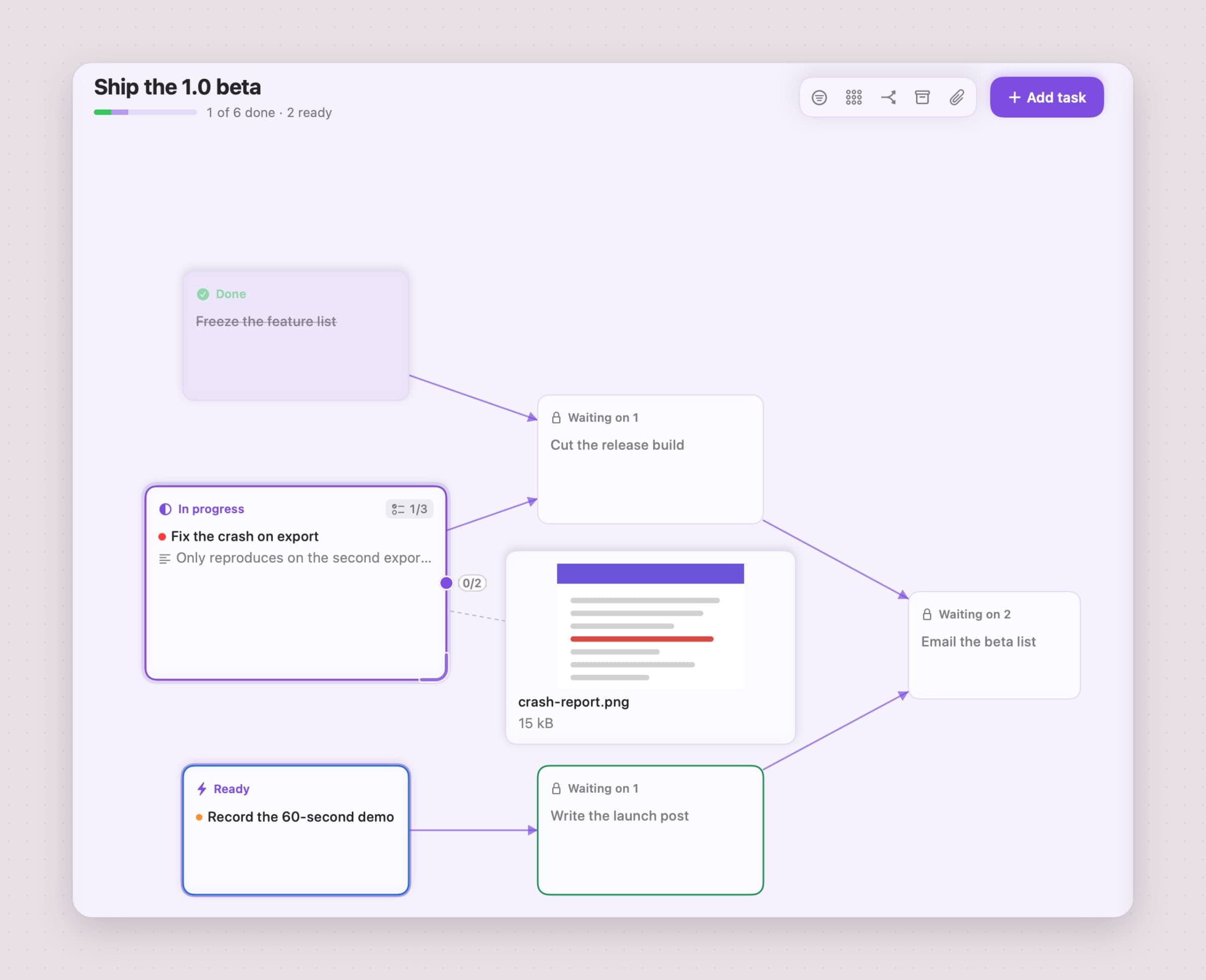
A Plexus flow is a canvas of task cards joined by arrows. Drag from one card's port to another and the second task waits for the first; a task can wait on several, and one task can unlock several, so parallel branches that meet again are drawn exactly as they happen. Add subtask makes a parent that waits until all of its children are done, so the leaves light up first. Each card says Ready or Waiting on 2, and the task panel lists what a task is Blocked by and what it Blocks. A link that would close a loop is refused with "That link would create a cycle."
That is the difference from a sequential project. In OmniFocus, order is an outline: nested sequential and parallel groups inside one project. In Plexus, order is whatever you draw: "Email the beta list" waits on both the release build and the launch post, the demo and the crash fix run side by side, and one task can unlock tasks on different branches, which an outline cannot hold. Arrange as tree tidies the layout, a branch can be collapsed, and undo keeps 50 steps per flow.
The honest limit: a link cannot cross from one flow to another. Two pieces of work that block each other belong in the same flow, and flows are a flat list, with no folders. Plexus also has no one-click "sequential" switch; you draw the order, press Tab to add a task that waits on the selected one, or let the model draw it.
Paste a paragraph, get a flow with the order already drawn
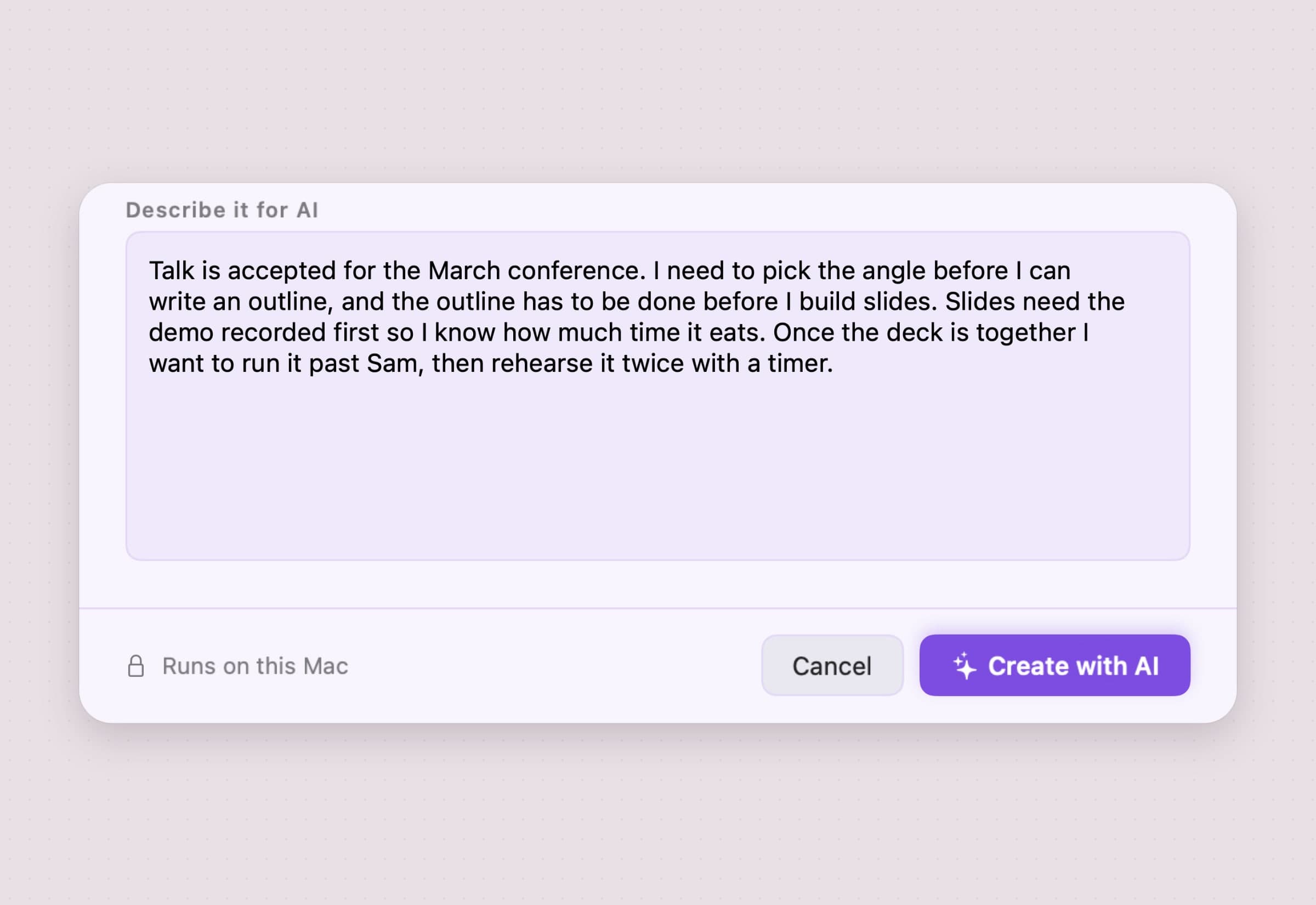
Most plans start as prose: a brief, meeting notes, a message to yourself. In Plexus you choose New flow…, paste that text into Describe it for AI and press Create with AI. Apple's on-device model pulls out the tasks, estimates how long each takes, and links them in the order the text implies: angle before outline, outline before slides, demo before slides, rehearsal last.
The dialog says Runs on this Mac, and it does: the text is never sent anywhere.
The same model works in smaller doses. Generate subtasks breaks one card into concrete steps, and Quick capture, on Command-Shift-Space from any app, files a line into the flow you pick, turns a date such as "on Nov 1" into the due date, and asks the model where the new task fits. Plexus remembers which links the model drew, and a later AI pass never removes a link you drew by hand.
The honest limit: the AI needs Apple Intelligence, which means an Apple silicon Mac with it turned on. On an Intel Mac, or with Apple Intelligence off, Plexus runs in manual mode and says so in a banner: you build and link flows by hand, and everything manual works, but Create with AI, Generate subtasks, AI estimates and automatic linking are gone, and Plan my day becomes Fit my day. One pass reads about 12,000 characters; past 40 tasks the estimates stop and the model links each batch of 40 on its own, and tasks you add on the canvas itself get no AI call.
Ready lists every task you can start, across all flows
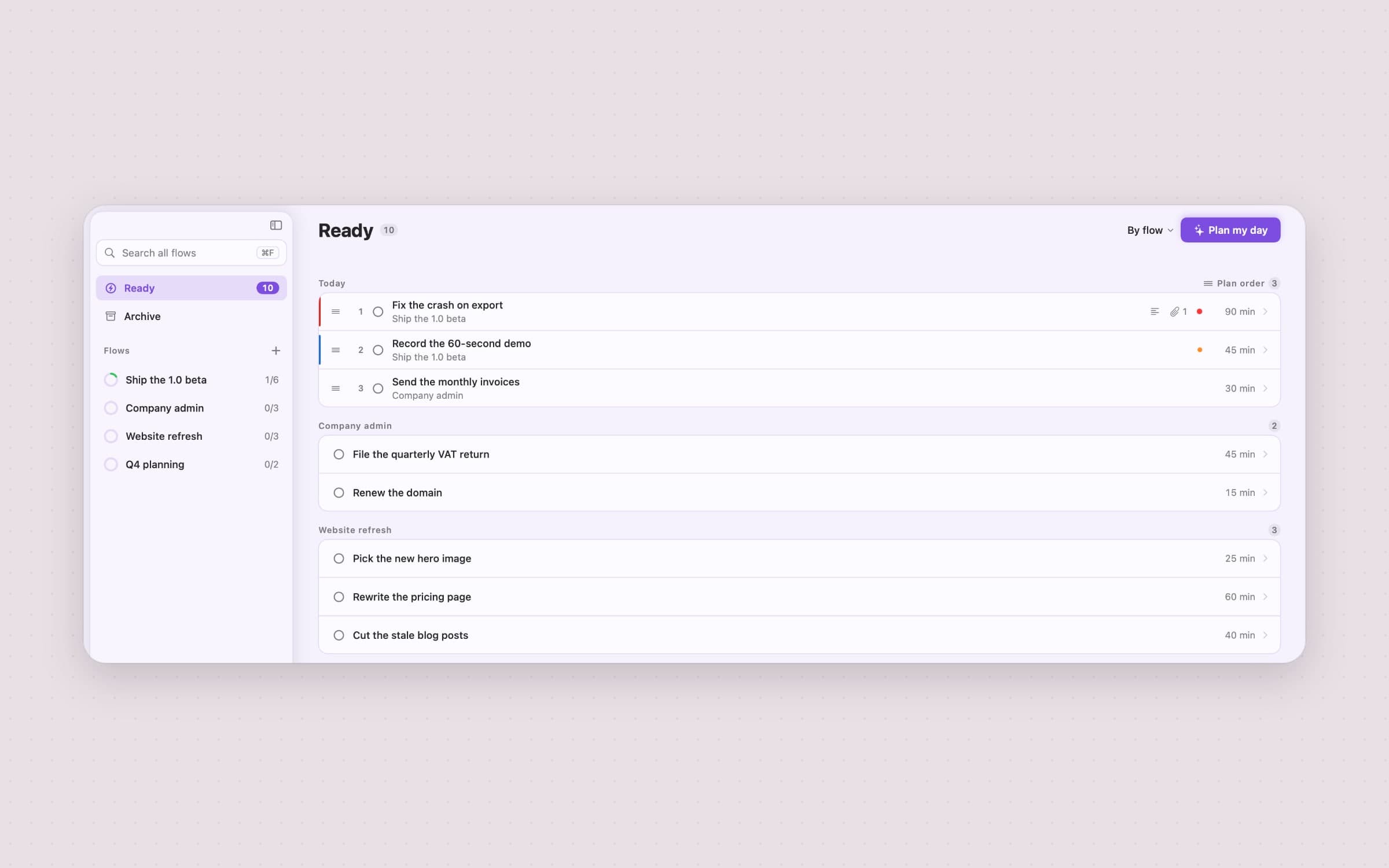
Where OmniFocus shows what is available in each perspective, Plexus keeps one list: Ready. A task appears there when it is not done, every task it waits on is done, and every subtask under it is done, and the same rule drives the card chips and the task panel, so the three never disagree. Ready sorts by flow, due date, priority or estimate, and a Today group pins tasks whose start date has come at the top, in the order of the day plan you accepted. When nothing can start, Ready says why: everything is done, everything is waiting, or nothing starts today.
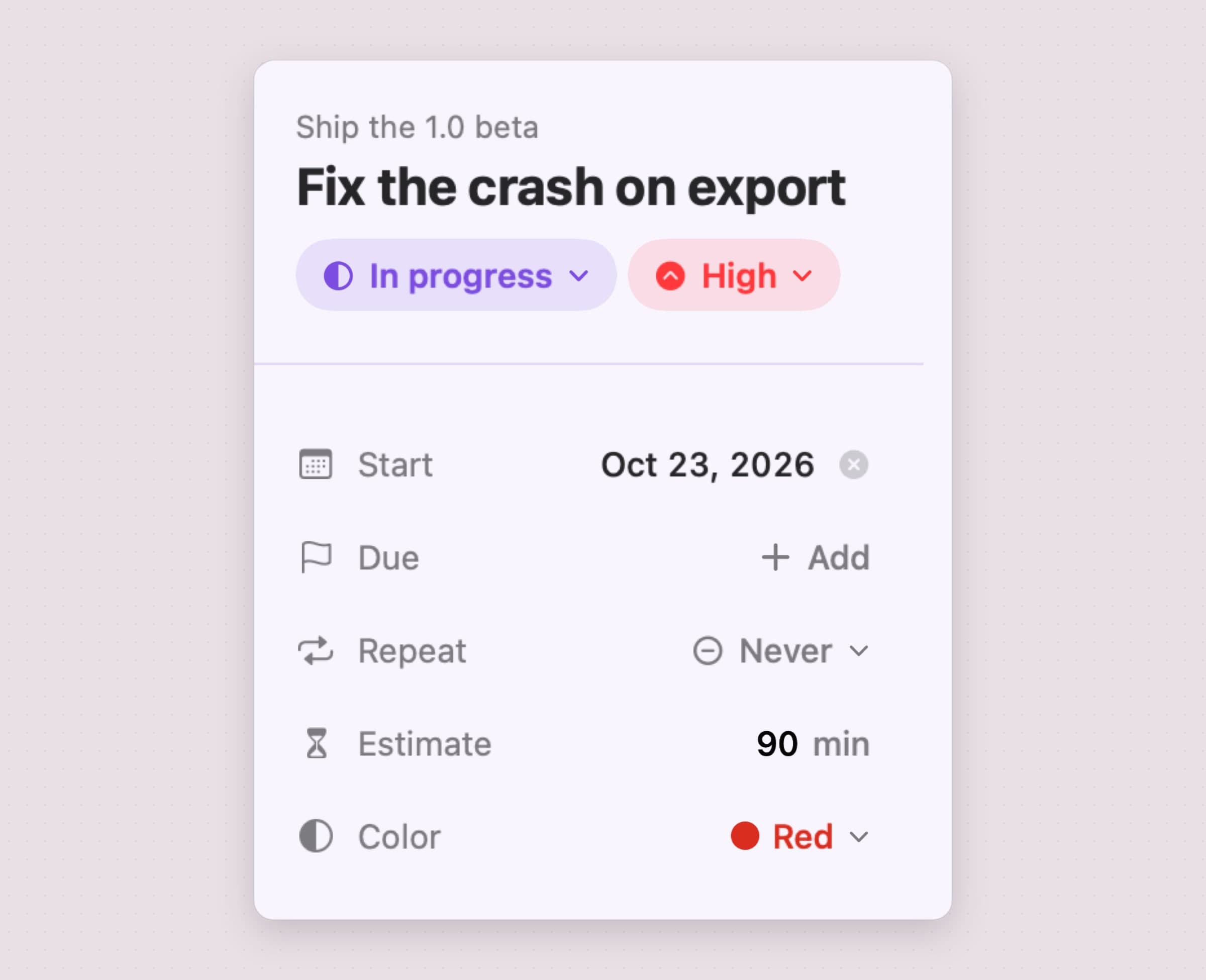
A Start date does the job of OmniFocus's defer date: the card stays on the canvas, but the task is left out of Ready until its day comes. Tasks can Repeat every day, on weekdays, weekly, monthly, or a set number of days after you finish them, and carry a Checklist of small steps. Ready also lives on the desktop as a widget in three sizes, with a tick on each row, and Shortcuts can add a task, get the ready tasks, complete one or open a flow. Deadline reminders arrive on the due day at one hour you choose, 9:00 by default, and an optional Daily summary tells you what is ready.
The honest limit: there are no custom views. Plexus has the canvas, Ready with its four sorts, a colour filter, search across all flows and the Archive, and nothing like a perspective. A task has one colour and a priority, not named tags, and every due task is reminded at the same hour, with no per-task alarm.
Plan my day fits ready work into the hours you have
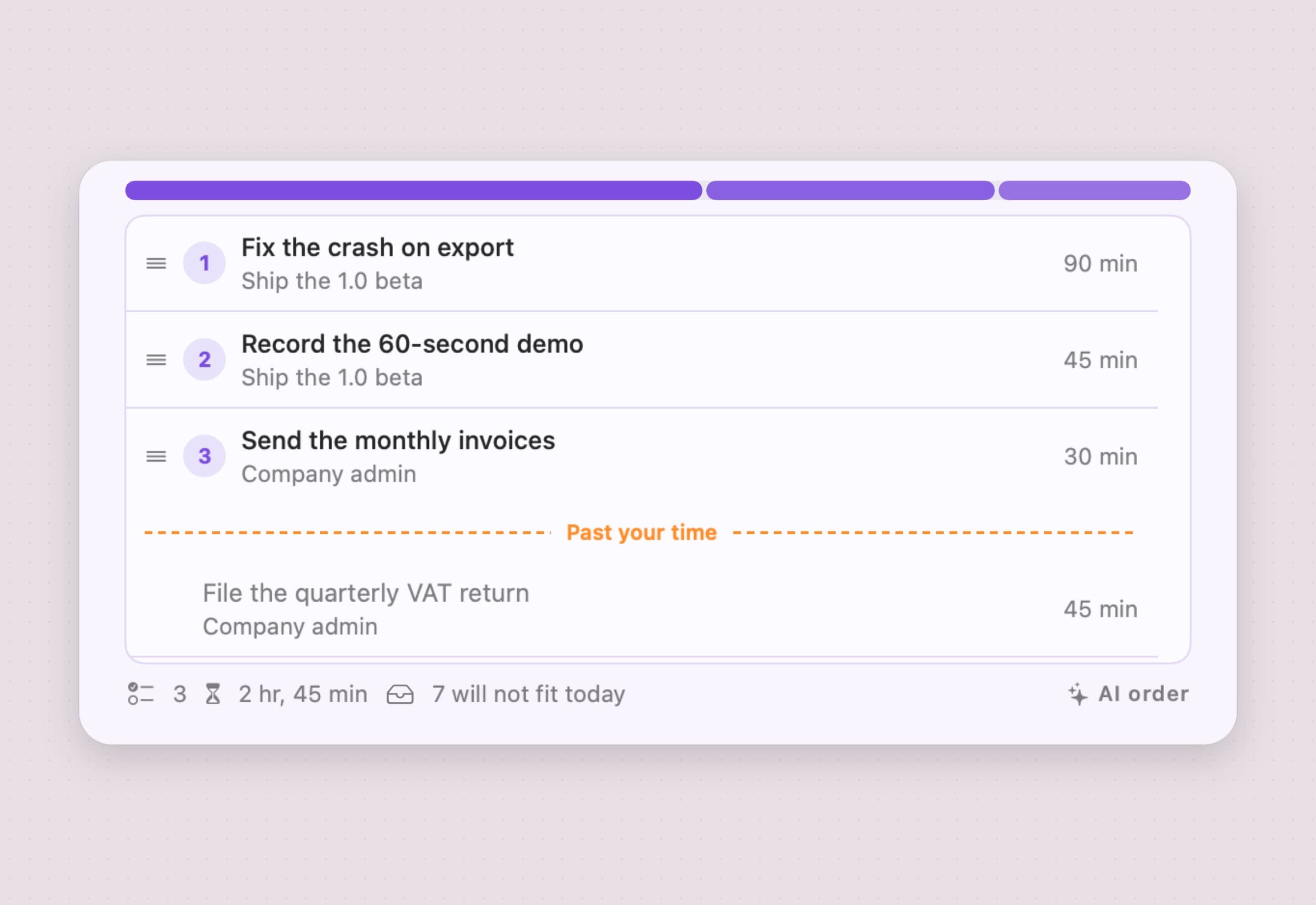
Plan my day, at the top of Ready, asks how long you have, from 30 minutes to 8 hours or a number you type, with 4 hours as the default. The model orders your ready tasks, and Plexus's own arithmetic decides what fits: the tasks above the Past your time line fit within your hours, a task with no estimate counting as 30 minutes, the rest wait below it, and the footer says how many will not fit today. Use this plan turns the result into Ready's Today group, in that order. With Apple Intelligence off the button reads Fit my day and keeps the list's current sort instead of an AI order.
OmniFocus has an estimated duration field and Forecast, and Omni's documentation describes no feature that fits a day's work into a time budget.
The honest limit: Plexus does not read or write your calendar. Plan my day knows the hours you give it, not the meetings in them, and it produces an order, not time blocks on a timeline.
OmniFocus vs Plexus, feature by feature
| OmniFocus | Plexus | |
|---|---|---|
| Price | $74.99 Standard, $149.99 Pro, or $99.99 a year | $4.99 once; a license from our site covers up to 3 Macs |
| Trial | 14 days, 30-day money-back guarantee | 30 days, no card or email |
| Devices | Mac, iPhone, iPad, Apple Watch, Vision Pro, web app | Mac only, macOS 26 or later |
| Sync | Free Omni Sync Server, end-to-end encrypted, or WebDAV | None; a backup file moves data between Macs |
| Order between tasks | Sequential projects and nested action groups, inside one project | Links between any tasks in a flow; a task can wait on several |
| What can start now | Available actions, defer dates, perspectives | Ready list across all flows; start dates keep a task out until its day |
| Custom views | Built-in perspectives; custom perspectives on Pro | Canvas, Ready with four sorts, colour filter |
| Review | Scheduled review of every project | None |
| Tags | Multiple tags and flags per action | One colour and a priority per task |
| Capture | Quick Entry, Share extension and Mail Drop on every device | Global quick capture on the Mac that reads dates from the line |
| AI | Apple Intelligence date parsing in beta; Foundation Models through Omni Automation on Pro | On-device model turns a paragraph into a linked flow, splits tasks, estimates and plans the day |
| Automation | AppleScript and Omni Automation on Pro, many Shortcuts actions | Four Shortcuts actions |
OmniFocus wins on reach and depth: every Apple device, encrypted sync, review, perspectives, Mail Drop and automation deep enough to build a whole system on. Plexus wins on the shape of the work: dependencies drawn between any tasks in a flow, a paragraph turned into a plan on the Mac, one Ready list, a day that fits your hours, and a fifteenth of the Standard price, paid once.
Other alternatives worth knowing
Things 3 from Cultured Code is $49.99 once on the Mac, version 3.24.1 from September 2026, for macOS 13.3 or later, with a 15-day trial from the developer's site. The iPhone and iPad apps are sold separately. It is the usual destination for people leaving OmniFocus, with far less machinery to keep up. Things has no dependencies, and its own OmniFocus importer flattens nested actions into single to-dos.
Todoist is free on its Beginner plan, with 5 projects and 3 filters, and Pro is $5 a month billed yearly, or $7 monthly. It is cross-platform, and paid plans add AI features such as Task Assist and unlimited Ramble. Pick it when you work across Windows, Android and a Mac, or share projects with other people.
TickTick is free for up to 9 lists of 99 tasks, and Premium is $49.99 a year with calendar views. It is cross-platform too and adds Kanban boards, which suits people who think in columns.
For the rest of the field, the best productivity apps for Mac compares task, focus and time tools side by side, and on-device AI apps for Mac covers the apps that keep their AI off the network.
When OmniFocus is still the right choice
Stay with OmniFocus if you capture on an iPhone or an Apple Watch, because Plexus has no app there and no sync. Stay if a weekly review is the heart of your system, if you rely on custom perspectives, tags or Forecast, or if your mail reaches your task list through Mail Drop. Stay if you have AppleScript or Omni Automation plug-ins that run your workflow, or if you need OmniFocus's 11 Mac languages. And if you already own a v4 license, every 4.x update is paid for, so the money is spent.
Switching from OmniFocus
- Decide what moves. Plexus fits active projects with real order in them, not a 400-action backlog. Pick the projects where "what can I start" is the hard question.
- Export from OmniFocus on the Mac with File > Export, as Plain Text or CSV. Expand everything first, because the export follows the current view.
- Paste each project into New flow… in Plexus and press Create with AI. The model reads the text, makes the tasks and links them in the order the text implies. Dates, tags and notes do not carry over this way, and a pass reads about 12,000 characters, so paste one project at a time.
- Check the arrows on the canvas, delete any link that is wrong, and draw the ones the model missed. Your links are never removed by a later AI pass.
- Re-add the dates that matter: Start for what used to be deferred, Due for deadlines, and Repeat for anything recurring.
- Keep OmniFocus for what Plexus does not do, such as capture on the iPhone, or retire it once a week of Ready has proved itself.
Perspectives, review dates, tags, attachments, repeat schedules and automation do not carry over, and OmniFocus has no OPML export, so Plexus's OPML import does not help here. How to turn notes into tasks on a Mac walks through every step in Plexus.
If what you really need is to stick with one task once you have picked it, Anchored keeps today's task and its timer in the menu bar, as a menu bar task timer for Mac shows, and Tally tells you afterwards where the hours went. The best Mac apps for ADHD puts Plexus and Anchored side by side.
Side by side
| Tool | Shape | What decides "next" | Platforms | Cost |
|---|---|---|---|---|
| OmniFocus 4 | Full GTD system | Sequential projects, defer dates, perspectives | Mac, iPhone, iPad, Watch, Vision Pro, web | $74.99 Standard, $149.99 Pro, or $99.99 a year |
| Reminders and Shortcuts | Built-in lists and automations | Dates, smart lists | Every Apple device | Free |
| Things 3 | Calm personal task list | Your own order, no dependencies | Mac; iPhone and iPad sold separately | $49.99 once on the Mac |
| Todoist | Cross-platform task list | Filters, dates, priorities | Cross-platform | Free, Pro $5 a month yearly |
| TickTick | Lists, Kanban and calendar | Dates, lists, boards | Cross-platform | Free, Premium $49.99 a year |
| Plexus | Task graph with on-device AI | Dependencies, Ready list, Plan my day | Mac (macOS 26+) | $4.99 once |
Pick by what fails. If what fails is capture away from the desk, or a review habit you want the app to enforce, it is OmniFocus, and nothing else here comes close. If it is the weight of the system, Things 3 or Reminders is the lighter answer. If it is other people and other platforms, Todoist or TickTick. And if nothing gets forgotten but you still cannot tell what to start, because the work comes in chains, a graph that lights up the next step is the piece the lists are missing.
Prices and features checked on 30 October 2026.


