What Freedom is actually good at
Freedom, the app and website blocker from freedom.to, blocks apps, websites or the whole internet for the length of a session, on every device you are signed in on at once. Start a session on the Mac and the iPhone goes quiet too, which is the one thing almost nothing else on this page does. It runs on macOS 11 or later, Windows, iOS, Android and Kindle, with ChromeOS and Linux covered by its browser extension, and there is no device limit, not even on the free plan.
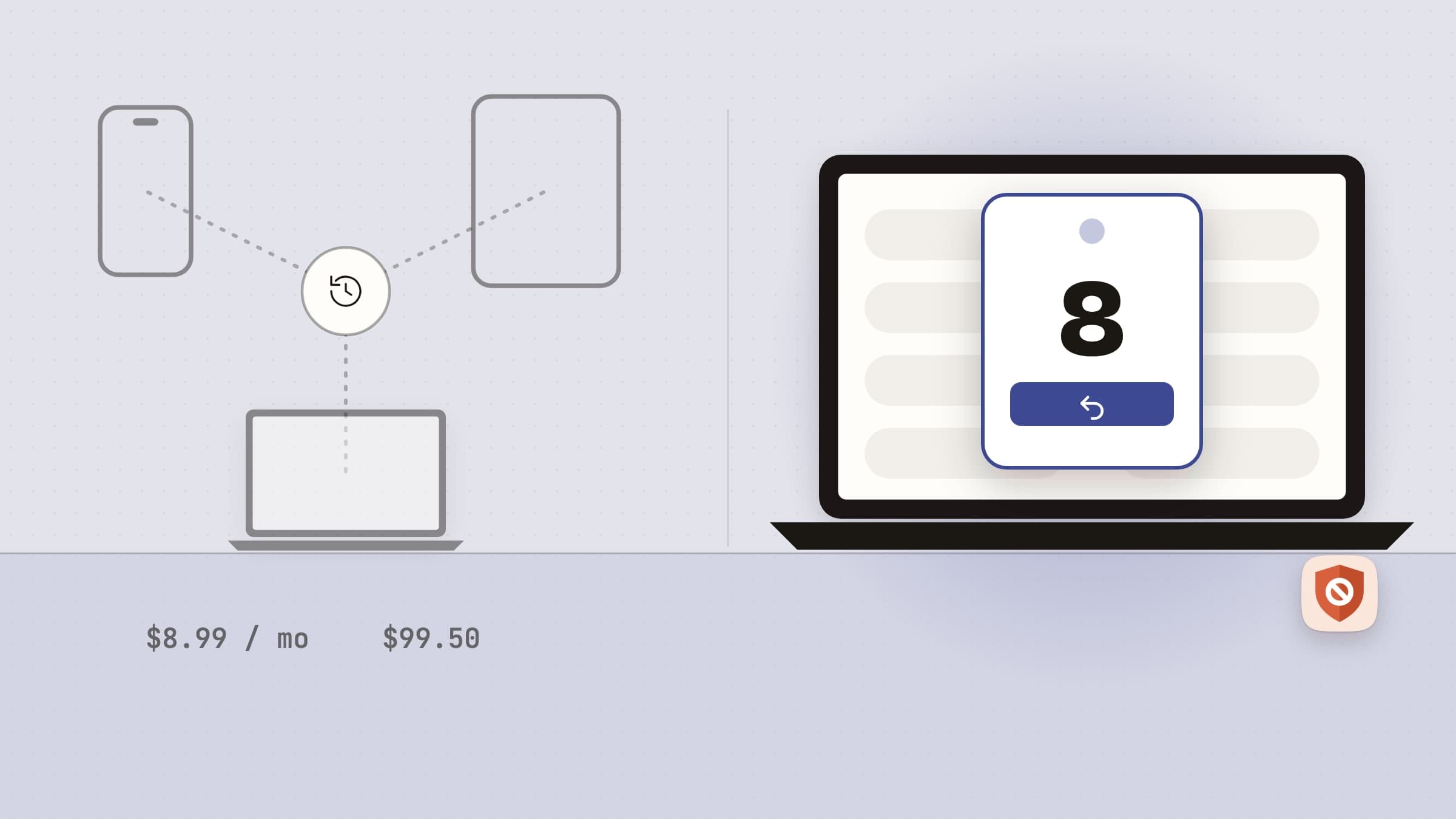
The free plan blocks apps, sites or everything, syncs across your devices, keeps custom blocklists and plays focus music, but it only runs Start Now sessions of up to two hours. Premium adds scheduled and recurring sessions that start on their own, sessions longer than two hours, and Locked Mode, which on a Mac means you cannot quit Freedom or log out until the session ends, and the dashboard lets you end a locked session early only once a week. Premium is $8.99 a month, $3.33 a month billed yearly, or $99.50 once for lifetime access, shown as half of $199. The 7-day trial comes with the yearly plan only.
Freedom is well kept. The Mac app reached version 2.26 in August 2026, its release notes keep closing ways around a block, and the iPhone app is rated 4.4 from more than 6,000 ratings in the US App Store.
If the hole in your day is the phone rather than the Mac, buy Freedom and stop reading. Blocking on iOS is hard to build, and Freedom is the mature answer to it. The Freedom alternatives for Mac below are for people whose problem is one machine.
Why people go looking anyway
The basics sit behind a subscription. Locked Mode, scheduling and anything longer than two hours are Premium. App Store reviewers in 2026 describe installing Freedom for Locked Mode and finding it paywalled, or being unable to start a session without starting the trial, and Trustpilot reviewers complain that the free version stops at two hours. A blocker is usually bought during a bad month, and a monthly plan keeps renewing after the bad month is over.
Billing and cancelling draw the sharpest complaints. The recurring stories in recent App Store and Trustpilot reviews are a refund refused right after an automatic renewal, a subscription that was hard to find and cancel, a retention discount that charged a new year at once, and a lifetime buyer whose account stopped showing Premium. Every plan except the lifetime one renews by itself, and Freedom's billing FAQ publishes no refund policy. Freedom's Trustpilot score was 2.8 from 30 reviews on 30 October 2026.
The proxy collides with VPNs. By default the Mac app blocks through a local proxy, and Freedom's own help pages say it can clash with VPNs, other proxy apps and managed work Macs. The fix, Non-Proxy Mode, needs browser Automation permission, hides Firefox entirely and, without the Freedom extension, adds a 1-2 second delay before a block lands. On the iPhone, Freedom's local VPN replaces any VPN you already run, because iOS allows only one at a time.
It is easier to get around than it looks. On the iPhone, reviewers turn off Freedom's VPN in Settings or revoke its Screen Time permission, and the 5-minute break button added in 2026 can be pressed again and again. On the Mac, Freedom's release notes fix workarounds such as Activity Monitor, and stopping an uninstall takes Locked Mode, start at login and an app block on Activity Monitor and the uninstaller together.
Freedom's privacy is not the reason. Freedom says its proxy runs on your Mac, that no traffic leaves the machine and that it records no browsing, and we found nothing that contradicts it. The fair points are smaller: it needs an account on every device, and its site and apps use Google Analytics and Mixpanel.
What macOS already does for free
Screen Time is built into the Mac, and for a blunt version of this job it costs nothing. On macOS 26 Tahoe, Downtime blocks everything except the apps you always allow on a schedule, App Limits caps time in apps, categories and websites with an optional block at the end, and Content & Privacy can limit websites. On macOS 27 Apple renames the first two Schedules and Time Allowances. A Screen Time passcode stops you from waving a limit away, though you set the passcode yourself.
It stops in two places. Apple files the website controls under Safari, and users report that Chrome, Edge and Firefox ignore them. And Apple's Screen Time framework is open to iPhone and iPad apps, which is how Freedom blocks on iOS, but not to native Mac apps, so no Mac blocker can build on it. Focus modes silence notifications on a schedule, but they do not block a single app or website.
If Screen Time is enough, you have saved yourself an app. If you live in Chrome, or a limit you can dismiss with your own passcode is no limit at all, read on.
NoMore: a choice at the moment you open it, not a session to start
NoMore is a Mac blocker that takes the opposite view of Freedom: there is no session. You list the sites and apps that eat your day, each one becomes a named streak with a day count, and when you open one, NoMore puts the streak and a lopsided choice in front of it. It is $4.99 once, with a 30-day trial that needs no card and no email, every feature is in that one price, and a license covers up to 3 Macs. It needs macOS 14 or later and is sold on our site, not the Mac App Store.
A list that is always on, with no session to start
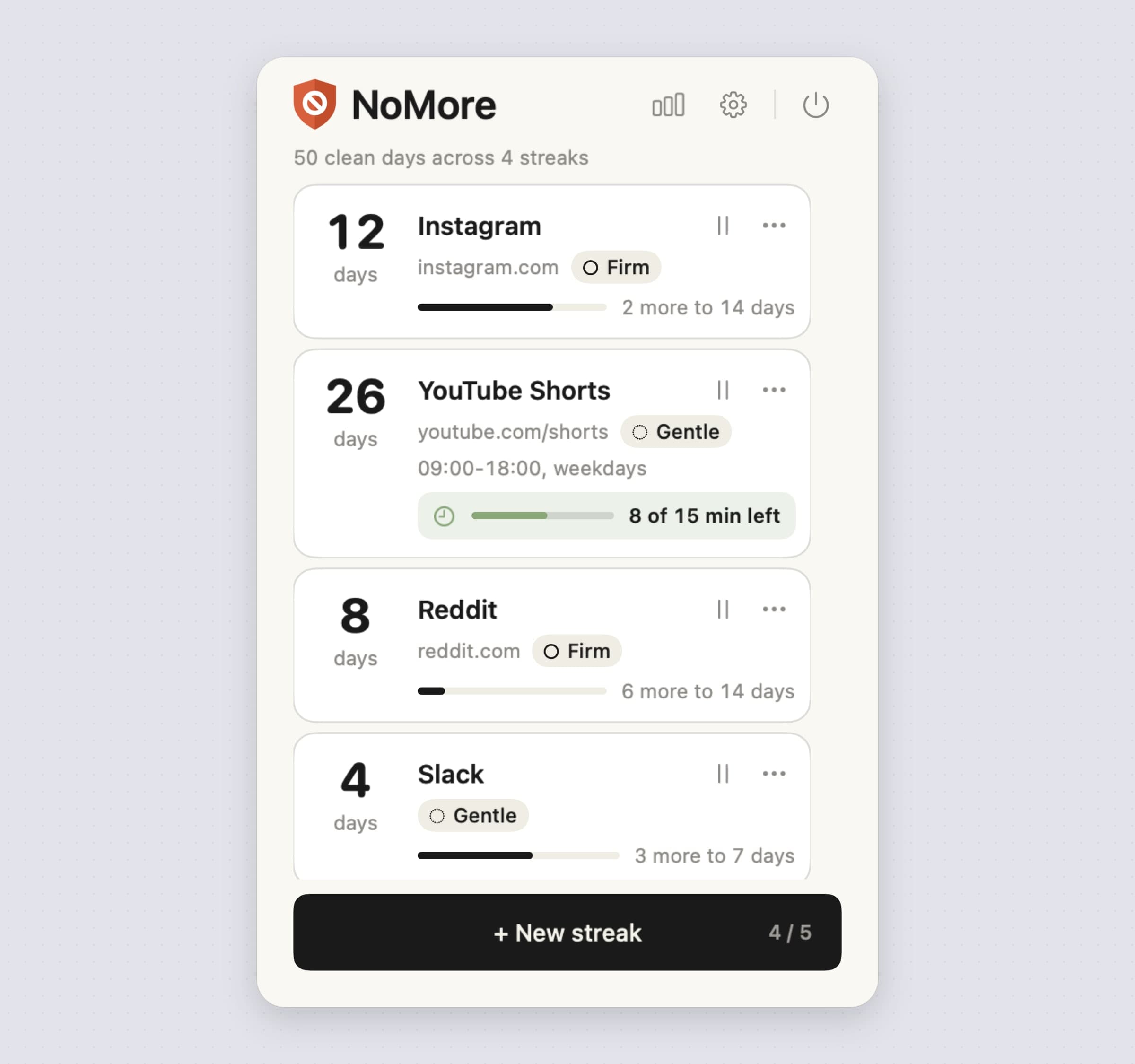
A NoMore streak blocks from the moment you add it, every time you open it, with
nothing to start or schedule. A streak is either a list of sites or a list of
apps: Site covers a domain and all its subdomains in every supported browser,
and a path narrows it, so youtube.com/shorts blocks Shorts and leaves the rest
of YouTube alone. App blocks whole apps you pick with Choose app…, and
needs no permission at all. Add a set fills a site streak in one pick from a menu of
ready lists for social media, video, news, shopping or games. You can keep up to
five streaks.
The menu bar list is the dashboard: each streak's day count, its strictness and how far it is to the next milestone, which comes as a notification at 7, 14, 30, 60, 90, 180 and 365 days if you want one. A pause icon on each streak pauses it for an hour and Resume ends the pause early.
The honest limit: the list only knows the browsers it can read. Sites are blocked in Safari, Chrome, Firefox, Opera, Brave, Microsoft Edge, Vivaldi and Arc; in any other browser a site is not blocked unless you add the whole browser as an app.
The panel puts the cost in front of you
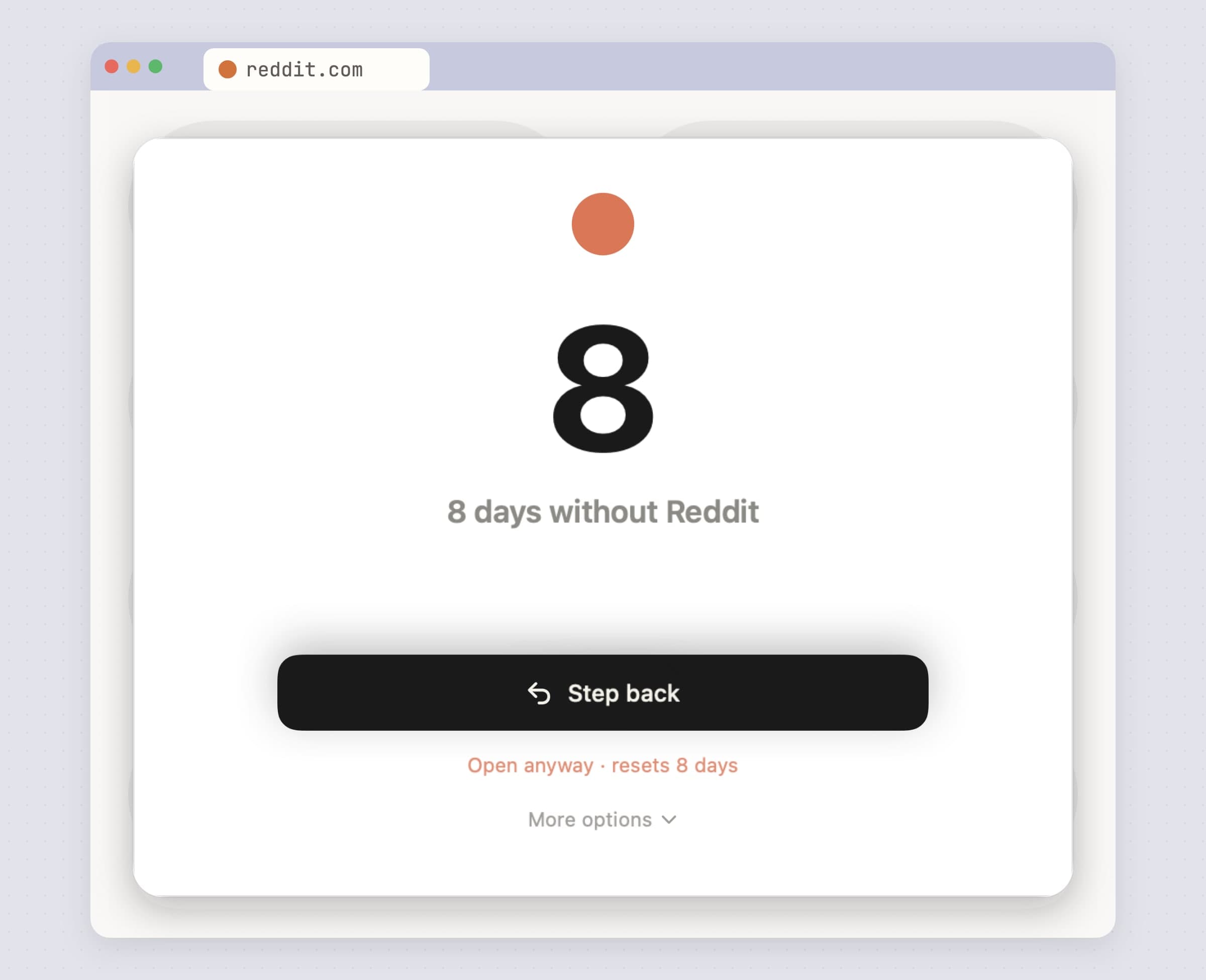
When you open a listed site or app, the screen blurs and a panel shows the day count, "8 days without Reddit", a large Step back and a small Open anyway · resets 8 days. Step back takes the browser back or closes the tab, and hides an app rather than quitting it, and the streak lives on. Open anyway sets the count back to zero. Freedom blocks the site for the rest of the session; NoMore shows you what giving in costs, at the moment the reflex fires, not in a weekly report.
How hard Open anyway is depends on the streak's Strictness. Gentle opens at once. Firm makes you wait 30 seconds, then 60, then 120 for each further open of that streak the same day. Brutal adds a typed reason of at least 40 characters to the wait. More options holds Pause 1 hour, a daily Use free pass that opens once without breaking the streak, and Open & don't count for a link you clicked in another app, such as Slack, Discord or Mail.
The honest limit: NoMore is friction, not a lock, and it says so. Quit NoMore is one click in the menu bar, Pause 1 hour works in every mode, and a streak can be edited or deleted at any time. There is nothing like Locked Mode. If you have already talked your way past three blockers, you want a wall, and NoMore is not one.
Hours, days and a daily allowance, in the one price
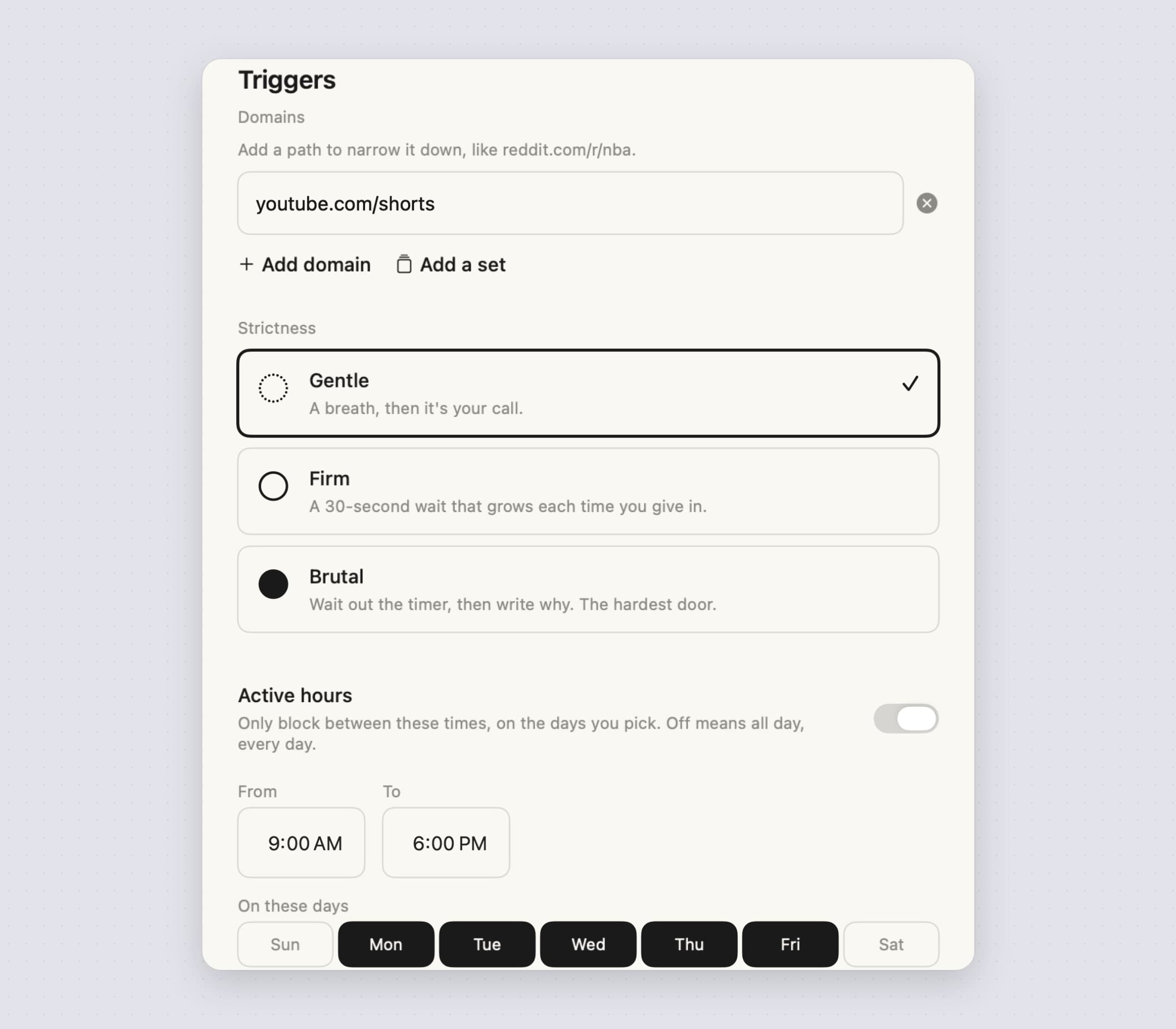
Freedom's free plan has no scheduling; NoMore has no plans at all, and every streak can carry its own timing. Active hours keeps a block to a window of the day, such as 09:00 to 18:00, and On these days keeps it to the days you pick, so a weekdays-only streak leaves the weekend free. A night window that runs past midnight counts for the day it starts. Daily allowance lets 5, 15, 30 or 60 minutes a day through without the panel and without breaking the streak; the menu bar shows "8 of 15 min left", and once the minutes are gone the panel comes back and says so.
Each streak also keeps its own free pass, its own external link option and its own strictness, so YouTube Shorts can be Gentle with a quarter of an hour a day while Instagram stays Firm.
The honest limit: active hours narrow a streak, they never start one. NoMore has no session that switches itself on at 09:00, the way Freedom's recurring sessions do, and it never blocks the whole internet.
It reads the tab on your Mac, with no proxy, VPN or account
NoMore has no proxy, no VPN, no DNS filter and no browser extension, so there is nothing to fight your VPN or a work Mac's network settings. It sees which app is in front, and when that app is a supported browser it reads the address of the front tab every two seconds: through Apple's Automation permission for Safari and the Chromium browsers, and through Accessibility for Firefox. Each browser asks once, from an Allow button in onboarding or Settings, and you can run NoMore with app streaks only and grant nothing.
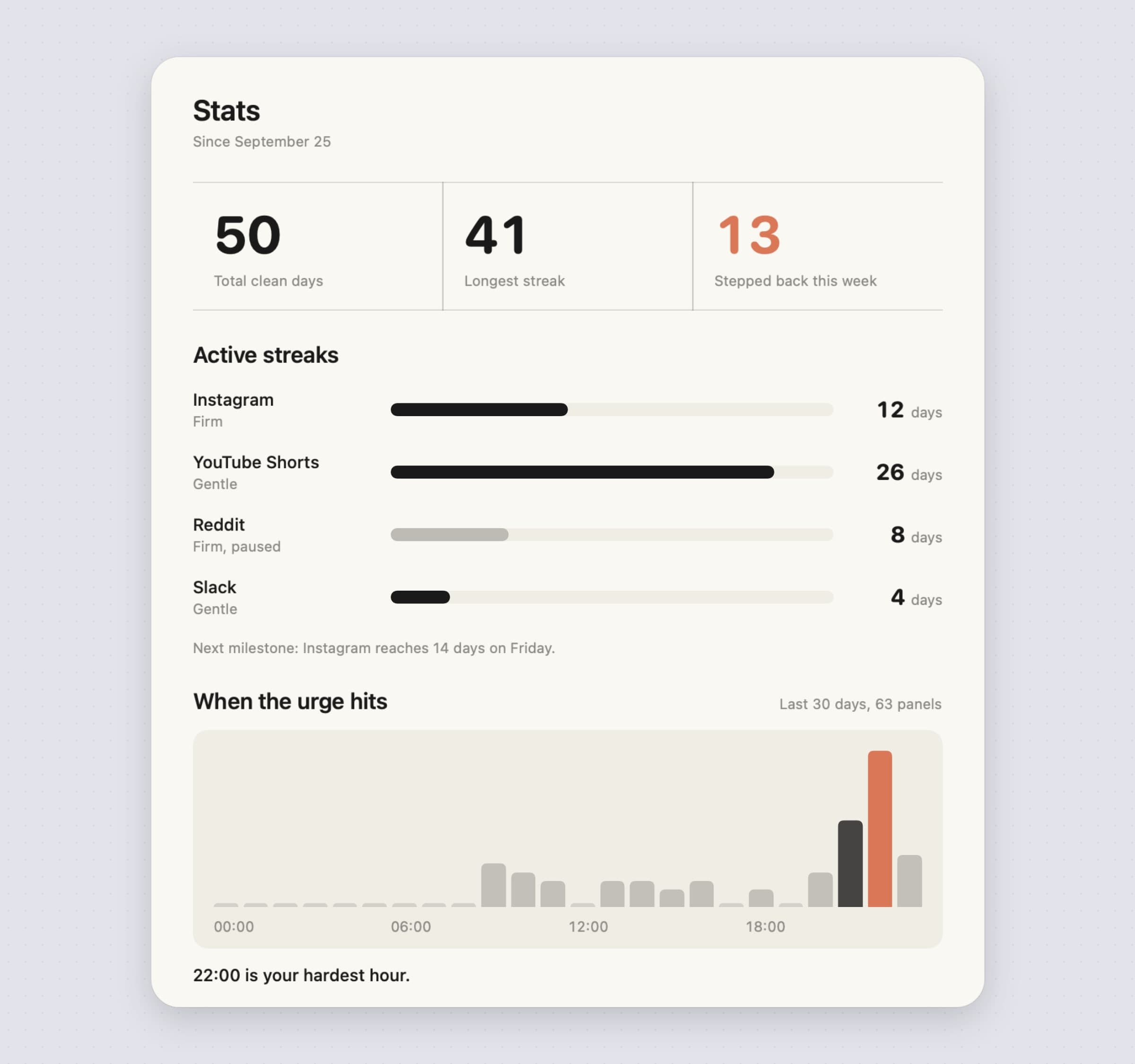
There is no account. Your streaks, the panel's history and your typed reasons live in a local store on your Mac, with no iCloud and no sync, and Stats is built from them: total clean days, the longest streak, how often you stepped back this week, a bar per streak and When the urge hits, the hour of the day you reach for the list most.
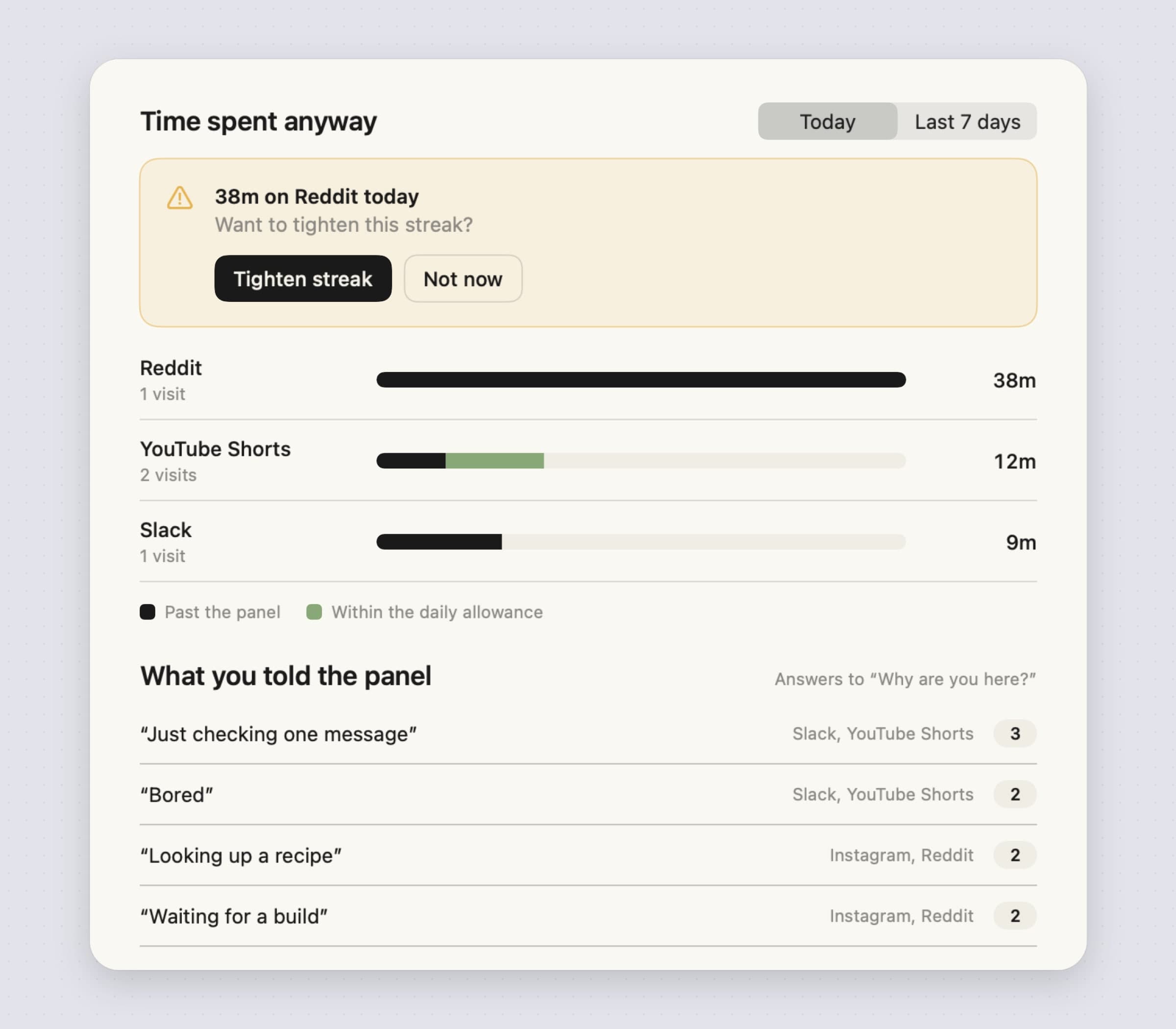
Time spent anyway shows how long you stayed on a listed site or app after getting past the panel, split from the minutes the allowance let through, and offers to tighten a streak that keeps losing.
The honest limit: only the front tab of the front window is checked, so a video already playing in a background tab keeps playing until that tab comes to the front. NoMore also goes online for its license and update checks, its settings, crash reports and a few anonymous usage events, with no addresses and no app names in them; there is no in-app switch to turn those events off.
Freedom vs NoMore, feature by feature
| Freedom | NoMore | |
|---|---|---|
| Price | Free plan; Premium $8.99 a month, $3.33 a month yearly, or $99.50 once | $4.99 once, 30-day trial, no card |
| What is in the free version | Start Now sessions up to two hours, no scheduling, no Locked Mode | Everything, for 30 days |
| Devices | Mac, Windows, iPhone, Android, Kindle; ChromeOS and Linux by extension; no device limit | Mac only; a license covers up to 3 Macs |
| Account | Required on every device | None |
| How it blocks on a Mac | Local proxy, or Non-Proxy Mode through browser Automation | Reads the front app and the front tab on the Mac |
| VPN conflicts | Documented by Freedom for the proxy | No proxy or VPN to conflict |
| When a block applies | During a session you start or schedule | Always, or in active hours on the days you pick |
| What you see | A block for the rest of the session | Your streak, Step back, and Open anyway with a cost |
| Strictness | Normal session or Locked Mode | Gentle, Firm or Brutal per streak |
| Can you quit it mid-block | Not in Locked Mode | Yes, in one click |
| Whole internet off | Yes | No |
| Minutes allowed per day | Not described | Daily allowance of 5, 15, 30 or 60 minutes |
Freedom wins on reach: the phone, every platform, the whole internet, and a Locked Mode that holds. NoMore wins on one Mac: one price with every feature, no account, no proxy to fight your VPN, and a choice at the moment you reach for something instead of a session you have to remember to start.
Other alternatives worth knowing
Cold Turkey Blocker is the strict one. Its free tier blocks websites with exceptions, timed blocks and statistics; Pro is $45 once in the US for every computer you use and adds app blocking, schedules, breaks, allowances and locks that stop you uninstalling the app or disabling its extension until the block ends. Frozen Turkey can lock, log off or shut down the whole computer. It runs on Mac and Windows, macOS 10.14 to 26.
SelfControl is free, open source and Mac only. You set a blocklist and a timer, and nothing undoes it until the timer ends, not quitting, not restarting, not deleting the app. It does one job, with no account and no schedule, and is the usual free recommendation for a wall on a Mac.
Focus by Brad Jasper is a Mac blocker with schedules, a Pomodoro timer, locked and password modes and scripting, $49 once for Focus 2 with a year of updates or $129 for lifetime, with a 30-day money-back guarantee.
one sec is the closest in spirit to NoMore: a breathing pause before a distracting app opens. It is free for one app and $19.99 a year or $99.99 for lifetime, on iPhone, iPad and Mac with macOS 14 or later, and on the Mac it interrupts websites through a Safari extension.
Blocking is half of the job. If what you actually want to know is where the hours go, Tally measures it, compared in RescueTime alternatives for Mac; if starting is the problem rather than stopping, Pawodoro is the timer, and the best focus apps for Mac sorts the field by the moment each one acts on.
When Freedom is still the right choice
Stay with Freedom if your phone is where the hours go, because NoMore cannot reach an iPhone, and a session that silences the Mac and the phone together is exactly what Freedom does best. Stay if you need Windows or Android in the same plan, one blocklist across a mix of devices, or blocking the whole internet for a writing sprint. Stay if you want a wall you cannot climb, since Locked Mode stops you quitting and NoMore never will. Stay if recurring sessions that start themselves at 09:00 are how you work. And if you already own the lifetime plan, there is no money to save by leaving.
Switching from Freedom
- Write down your blocklists from the Freedom dashboard before you cancel, site by site and app by app. Nothing imports; NoMore starts empty.
- End any running session and cancel Premium where you bought it: on freedom.to for a web plan, or in the App Store or Google Play for a mobile one. Remember that the yearly trial turns into a charge on day 7.
- Quit Freedom on the Mac and uninstall it, so its proxy is gone. If you kept a Freedom browser extension, remove it too.
- Install NoMore from our site, open it, and give Allow to the browsers you use, or continue with app streaks only.
- Rebuild the list as streaks: one site streak per habit, using Add a
set for the obvious ones and a path like
reddit.com/r/nbawhere only part of a site is the problem, and one app streak for apps like Slack or games. - Set each streak's Strictness, then add Active hours and On these days where you used Freedom's schedules, and a Daily allowance where you want a few minutes rather than none.
- Keep the phone covered with Screen Time on the iPhone, or keep Freedom's free plan for the phone alone.
Freedom's sessions, Locked Mode, focus music and phone blocking do not carry over, and its schedules have to be rebuilt by hand as active hours. Rebuilding five streaks takes about ten minutes. How to block websites on a Mac walks through every NoMore setting, and the best screen time apps for Mac covers the measuring side.
Side by side
| Tool | Shape | Devices | Account | Cost |
|---|---|---|---|---|
| Freedom | Sessions, scheduled or locked | Mac, Windows, iPhone, Android, ChromeOS | Required | Free plan; $8.99 a month, $3.33 a month yearly, $99.50 once |
| Cold Turkey Blocker | Hard blocks and locks | Mac, Windows | No, data stays local | Free tier; Pro $45 once |
| SelfControl | A timer you cannot undo | Mac | No | Free |
| Focus | Schedules, Pomodoro, locked modes | Mac | No, data stays local | $49 once, $129 lifetime |
| one sec | A pause before an app opens | iPhone, iPad, Mac | Not stated | Free for one app; $19.99 a year |
| Screen Time | Downtime and App Limits | Apple devices | No | Free |
| NoMore | Friction at the moment you open it | Mac | No | $4.99 once |
Pick by what fails. If you lose the evening to the phone, it is Freedom. If you have already beaten three softer blockers, it is Cold Turkey or SelfControl. And if you open a tab on the Mac before you have decided to, a wall is more than you need: a day count in front of it, at the moment you reach for it, is usually enough. For more on the ADHD side of the same problem, see the best Mac apps for ADHD.
Prices and features checked on 30 October 2026.


