What Time Out is actually good at
Time Out, by Dejal Systems, is the break reminder most Mac users meet first, and it has earned that place over some fifteen years. It dims the screen on a schedule and shows a break with a progress bar, then gets out of the way. Out of the box there are two kinds: a Normal break of about ten minutes every hour and a Micro break of about fifteen seconds every fifteen minutes. Either can be changed or removed, and you can add your own, such as a lunch break or a stretching break.
The depth is the point. Each break type has its own schedule, length, theme and actions, and breaks can run on an interval, at fixed times or from your calendar. Rules postpone or skip a break while a chosen app is in use, during a calendar event, in a Focus, in a full-screen app or in a FaceTime, Teams or Zoom call. Actions can play a sound, speak, or run an AppleScript, shell, Python or Automator script before, during or after a break. Postpone and skip can be limited per break, per hour or per day, which reviewers credit with making their breaks stick.
On dejal.com the core features are free. Optional Supporter purchases unlock the premium ones and do not renew: $4.99 for 3 months, $9.99 for 6 months, $19.99 for 12 months or $59.99 for Lifetime. The Mac App Store version also offers Premium at $1.99 a month or $19.99 a year, and Setapp includes it. Version 3.1, from August 2026, needs macOS 26; older Macs stay on 2.9.7.
If you are on macOS 26, want a free break timer, and like to script and theme your breaks, Time Out is hard to beat, and no Time Out alternative for Mac on this page will argue otherwise.
Why people go looking anyway
Complaints about Time Out are few and mostly old, and recent reviews are overwhelmingly positive. The reasons people still look elsewhere are consistent, though.
Current versions need macOS 26. Time Out 3.0, from April 2026, requires macOS Tahoe. A Mac on Sonoma or Sequoia stays on 2.9.7, without the new rules, themes and fixes, and every release since then is out of reach.
The price model takes some reading. The free version is generous, but the premium tiers come as 3-, 6- and 12-month Supporter purchases that never renew, a Lifetime option, and on the Mac App Store a monthly or yearly subscription too. Some users have found the paid tiers too expensive or the "buy me" prompts irritating, and one App Store reviewer had to correct another who thought it needed a subscription.
It is a configurable utility first. Everything is possible, and much of it is left to you: the content of a break is a theme you pick or build, and the behaviour is a set of rules you write. Competitors pitch exactly the opposite, something calmer and more opinionated that ships with a sensible routine, and at least one Setapp user wished for it.
Idle detection needs a permission. Time Out counts time away as a natural break, but watching the keyboard needs Accessibility permission. Without it, one reviewer found the timers drifting because inactivity went unnoticed.
What macOS already does for free
macOS has no break reminder. Screen Time sets downtime schedules and app limits, which stop you using the Mac at certain hours, but nothing in it tells you to look away every twenty minutes or stand up every hour. Clock and Reminders can fire a repeating alert, and a repeating alert is easy to dismiss without moving.
The free, open-source options most often named next to Time Out are Stretchly and BreakTimer, both cross-platform; more on them below.
Recess: breaks that know when to wait, and what to do
Recess is a menu bar break reminder that runs two clocks, an eye break and a body break, and makes most of the decisions Time Out leaves to you. It is $11.99 once, with a 30-day trial that needs no card and no email, and it runs on macOS 14 or later. Out of the box an eye break comes every 20 minutes for 2 minutes and a body break every 50 minutes for 5 minutes; the eye break can be set from 20 seconds to 4 minutes, which covers the 20-20-20 rule exactly. Everything below is in the shipping version.
It waits for calls and video, and counts the time you were away
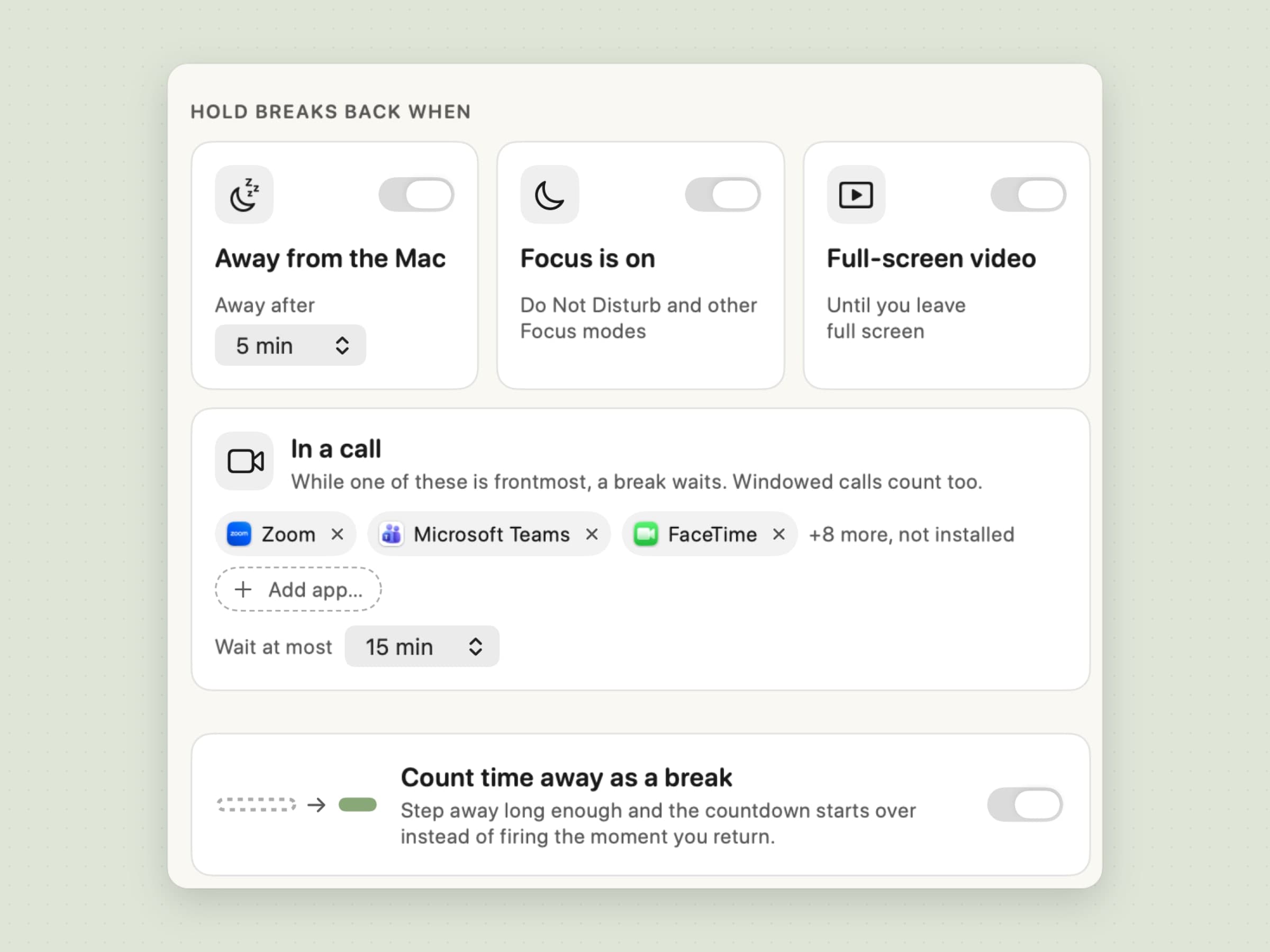
A break that lands in the middle of a call is a break you skip. Recess holds it instead. In a call keeps a break waiting while one of a list of apps is frontmost, windowed calls included; the list starts with Zoom, Microsoft Teams, Webex, Slack, FaceTime, Discord and Google Meet, and you can add any app. Full-screen video holds a break while a window fills the screen and is keeping the display awake, which covers YouTube in a browser, IINA or VLC with no list at all. Focus is on holds breaks while a Focus is active.
A held break does not wait forever. Wait at most gives up after 5, 15, 30 or 60 minutes and says so, without a penalty, so a long day of meetings cannot switch Recess off by accident.
Time away works the other way round. With Count time away as a break on, stepping away for at least a break's length restarts that clock when you come back, with a short note that the break was counted, instead of firing the moment you sit down. Away is no keyboard or mouse input for 1, 2, 5, 10 or 15 minutes. None of this needs Accessibility: the only permission Recess asks for is notifications.
The honest limit: a call is recognised by which app is in front, not by the camera or microphone, Recess reads Focus from a system signal Apple does not document, and Time Out's rules reach further - calendar events, any app you name, and Focus as a documented rule.
Skipping costs something, if you want it to
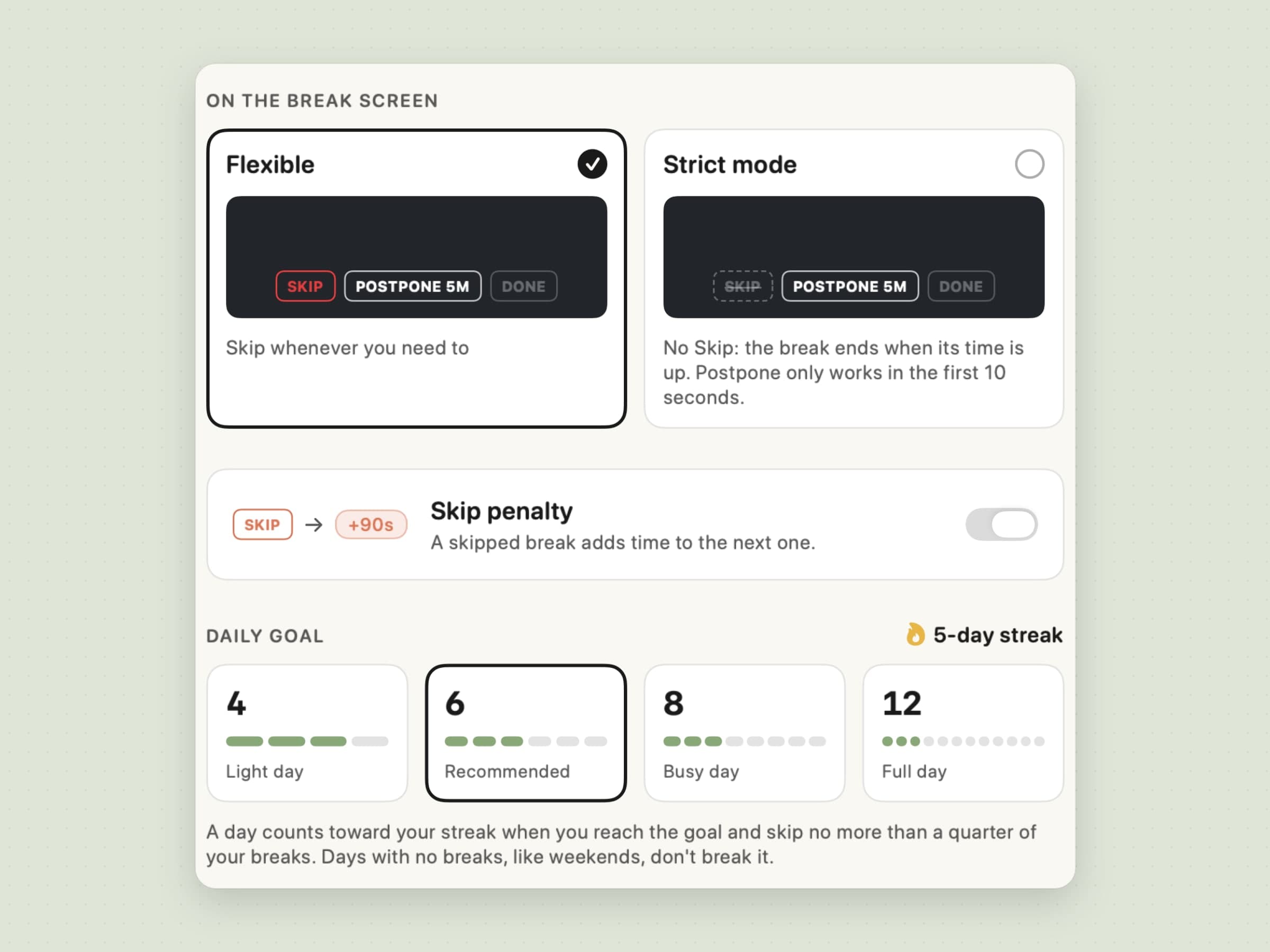
Every break reminder can be skipped; the question is what skipping costs. Recess gives three answers, all in Discipline. The Skip penalty, on by default, adds 90 seconds to the next eye break after a skip, then 180, then 300 within the same hour, and quitting the app does not clear it. Postpone 5m works once per rolling hour. Strict mode removes the Skip button altogether: the break ends when its time is up, and Postpone only works in the first 10 seconds.
The Daily goal of 4, 6, 8 or 12 breaks turns this into a streak. A day counts when you reach the goal and skip no more than a quarter of your breaks, and days with no breaks, such as weekends, do not break it.
The honest limit: strict is firm, not a lockout. The Toggle pause shortcut still ends a break, and the penalty applies to eye breaks only. Time Out's limits on postpone and skip are finer, set per break, per hour or per day.
A break you can take without being locked out
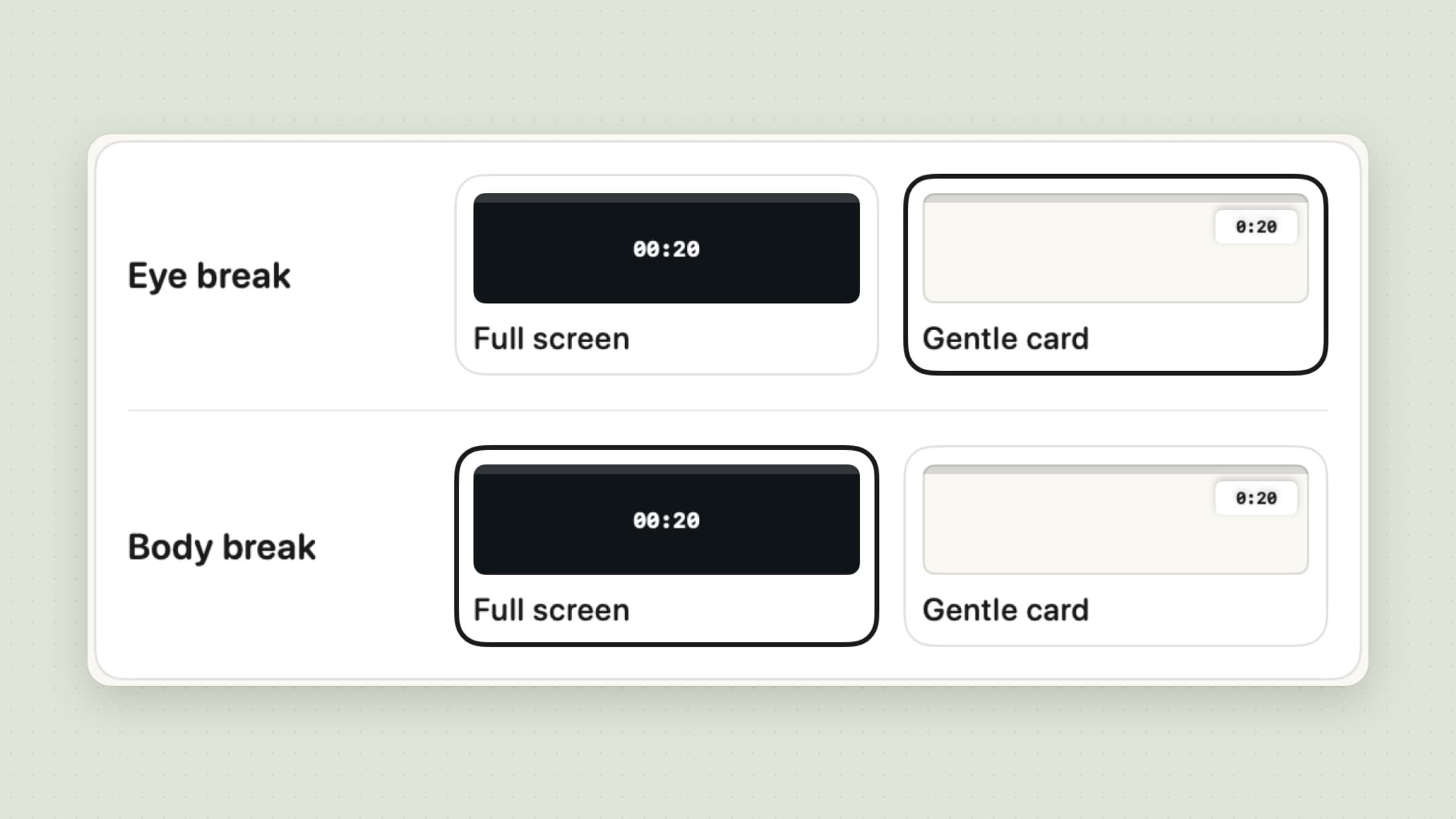
Not every break needs the whole screen. In Break screen, each kind can arrive Full screen, covering every display with a dimmed, blurred copy of the desktop, or as a Gentle card, a small countdown under the menu bar. A gentle break counts itself: stay off the keyboard and mouse for most of it and it is logged as taken, and if you kept typing, Recess asks afterwards whether you took it.
Full screen has four tints and a dim level from 55 to 95 percent, and on a second display it shows the countdown without buttons. In strict mode every break takes the full screen. An eye break due less than five minutes before a body break waits and joins it, so two breaks never arrive back to back.
The honest limit: there are no themes. Time Out can show an image, a video, a web page or your own HTML on its break screen; Recess has four tints, the countdown and the move.
Every break says what to do
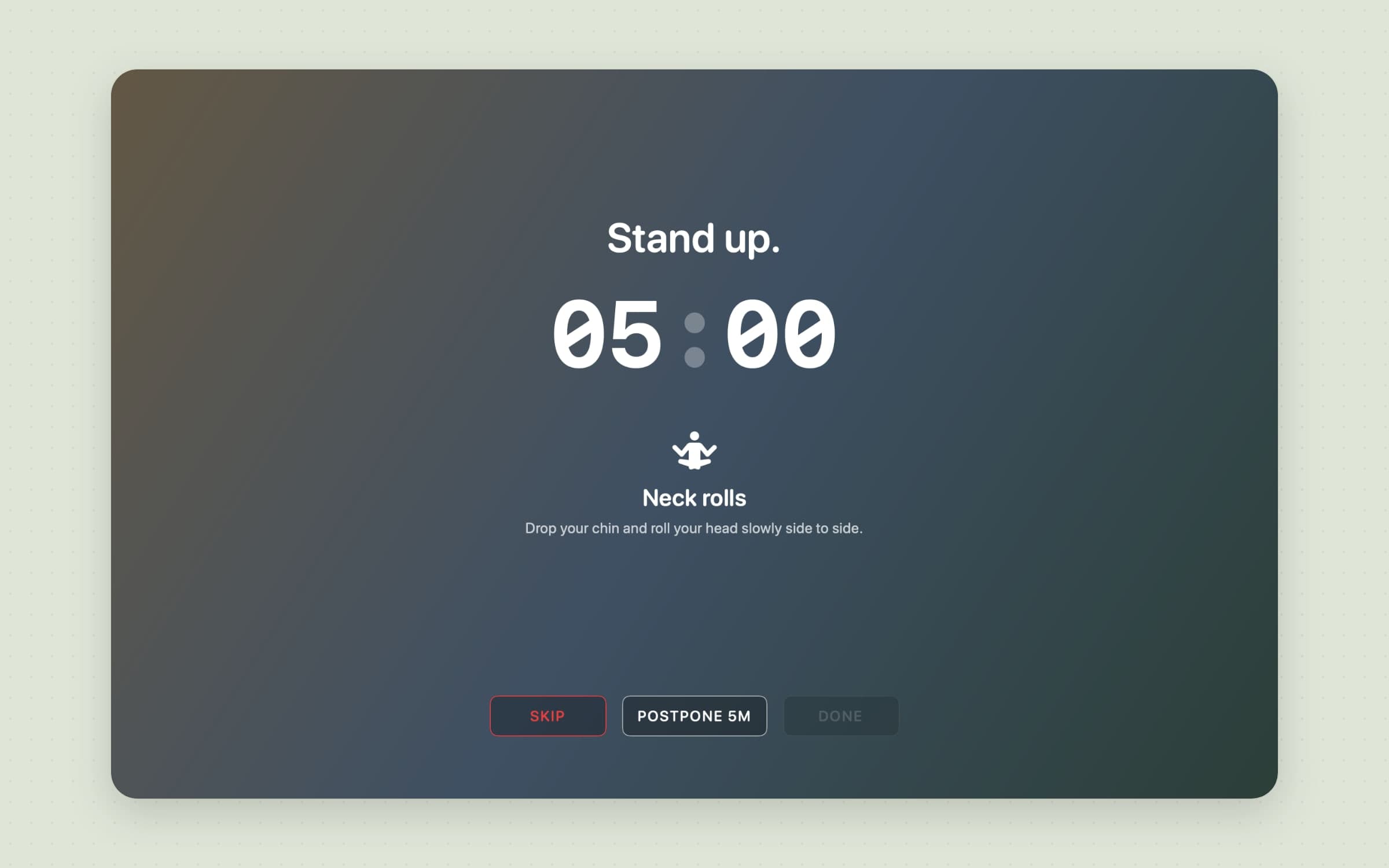
A break is easier to take when it says what to do with it. In the default Guided style, an eye break shows one of six eye exercises - Focus far away, Palming, Trace an eight, Slow blinks, Near, then far, Find some daylight - and a body break walks through ten office moves, from Neck rolls and Shoulder rolls to Calf raises and Walk and refill, changing every 60 seconds and picking up where the last break left off. Minimal shows the countdown alone, and Your messages adds up to 20 lines of your own, shown one per break in turn.
The honest limit: a move is an icon and a line of text, not an animation, and there are two built-in chimes, at the start and the end of a break, which you can turn off. Time Out can play any sound or speak.
Two clocks, a plan for the next two hours, and a report
The menu bar shows two rings and the time to the next break, like the other menu bar apps for Mac we would install, and the popover holds the next break with Start now and 5 min later, today's goal and streak, and pause chips from 30 minutes to tomorrow morning or Until I resume. Work hours keep Recess quiet outside a window you set, and a day starts with fresh timers.
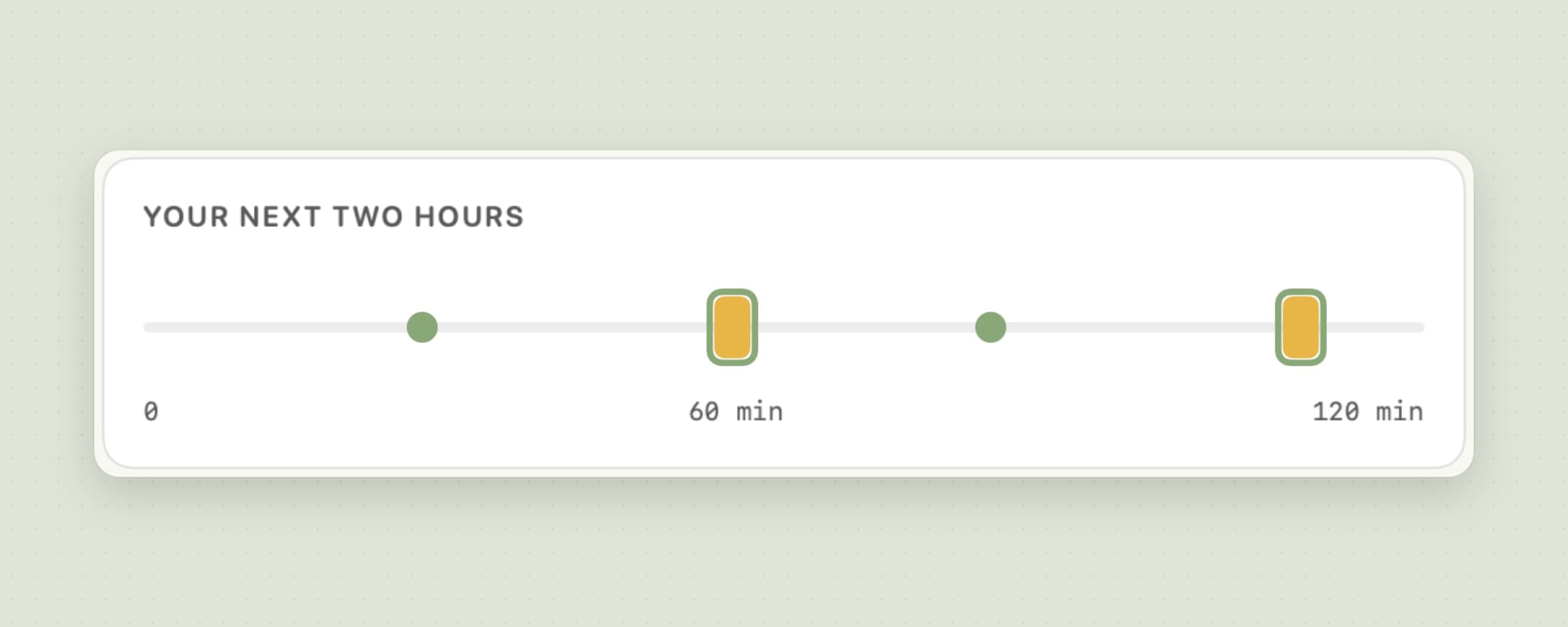
Choose Light, Standard or Strict as a starting point, or set each clock yourself; Your next two hours draws the result. A report shows the last 7, 30 or 60 days, with breaks taken, skip rate, postponements and streak, and a summary arrives on Monday mornings. For water, Aqumi sits beside it in the menu bar, and the rest of desk health apps for Mac covers what Recess does not.
The honest limit: two kinds of break is all there is, and Recess runs no scripts, has no Shortcuts actions or widgets, and keeps 60 days of history with no export.
Time Out vs Recess, feature by feature
| Time Out | Recess | |
|---|---|---|
| Price | Core free; Supporter from $4.99, Lifetime $59.99 | $11.99 once, 30-day trial |
| macOS | 26 or later (2.9.7 for older Macs) | 14 or later |
| Break types | Normal and Micro, plus any you add | Eye break and body break |
| Scheduling | Interval, fixed times, calendar | Interval, with work hours |
| Holding a break | Rules for apps, calendar, Focus, full screen, calls | Calls, full-screen video, Focus, time away, with a wait limit |
| Time away as a break | Yes; keyboard watching needs Accessibility | Yes, with no permission |
| Limiting skips | Postpone and skip limits per break, hour or day | Escalating skip penalty, strict mode, one postpone an hour |
| What a break shows | Themes: images, text, video, web pages, HTML | Guided eye exercises and office moves, or your own messages |
| Non-blocking breaks | Not described | Gentle card that counts itself |
| Actions and scripts | Sounds, speech, AppleScript, shell, Python, Automator | Start and end chimes |
| Goals and history | Optional statistics | Daily goal, streak, 60-day report |
Time Out wins on flexibility, price and automation: more break types, more rules, real scripting, and a free core. Recess wins on running on macOS 14 and 15, needing no Accessibility permission, and shipping a routine with guided content and a reason not to skip.
Other alternatives worth knowing
LookAway is $19 once for one Mac and runs on macOS 13 or later. It pauses on its own during meetings, screen recording, video and games, and adds posture and blink nudges, and syncs with an iPhone.
Stretchly is free and open source and runs on macOS, Windows and Linux. It is the pick if you need the same break app on every computer you use, and it pauses for Do Not Disturb and idle time.
BreakTimer is free, open source and cross-platform too, with a simpler schedule and working hours.
Pandan by Sindre Sorhus is free on the Mac App Store and is about time awareness rather than forced breaks: it keeps you aware of the time you spend at the Mac and can remind you gently. If you want the habit around breaks rather than the break itself, Pawodoro and the menu bar Pomodoro timer guide are the other route.
When Time Out is still the right choice
Stay with Time Out if you are on macOS 26 and the free version already does what you need; there is no reason to pay for a break reminder that does less. Stay if your breaks depend on the calendar or on fixed times of day, if you want more than two kinds of break, or if you run scripts when a break starts. And stay if the break screen is part of the point for you - a photo, a video, a page of your own - since Recess offers four tints and a countdown.
Switching from Time Out
- Note your schedule. Write down how often and how long your Normal and Micro breaks are; they map to Recess's body and eye breaks.
- Install Recess and pick a preset under Breaks - Light, Standard or Strict - then set each clock to match what you had.
- Choose how breaks arrive in Break screen: full screen or a gentle card for each kind, Guided or Minimal, and a tint.
- Set what holds a break in Schedule: add any call app you use that is not on the list, and set Wait at most.
- Decide on discipline: leave the skip penalty on, or turn on strict mode if skipping was the problem.
- Turn on Launch at login in General.
- Quit Time Out and remove it from your login items, so two apps do not dim the screen at once.
Your Time Out statistics, themes and scripts do not carry over. Expect a day to get the timings right and a week before the streak means much.
Side by side
| Tool | Break types | Holds for calls and video | Platforms | Cost |
|---|---|---|---|---|
| Time Out | Normal, Micro and custom | Rules for apps, calendar, Focus, full screen, calls | Mac, macOS 26+ | Core free; Supporter from $4.99 |
| LookAway | Reminders plus posture and blink nudges | Meetings, recording, video, games | Mac 13+, iPhone | $19 once |
| Stretchly | Scheduled breaks | Do Not Disturb, idle | Mac, Windows, Linux | Free |
| BreakTimer | Scheduled breaks, working hours | Not checked | Mac, Windows, Linux | Free |
| Pandan | Time awareness, gentle reminders | Not applicable | Mac 14+ | Free |
| Recess | Eye and body breaks | Calls, full-screen video, Focus, time away | Mac, macOS 14+ | $11.99 once |
Pick by what fails. If the break you never take is the one that lands in a call, choose an app that holds breaks: Time Out with its rules, LookAway, or Recess. If the problem is skipping, choose one that makes skipping cost something, a point the best Mac apps for ADHD makes too. If you are not on macOS 26, the current Time Out is out, and the choice is between 2.9.7, the free cross-platform tools and Recess. For the wider field around a desk, see the best posture apps for Mac and the best focus apps for Mac.
Prices and features checked on 29 October 2026.


