What the 20-20-20 rule is, and why an app has to help
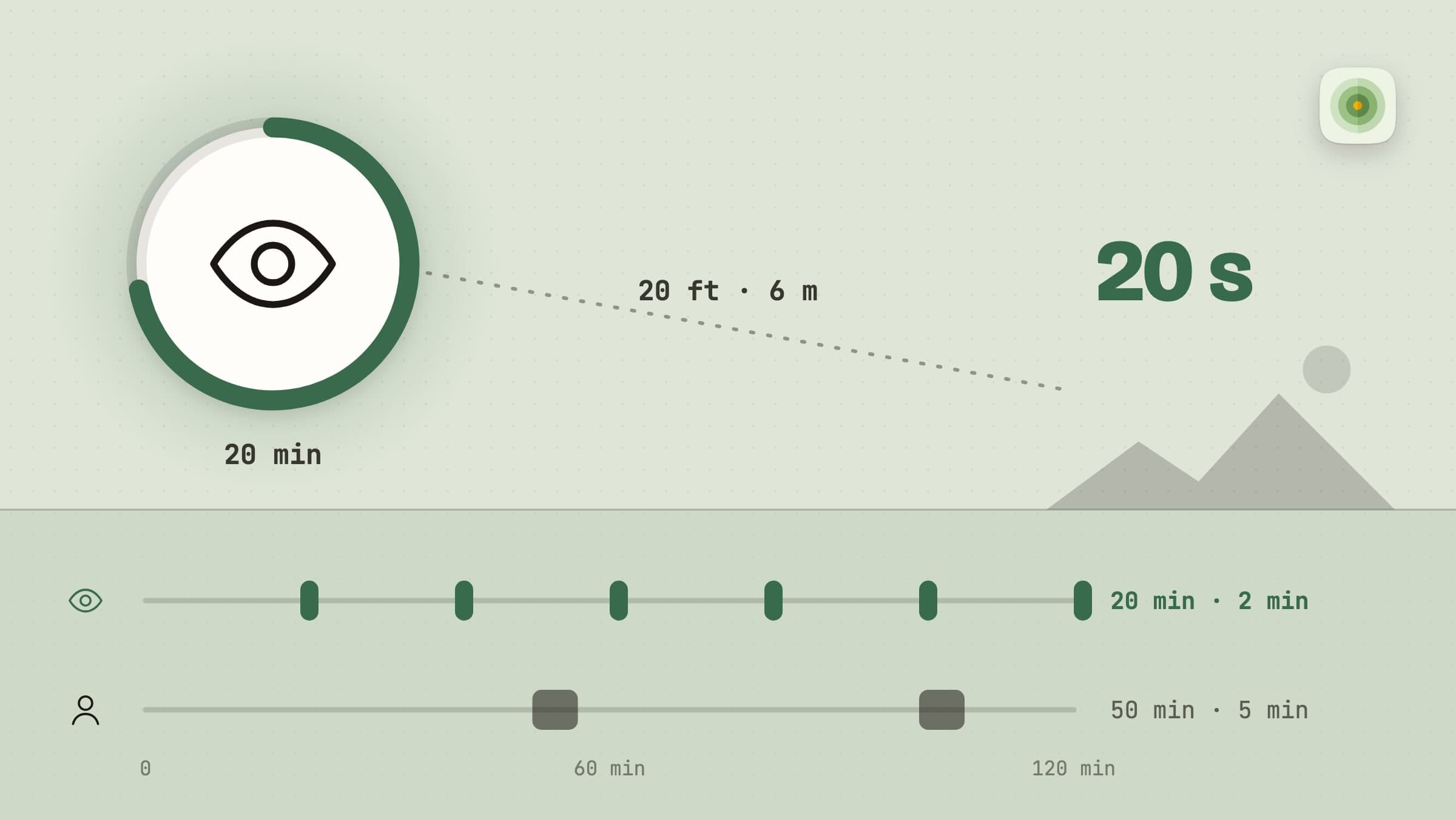
Every twenty minutes, look at something twenty feet away for twenty seconds. That is the whole rule. It exists because the muscle that focuses your eye stays contracted the entire time you look at a screen at arm's length, and relaxing it briefly and often is what stops the ache that arrives around six in the evening.
The rule is trivially easy and almost nobody follows it, for one reason: you cannot notice you have stopped noticing. Twenty minutes of concentration is precisely the state in which no internal signal fires. Something outside your head has to do the counting.
Recess is that something on macOS. Everything below is in the shipping version.
Two timers, because eyes and body are not the same problem
Recess runs two independent cadences. Eye rest wants to be frequent and very short. Standing up and stretching wants to be occasional and longer. Put them on one clock and one of the two is always wrong - either you are stretching every twenty minutes, which is absurd, or you are resting your eyes every hour, which does nothing.
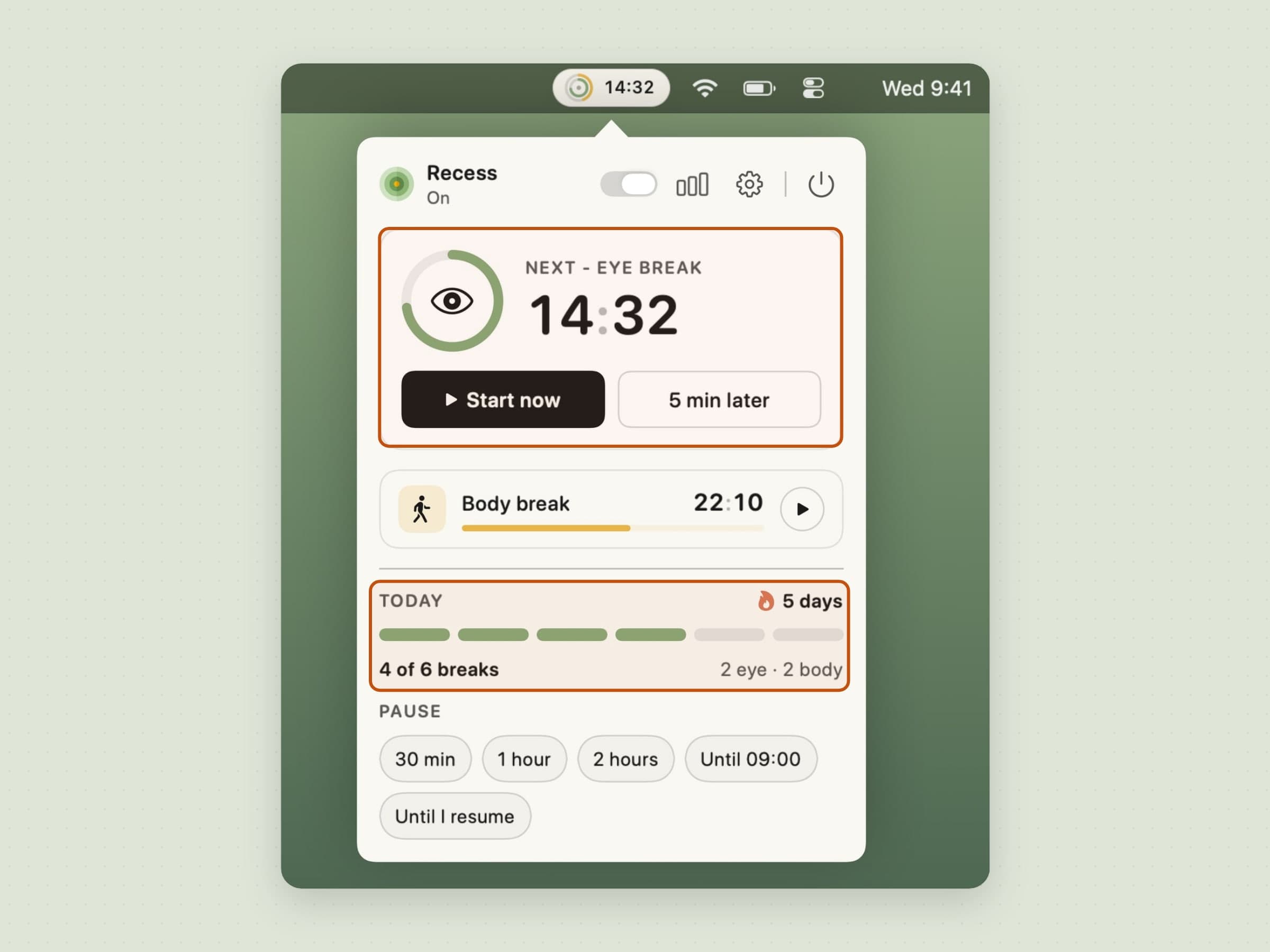
The popover puts whichever break comes next in a card of its own, with a countdown ring and two buttons: Start now if you want it early, 5 min later if the moment is wrong. The other break sits on a slim row beneath it. Under that, a Today block fills a segmented bar toward your daily goal and shows your streak, and a row of pause chips closes the panel. The header holds a master switch for the whole app and buttons for the report and Settings.
Three presets set both cadences at once:
| Preset | Eye break | Body break |
|---|---|---|
| Light | 45 s every 30 min | 3 min every 90 min |
| Standard | 2 min every 20 min | 5 min every 50 min |
| Strict | 90 s every 15 min | 5 min every 40 min |
Every interval and duration is also editable directly, which turns the preset into a starting point rather than a cage. Below the presets, the Breaks page in Settings draws your next two hours as a timeline, so you can see where eye and body breaks will land before they do - including the spot where two of them merge into one, which is covered further down.

What a break looks like
Ten seconds before one lands, a small countdown appears under the menu bar - long enough to finish the sentence you are typing, short enough that it is not a second thing to plan around. It needs no permission, because it is the app's own window rather than a notification. If you would rather hear about it ahead of time and inside whatever app you are in, there is a system notification for that too, a minute ahead by default. Both lead times are set on the Notifications page, either can be switched off, and both carry Start now and 5 min later, so a break that lands at a bad moment can be moved before it arrives.
When the break is due, an overlay covers every connected display - a second monitor you can keep working on would defeat the point - and states one instruction.

For an eye break it says Look away with a countdown in seconds. For a body break it says Stand up. with one in minutes.
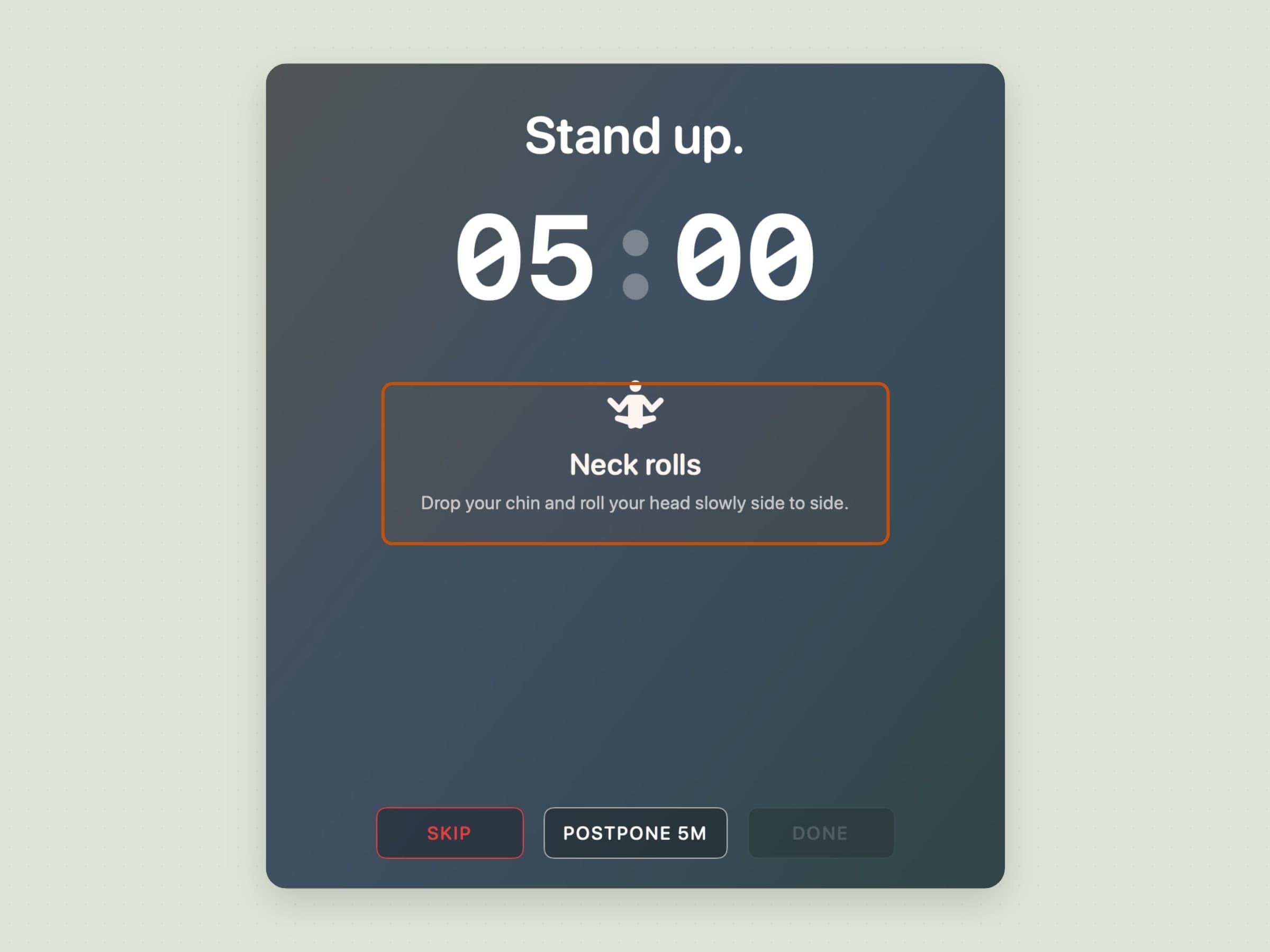
What sits under the countdown is your choice. The guided style, the default, gives a body break a named stretch and swaps in a new one every 60 seconds from a set of 10, and gives an eye break an eye exercise to do while you look away. The minimal style shows the countdown and nothing else. You can also write your own messages, and Recess shows them in turn in place of the default titles. Nothing animates for the sake of it, and the screens honor the macOS Reduce Motion setting.
Three buttons sit at the bottom, and their labels are the design:
- Skip - on an eye break it carries what this skip would cost (+90s, +180s or +300s); a body break skip costs nothing, so its button is bare
- Postpone 5m - once per rolling hour, and that one postpone is shared by eye and body breaks
- Done - closes the break once the countdown has run
All three are on the keyboard as well, and the keys are fixed rather than yours: Escape skips, Space or Return ends the break, and P postpones it. The General page in Settings lists them read-only, beside the two global chords it does let you rebind. An overlay that has just taken every screen should not also require you to find the pointer.
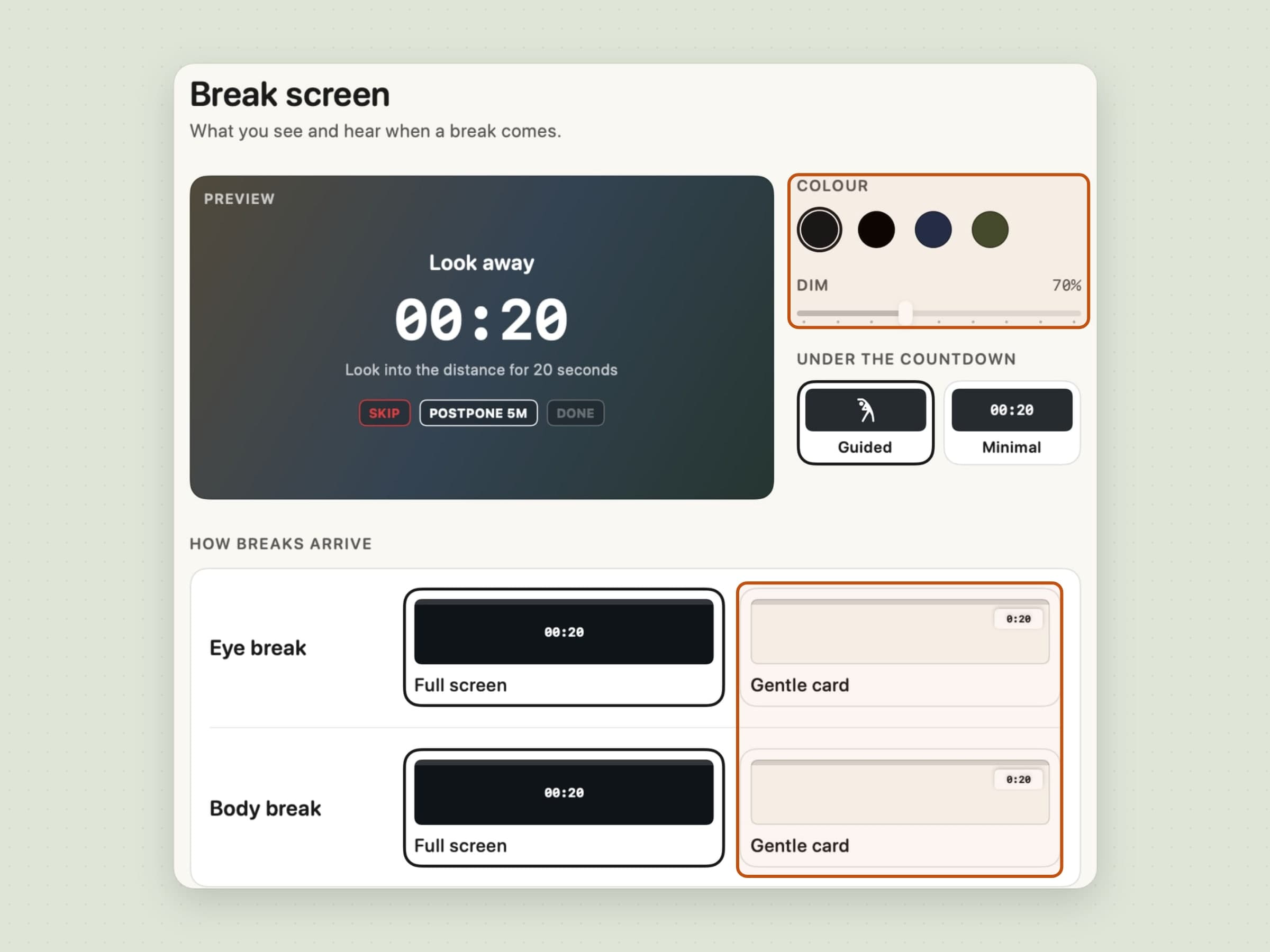
Full screen is not the only way a break can arrive. On the Break screen page, eye and body breaks each choose between Full screen and a Gentle card - a small countdown under the menu bar that leaves your work visible. Stay off the keyboard and it counts down by itself, and it never costs a penalty. The same page sets the colour - Ink, Black, Navy or Sage - and how far the screen dims, with a live preview so you are not judging it from a real break.
The chimes are two chips rather than one switch: As a break starts and As a break ends, both on by default. On a shared desk the sound is the part other people notice, and the end chime alone is usually the useful answer - the screen already told you the break started, and the chime tells you it is over without you having to watch the countdown.
The escalation, and why it is small
Skipping an eye break adds time to the next one, and the penalty escalates inside a rolling hour: 90 seconds, then 180, then 300 for the third and beyond. An hour without a skip clears it. Skip three in a row and the app bounces its icon in the Dock, which is the loudest thing it ever does.
Body-break skips are recorded but do not add to that pool, because five minutes of stretching is not a debt you can usefully accumulate.
If the whole idea grates, skip penalties can be turned off entirely on the Discipline page in Settings. A prompt you cannot argue with is a prompt you disable at the app level, and an app disabled at the app level helps nobody. The setting says so itself when you reach for it: Without the skip penalty, Recess is just a polite reminder. That is a description rather than a warning, and it is there so the choice gets made with its consequence in view.
Strict mode is the same dial turned the other way. The Discipline page offers two styles. Flexible, the default, keeps Skip and Postpone on the screen for the whole break. Strict removes Skip, lets Postpone work only during the first 10 seconds, and after that takes the buttons away so the break runs to its end. Strict breaks always take the full screen, whatever the gentle card is set to, and the menu bar carries a small dot the whole time strict mode is on so the state is never a surprise. The penalty stays a separate switch, so strict without a penalty and flexible with one are both possible. Strict ships off. A break app that arrives strict is a break app you are fighting by the end of the first week.
Recess can also warn you after consecutive skips, which is on by default and is the only notification it ever sends about your own behavior.
What it does when you are not there
Four checks stop Recess from asking you to rest from work you were not doing.
Time away counts as the break. Stop touching the machine for long enough and the countdown starts over rather than firing the second you sit back down. Walking to the kitchen is looking away from a screen, and an app that makes you do it twice is an app you switch off by Thursday. "Long enough" means as long as that break itself, judged per timer: with Away after set to 2 minutes, three minutes away renews the eye clock, whose break is two minutes, and leaves the body one - whose break is five - where it was. A shorter absence that still passes Away after only pauses the timers, which is the older behaviour and still there underneath.
Focus and Do Not Disturb hold breaks entirely. An overlay landing on a screen you are sharing in a meeting is the failure that gets a break app uninstalled within a week.
The apps you name hold them too. Do not interrupt me in takes a list, and a call in a window counts exactly like one in full screen - the older check looked for a full-screen app and missed every call somebody had resized.
Video playback detection delays a break during full-screen video, with a separate switch, because being interrupted twenty minutes into a film is not a health intervention.
None of it queues forever. Give up on a held break after sets the point where Recess drops a held break and waits for the next one, so a long meeting does not end in four breaks at once.
One more rule keeps breaks from piling up while you are there. With Combine breaks that fall close together on, which is the default, an eye break due within about five minutes before a body break waits and joins it, and the eye countdown starts over after the body break - five minutes away from the desk rests your eyes too. A short notice says so when it happens, and the timeline on the Breaks page shows it in advance.
Work hours, and a pause that ends
Recess ships with no schedule, because for most people it should run whenever the Mac is on. Turn work hours on and it runs between the two times you set, on the days you tick, and stays quiet outside them - no eye break at 23:00 on the sofa. A window that crosses midnight is allowed, and the setting says so rather than leaving you to work it out.
The pause has a failure mode of its own, which is forgetting about it, so it comes as a row of chips in the popover, each with an end on it: 30 min, 1 hour, 2 hours, until tomorrow morning, or until I resume. The morning chip names the actual time - the next work-hours start, or 09:00 if you have set none - and always the next one, so choosing it at 02:00 does not quietly mean "in seven hours". Remind me if Recess stays paused is still on by default, because one of those five options still has no end.
Work hours also give the day an end, and Recess can mark it. Wrap up the day when work hours end sends one notification with the day's eye and body breaks, the skips and your streak. The weekly summary on Monday mornings is a switch of its own and can be turned off.
Two global shortcuts sit on top of all of it, both rebindable on the General page: Command Shift B starts a break now, and Control Command P pauses and resumes. That second one used to flip the master switch off and on; it pauses instead now, which is what people were reaching for it to do. It uses Control rather than Shift on purpose - Command Shift P is private-window in every browser.
What it records
A 60-day log, daily counters, a daily goal and a report, all stored locally. Nothing is written to Apple Health and nothing is uploaded. The point of the log is the shape of the week.
The goal is the one number that asks something of you: 4, 6, 8 or 12 breaks a day, 6 by default, set on the Discipline page. Reach it without skipping more than a quarter of your breaks and the day counts toward a streak; days with no breaks at all, like weekends, do not break it. The popover shows the goal and the streak, the report shows the streak and your best, and the day-end wrap-up mentions the streak.
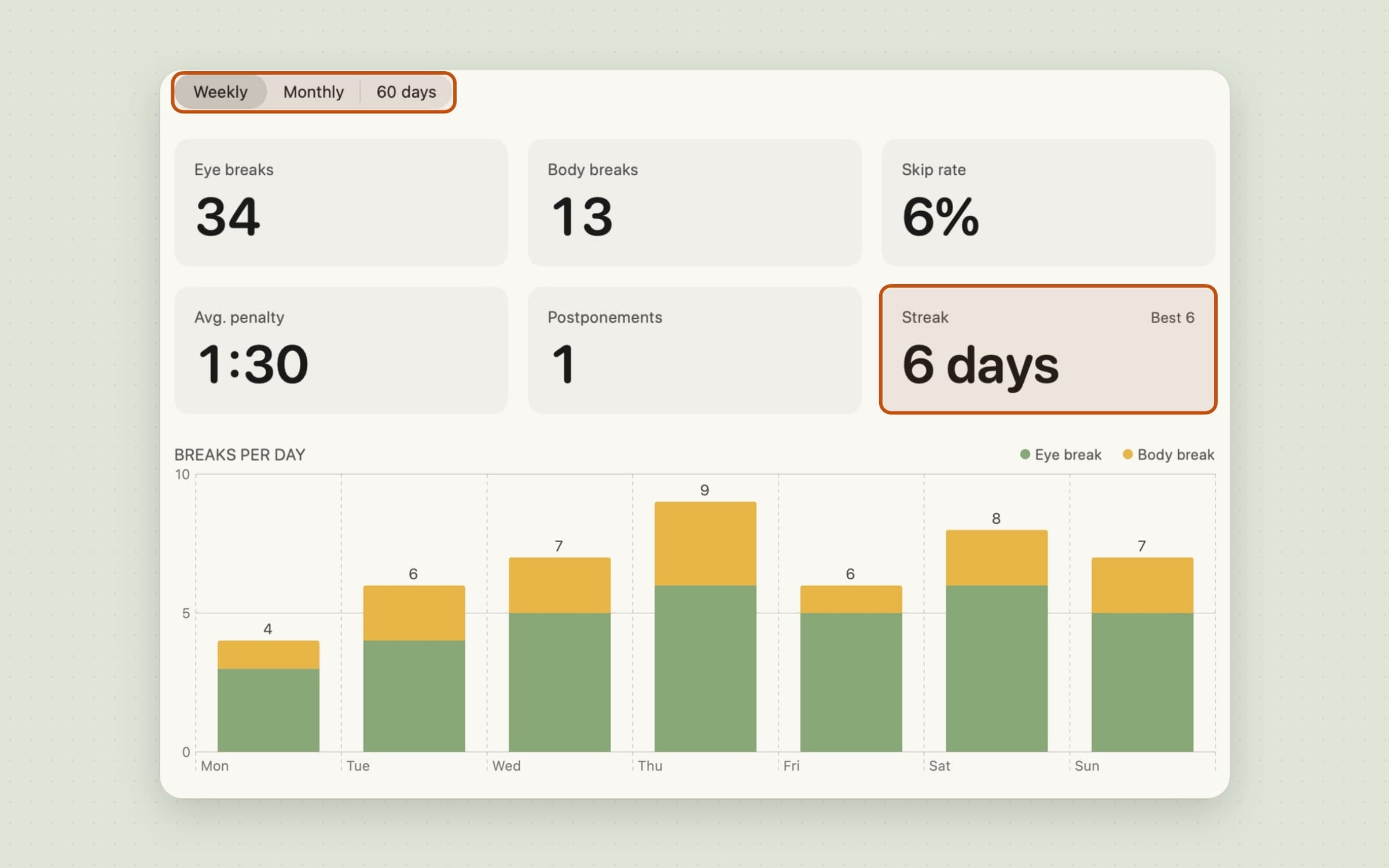
The report used to open only from the weekly notification, which made a week you dismissed a week you could not look at. It now has a button of its own in the popover's header, beside Settings, and the range is yours: weekly, monthly, or the full 60 days.
What it deliberately does not do
It does not count reps or score your posture. The guided style names a stretch and leaves it to you; nothing checks whether you did it, because checking would need you to look at the screen, which is the thing the break exists to interrupt.
It never locks the screen or blocks input, and strict mode stays off unless you turn it on. Flexible keeps Skip on the screen for the whole break, and even strict leaves Postpone working for the first ten seconds, because the one moment a break app must not win is the moment you are about to demo something. An overlay you cannot get out of at all eventually costs someone a meeting, and after that it costs the app its place on the machine.
Nothing is written to Apple Health, there is no account, and two Macs running Recess know nothing about each other. The 60-day log is a local file, and syncing it would mean building the account this app otherwise has no reason to have.
There are no points or badges either. The streak is the one counter, and it is built to be hard to lose: it is measured against a goal you set, a quarter of the day's breaks can be skipped without breaking it, and a day you did not work does not count against you.
What it costs, and what else to look at
Recess runs on macOS 14 or later, on Apple Silicon and Intel, and takes about 30 MB. It is a one-time $2.99 purchase rather than a subscription, with a 30-day trial that needs no card and no email. The full specification is on the Recess page.
Recess rests you on its own clock, regardless of what you are doing. If you would rather rest on your work's rhythm - a break earned at the end of a focus block - that is a Pomodoro timer, Pawodoro. The other thing a desk quietly costs you is water, which is Aqumi, covered in a water reminder app for Mac. Both are covered together in desk health apps for Mac.