What WaterMinder is actually good at
WaterMinder, from Funn Media, is a hydration tracker that follows you across every device you own: it sets a daily water goal, logs what you drink with a hydration value per drink, reminds you to drink, and runs on iPhone, iPad, Apple Watch, Apple Vision, the Mac and Android. The iPhone app first shipped in July 2013 and the Mac app in September 2018. The current versions are 8.3.1 on iPhone, iPad and Watch (24 October 2026) and 7.0.1 on the Mac (27 October 2026). Its home is waterminder.com.
The depth is real. WaterMinder works out a goal from your weight, activity, climate and pregnancy, or takes your own number, and with Apple Health on the iPhone it can add to the goal on days you burn a lot of calories. Drinks carry hydration values (water 100%, coffee 90%, milk 120%), and multi-ingredient cups log each part with its caffeine. Reminders come in three modes: Static at fixed times, Interval (by default every 60 minutes from 8:00 to 19:00) and Water Level, which nudges only when you are behind a time-of-day target. Around that sit an Apple Watch app with complications, widgets, Siri Shortcuts, a history by day, week, month and year, CSV export on the Mac, friends, challenges and, since 8.0 on iPhone, a Coach chat assistant.
The Mac app is a real Mac app with its own App Store listing, for macOS 14 or later, and version 7.0 added full-screen reminders you can log from and Smart Pause, which holds reminders during meetings, videos and full-screen activities. WaterMinder is free to download. On the Mac, Premium is $2.99 a month, $14.99 a year or $29.99 for a lifetime unlock; the US iPhone listing shows yearly plans and a $2.99 monthly plan, with a 7-day trial. The iPhone app holds 4.75 stars from about 35,600 ratings and speaks 24 languages (16 on the Mac).
If you drink away from your desk as much as at it, want the count on your wrist, or want water in Apple Health beside your workouts and sleep, buy WaterMinder Premium and stop reading. The WaterMinder alternatives for Mac below are for people whose forgetting happens in one chair, in front of one Mac.
Why people go looking anyway
Ads in the free version, and sometimes after paying. The developer says ads fund the free version. In 2026, US App Store reviewers described pop-up ads on nearly every log since 8.0 and a yearly subscriber who still saw a full-screen ad on an iPad and cancelled.
The subscription and the trial. "WaterMinder subscription" and "WaterMinder free alternative" are among the phrases Google suggests for the name. Single reviewers in 2026 report finding no cancel option inside the app during the 7-day trial, then a charge. A Mac reviewer in 2021 did not want to pay twice, for the Mac and the iPhone; the Mac app has its own listing and its own in-app purchases.
It grew beyond a water counter. Recent reviews call the app "way too much going on" and "hard to learn and easy to mess up" (autumn 2026). Someone who wanted a glass counter now gets a coach, nutrients, friends and challenges.
Sync and data glitches. In 2026 reviewers reported a Watch app that duplicated entries and an entry that vanished overnight, and older Mac reviews describe iCloud sync that pushed but did not pull.
What macOS already does for free
macOS can nudge you to drink for nothing, but it cannot count. In the Reminders app a reminder can repeat hourly or every few hours, which covers the nudge. An hourly repeat runs around the clock, though, so keeping it to working hours means several reminders or a Focus that silences them in the evening, and ticking one off records nothing about how much you drank.
Apple Health on the iPhone and iPad can log water by hand (Browse, then Nutrition, then Water, then Add Data) and pin Water to Favorites, but it has no goal and no reminders, and a wrong entry is deleted and added again rather than edited. There is no Health app on the Mac at all: on macOS 26 the system applications include Reminders and Shortcuts, and no Health.
So the free route is a chime with no ledger, or a ledger on your phone with no chime. If you want both at the desk, read on.
Aqumi: a menu bar tracker that speaks up only when you fall behind
Aqumi is a Mac-only hydration tracker that lives in the menu bar, reminds you only when you are behind your pace for the day, and keeps its log on your Mac. It is $2.99 once after a 30-day trial. The version from our site starts that trial with no card and no email, a license covers up to 3 Macs, and it is also on the Mac App Store. It runs on macOS 14 or later, speaks English, Turkish, German, Spanish and French, and asks for one permission, notifications, which you can refuse and still log and see your progress.
Aqumi's daily goal comes from a short profile (weight, age, sex and activity level) or, with the goal card on Manual, from a number you type between 500 and 6000 ml. The drop in the menu bar sits in a ring that fills through the day and turns green at the goal, with today's amount or percent beside it if you want.
Reminders that come only when you are behind
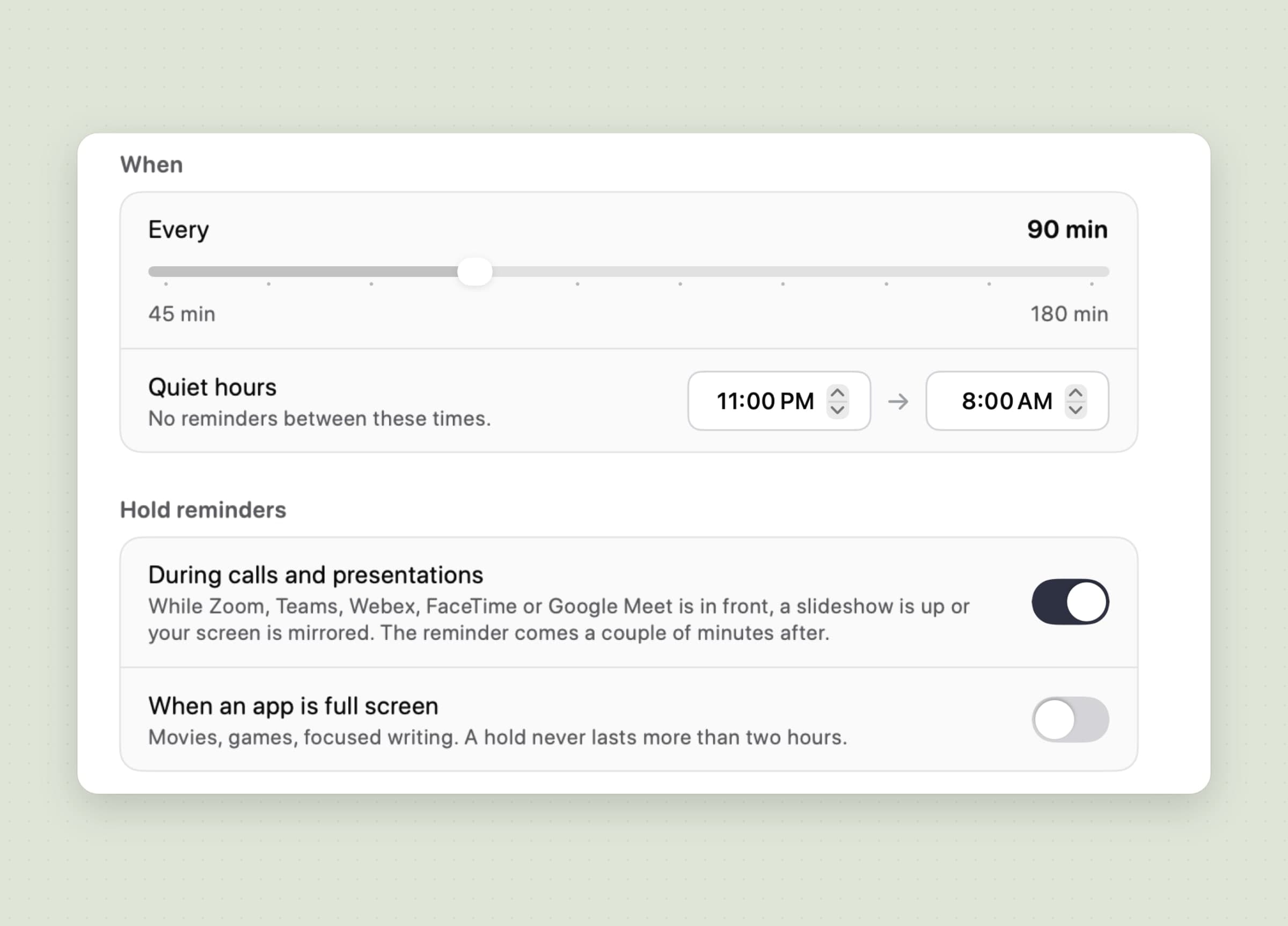
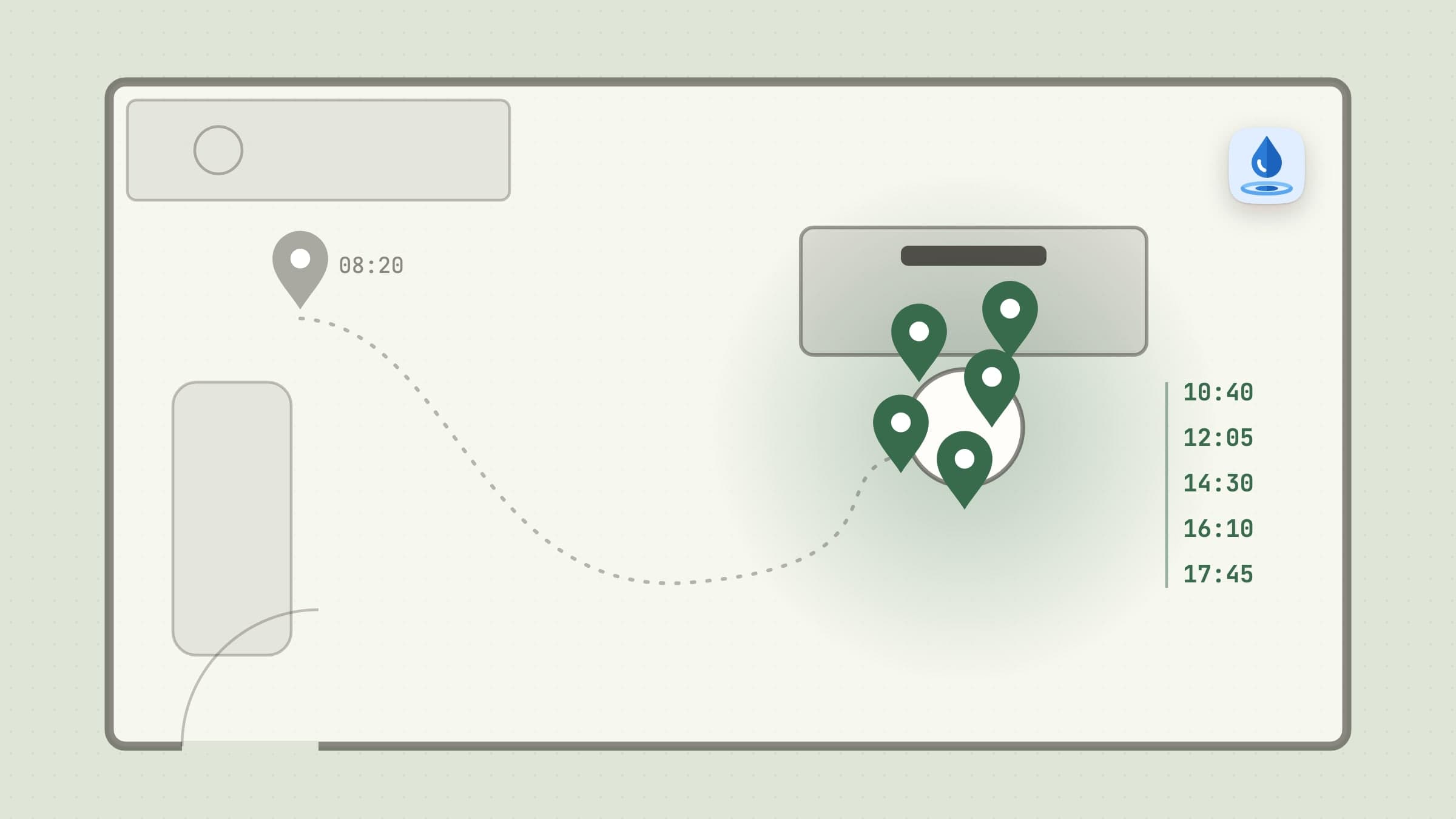
An Aqumi reminder is a correction, not a timer. Aqumi sends one only when two things are true: the interval you set (45 to 180 minutes, 90 by default) has passed since your last drink or last reminder, and today's total is below a straight line from the start of your day to 23:00. Drink a glass on your own and the clock starts again; stay on pace all afternoon and you hear nothing. Quiet hours (23:00 to 8:00 by default) and a cap of eight a day sit on top, and the Silent mode only updates the menu bar icon.
Hold reminders keeps a nudge off a screen other people can see. While Zoom, Teams, Webex, FaceTime or the Google Meet web app installed from Chrome is in front, while a Keynote or PowerPoint slideshow fills a display, or while the screen is mirrored, the reminder waits and arrives a couple of minutes after. A second switch, off by default, does the same while any app is full screen, and no hold lasts more than two hours. Aqumi decides this from the app in front and the window sizes, without the microphone, the camera or your calendar.
The honest limit: neither half of this is unique. WaterMinder's Water Level mode also nudges only when you are behind, and its Smart Pause on the Mac holds reminders during meetings, videos and full screen. The difference is in the details: Aqumi counts its interval from your last drink and names the apps it waits for, but it has no fixed-time schedule, no per-weekday settings, and it does not recognise Google Meet in an ordinary browser tab, Slack huddles or Discord. macOS Focus silences Aqumi's notifications the way it silences any app's.
Log from the menu bar, or from the reminder itself
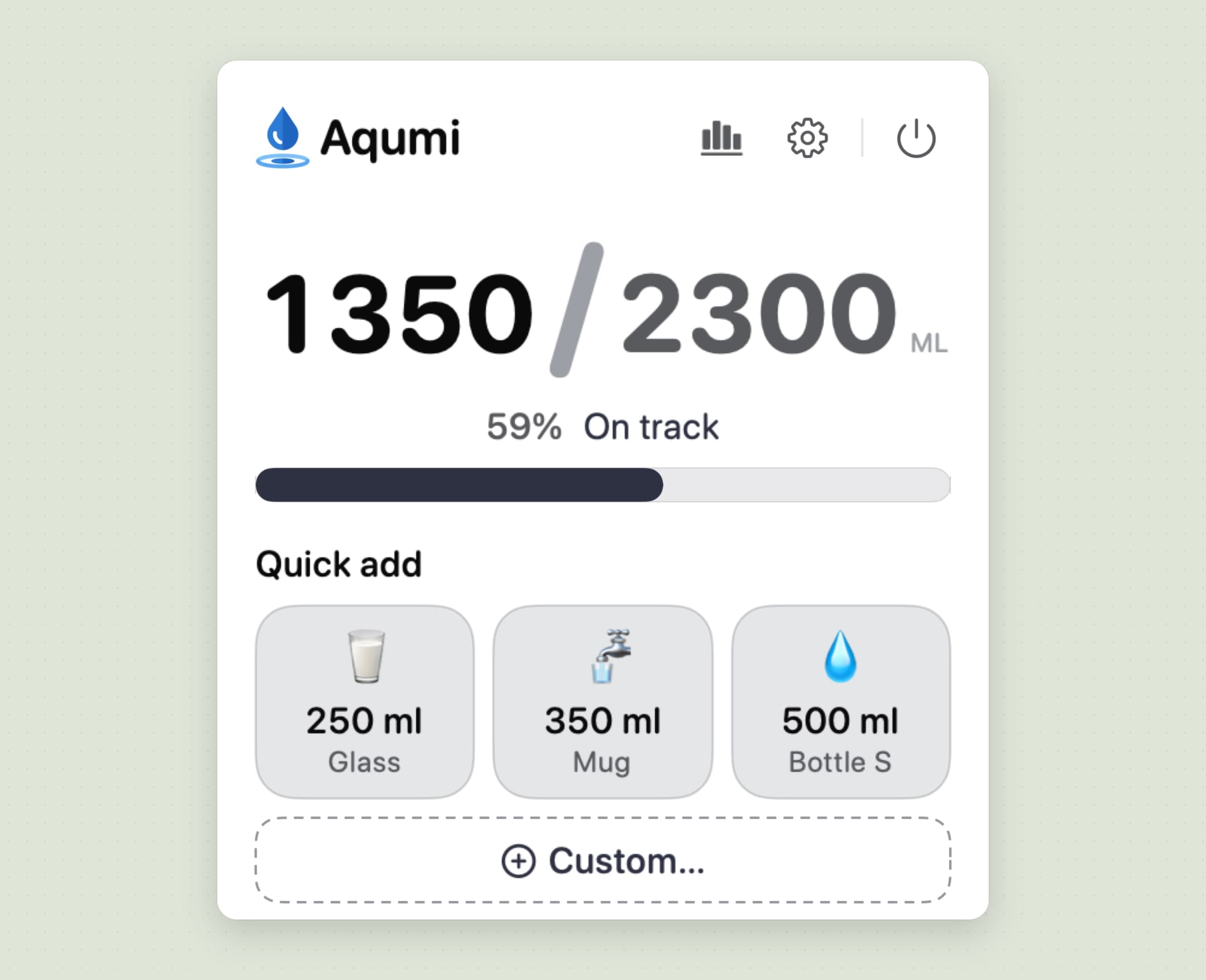
Logging in Aqumi is one click on a drink you already have. The popover shows the day against the goal, a Quick add button for every drink you pinned and Custom… for an odd amount, and every log shows an Undo for 30 seconds. From any app, ⌃⌥W opens the popover and ⌃⌥L logs your first pinned drink.
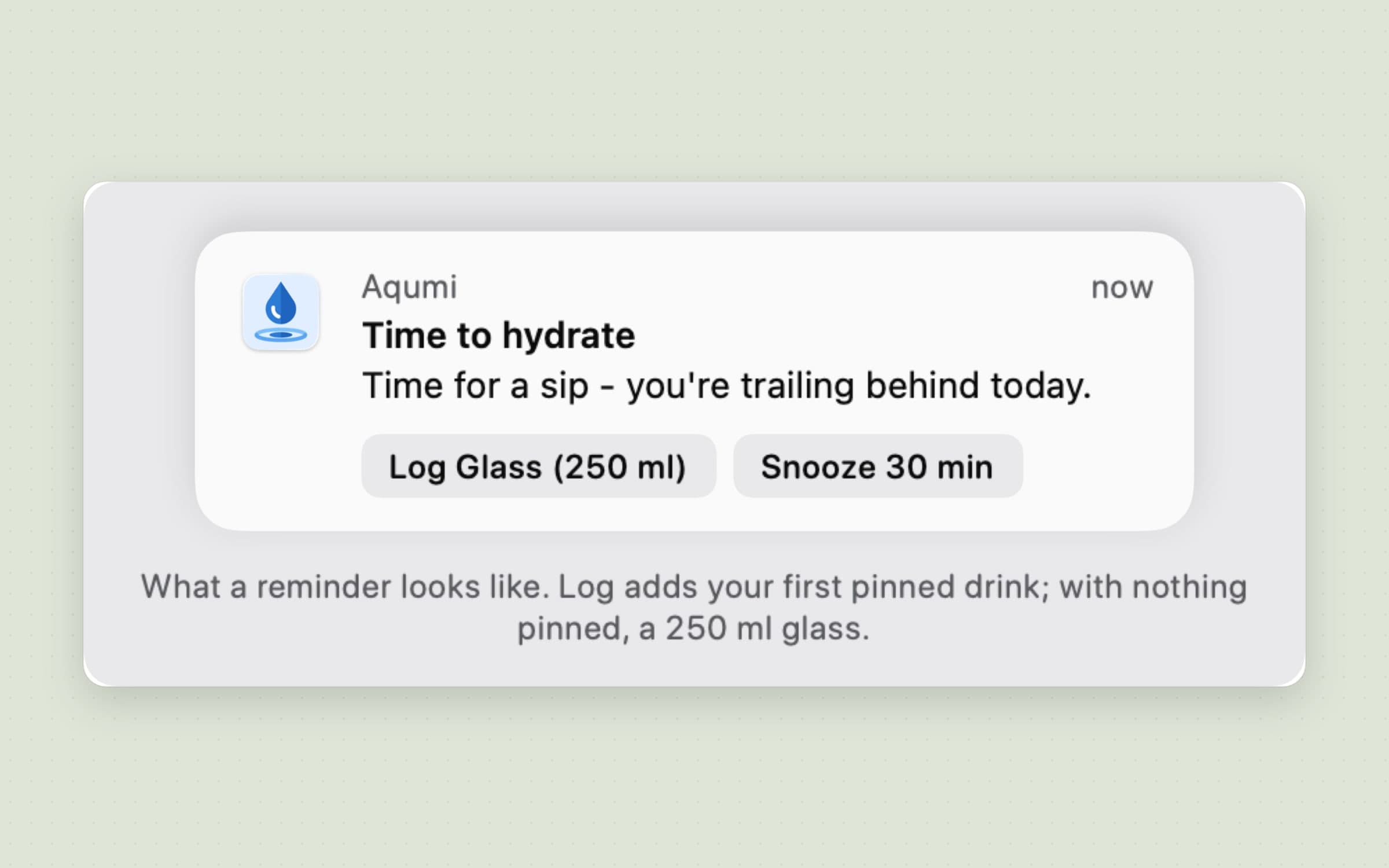
The reminder carries the same shortcut. Its button logs your first pinned drink by name and volume, so the notification reads Log Glass (250 ml) rather than a generic "log", and the drink is counted without the app opening. The other actions snooze for 30 minutes or an hour, or mute reminders for the rest of the day. A desktop widget shows the day and one quick-add button in its small size, and adds the week and up to three buttons in its medium size.
The honest limit: there is no Siri, no usable Shortcuts action and no Apple Watch, so away from the Mac nothing is logged until you come back. The two shortcuts are fixed and cannot be reassigned. A widget button records the drink only while Aqumi is running; with the app quit, the drink waits until it starts again. WaterMinder's Mac reminders also let you log from the reminder, so the difference here is the menu bar, not the button.
Drinks counted by what they are, caffeine included
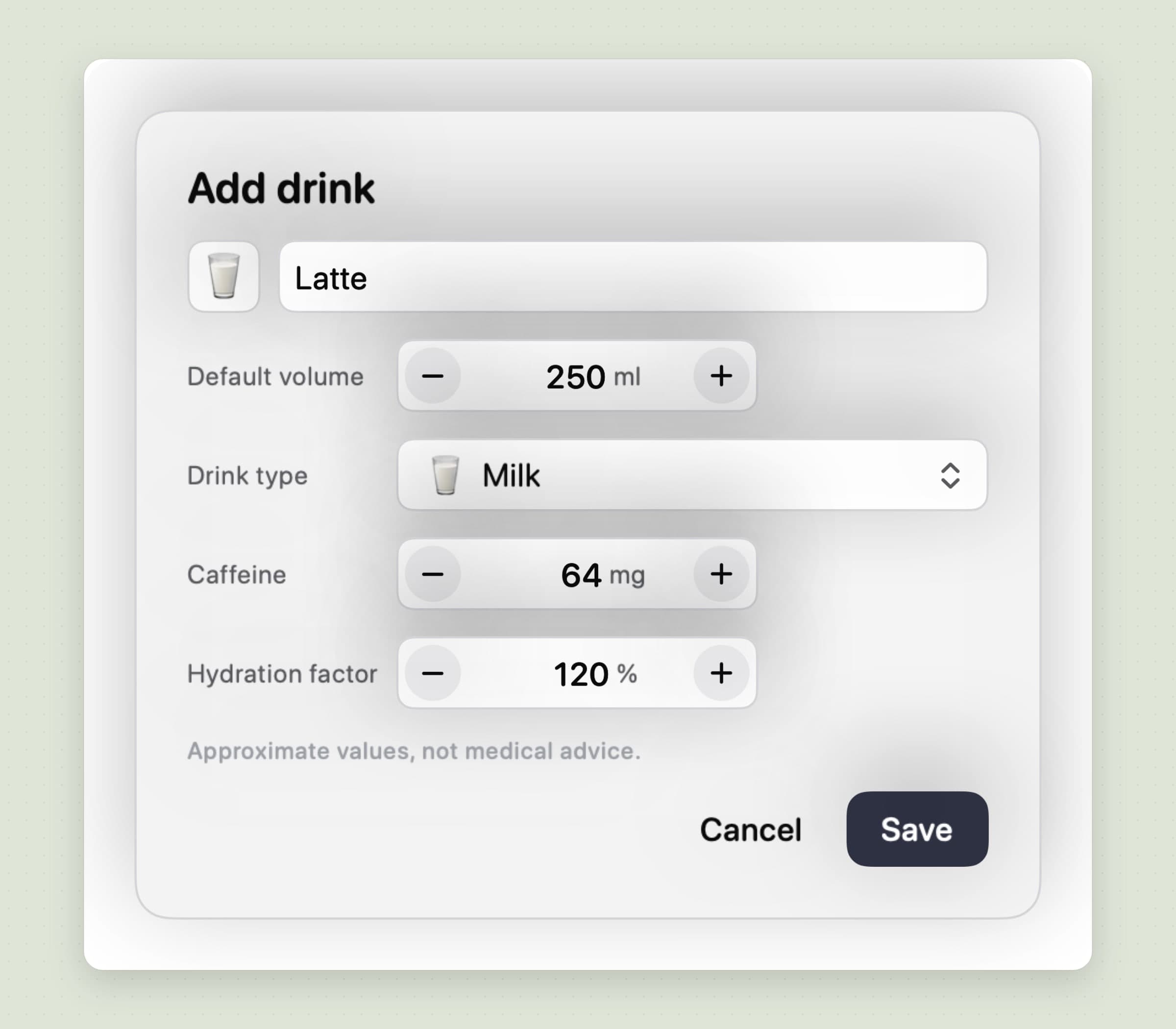
Each of your drinks in Aqumi has a type, a hydration factor and a caffeine amount, so the total reflects what you drank rather than the volume alone. Factors start from the Beverage Hydration Index: milk counts 120%, a sports drink 110%, water, juice, tea and coffee 100%, an energy drink 90% and alcohol 75%, and you can set any drink between 50% and 150%.
Caffeine is tracked per serving. The popover shows today's total in a chip that turns amber past your daily limit (400 mg by default), and the day you cross it Aqumi sends a single note suggesting water from there. You can keep up to eight drinks, each with an emoji, a name and a volume.
The honest limit: WaterMinder goes further here. It has many more drink types (version 6.2 on the Mac added 37), multi-ingredient cups and nutrient tracking. Aqumi's caffeine is today only, with no caffeine history, and eight drinks is a hard cap.
A history you can correct, kept on this Mac
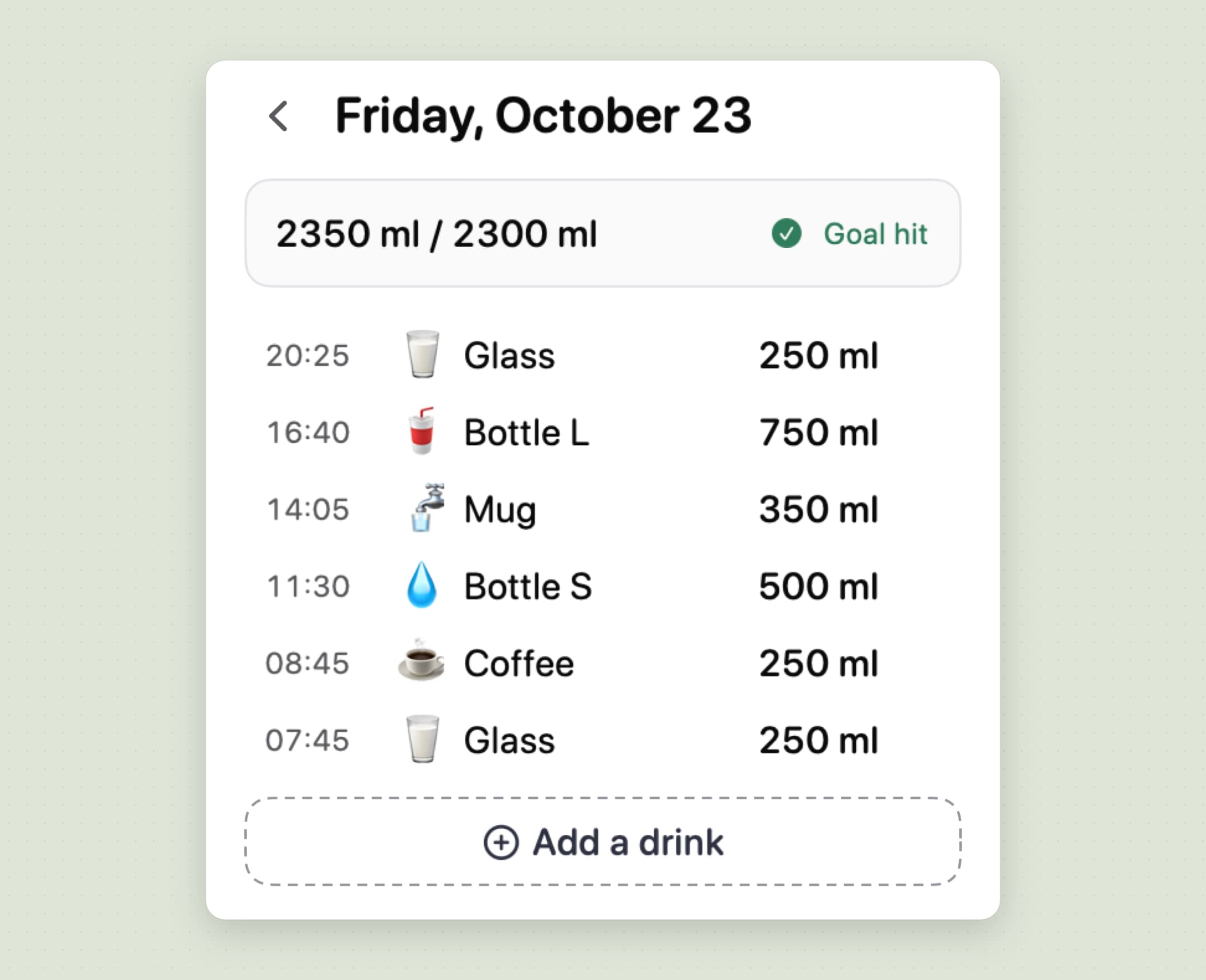
Aqumi's Statistics open inside the popover. Week shows the last seven days with the daily average, goal-hit rate and streak; Month is a calendar shaded by how close each day came to the goal, paged back to your first month; Year shows the total, goal days and best month. Tap a day and it opens as a list: change a drink, its amount or its time, delete it, or add the one you forgot.
All of it is stored in a local database inside Aqumi's own container on your Mac. There is no account, and no drink, goal or profile data is sent anywhere. Aqumi does send anonymous usage counts and crash reports, and the version from our site checks its license and looks for updates online. There are no ads, in the trial or after it.
The honest limit: the log stays on one Mac. There is no export or import, no iCloud sync, so Aqumi on three Macs keeps three separate logs, and no Apple Health. If you want your water beside your workouts, that is WaterMinder's ground. Every setting is walked through in a water reminder app for Mac.
WaterMinder vs Aqumi, feature by feature
| WaterMinder | Aqumi | |
|---|---|---|
| Price | Free with ads on iPhone; Premium on the Mac $2.99 a month, $14.99 a year or $29.99 lifetime | $2.99 once after a 30-day trial; a license from our site covers up to 3 Macs |
| Devices and sync | iPhone, iPad, Apple Watch, Vision, Mac and Android; Apple devices synced through iCloud | Mac only, macOS 14 or later; each Mac keeps its own log |
| Apple Health | Writes water and reads weight on iPhone and Watch | None |
| Daily goal | Weight, activity, climate and pregnancy, or your own number | Weight, age, sex and activity, or your own number |
| Drinks and caffeine | Dozens of types, custom and multi-ingredient cups, caffeine per drink | Up to 8 drinks, nine types, editable factor, caffeine with a daily limit note |
| Reminder modes | Static times, Interval and Water Level; weekdays, stop at 100% | An interval counted from your last drink, only when behind pace; quiet hours; notification or silent |
| Holding reminders | Smart Pause during meetings, videos and full screen on the Mac | During Zoom, Teams, Webex, FaceTime, Meet web app, slideshows and mirroring; full screen optional |
| Logging without opening the app | Watch, widgets, Siri, Shortcuts, x-callback-url, the Mac reminder | Menu bar popover, the reminder's button, a global shortcut, a desktop widget while the app runs |
| History and export | Day, week, month and year; edit past days; CSV export | Week, month calendar and year; edit past days; no export |
| Social and coaching | Friends, pokes, challenges, achievements, Coach chat | A streak count only |
| Languages | 24 on iPhone, 16 on the Mac | 5 |
| Ads and tracking | Ads in the free tier; iPhone privacy label lists data used to track you | No ads; the drink log never leaves the Mac |
WaterMinder wins on reach and depth: every device, Apple Health, the Watch, Siri, more drink types, CSV export, friends and challenges, more languages and 13 years of track record. Aqumi wins on the desk: it lives in the menu bar, speaks up only when you fall behind, costs $2.99 once instead of a subscription or a $29.99 unlock, shows no ads and keeps your log on the Mac.
On privacy, the two labels differ by platform. WaterMinder's iPhone App Store label lists purchases, identifiers and usage data as "used to track you" and your email as linked to you for marketing, and its privacy policy names AdMob, the Meta pixel and Facebook Analytics. Its Mac label is lighter: analytics only, not linked to you.
Other alternatives worth knowing
Waterllama, from Llama Luna Apps, makes drinking water a game, with characters, challenges and streaks. It is free with Premium as a monthly, annual or one-time purchase, runs on iPhone, iPad, Apple Watch and Vision, and installs on Apple silicon Macs as the iPad app (macOS 14, M1 or later). It writes water, caffeine and energy to Apple Health and holds 4.87 stars from about 164,000 ratings. Of the phone-first trackers it is the one people compare WaterMinder with by name.
Plant Nanny, from SPARKFUL, grows a plant when you drink, which works for people whom numbers leave cold. It is free with subscriptions ($3.99 or $7.99 a month, $69.99 a year) and syncs with Apple Health, but it runs on iPhone, iPad, Apple Watch and Vision only, with no Mac app.
TakeSip, Hydration Hostage and Mizu are the free Mac reminders. TakeSip is a quiet menu bar app with gentle periodic reminders (macOS 13 or later). Hydration Hostage, free with in-app purchases, takes the opposite bet: it can lock the screen until the camera sees you take a sip, processed on the device. Mizu is a small open-source (MIT) drink-water reminder on GitHub. All three are reminders first, not trackers.
Just Drink! runs on Mac and Windows with a sound and a visual cue. It is €1.49 a month, €8.99 a year or €12.99 for a lifetime license, with a free trial on the yearly and lifetime plans.
If water is one habit among several you want to keep, Habitify alternatives for Mac covers the trackers built for that. And if the desk is also costing you your eyes and your back, Recess runs eye-rest and stretch breaks, explained in a 20-20-20 rule app for Mac and compared in Time Out alternatives for Mac.
When WaterMinder is still the right choice
Stay with WaterMinder if you drink a lot of your water away from the Mac, at the gym, on a walk or in the car, and want to log it from your wrist. Stay if water in Apple Health matters, because something else you use reads it, or if you want a goal that accounts for climate and grows on days you burn a lot of calories. Stay if you rely on Siri, Shortcuts or the x-callback-url scheme, on multi-ingredient cups, on challenges with friends, or on CSV export to keep your own records. Stay if your language is one of the 16 the Mac app speaks and Aqumi's five do not include it. And if you already bought the $29.99 lifetime unlock on the Mac, the money is spent, and the case for switching is the menu bar, reminders that come only when you fall behind, and a log that stays on the Mac.
Switching from WaterMinder
- Export your history first. On the Mac, WaterMinder has had CSV export since version 6.0; keep the file as your own record. Aqumi has no import, so its history starts on the day you install it.
- Note your goal and your cups. Write down the daily goal and the three to eight drinks you actually log, with their sizes.
- Install Aqumi from our site or the Mac App Store, fill in the profile or switch the goal to Manual and type your number.
- Recreate your drinks in Settings, under My drinks: name, volume, type, caffeine, and pin the ones you want as Quick add buttons. The first pinned drink is the one the reminder and ⌃⌥L log.
- Set the interval and quiet hours under Reminders, and turn off WaterMinder's reminders on the Mac so the two apps do not nudge you twice.
- Cancel Premium in your Apple Account's subscriptions if you were paying monthly or yearly; one reviewer found no way to cancel inside the app.
Water that WaterMinder wrote to Apple Health stays there after you leave. Custom and multi-ingredient cups, reminder schedules, streaks, achievements and friends do not carry over. The whole move takes about ten minutes.
Side by side
| Tool | Shape | Devices | Apple Health | Cost |
|---|---|---|---|---|
| WaterMinder | Cross-device tracker with Watch, Health and a coach | iPhone, iPad, Watch, Vision, Mac, Android | Writes water from iPhone and Watch | Free with ads; Mac Premium $2.99/month, $14.99/year or $29.99 lifetime |
| Reminders | Built-in repeating reminder | Mac, iPhone, Watch | No | Free |
| Apple Health | Built-in manual water log | iPhone, iPad | It is the Health log | Free |
| Waterllama | Tracker with characters and challenges | iPhone, iPad, Watch, Vision, Apple silicon Mac | Water, caffeine and energy | Free; Premium monthly, annual or one-time |
| Plant Nanny | Tracker with a plant that grows | iPhone, iPad, Watch, Vision | Syncs | Free; $3.99 or $7.99/month, $69.99/year |
| TakeSip | Menu bar reminder | Mac | No | Free |
| Hydration Hostage | Screen lock until the camera sees a sip | Mac | No | Free with in-app purchases |
| Mizu | Open-source reminder | Mac | No | Free, MIT |
| Just Drink! | Sound and visual cue | Mac, Windows | No | €1.49/month, €8.99/year or €12.99 lifetime |
| Aqumi | Menu bar tracker with pace-based reminders | Mac (macOS 14+) | No | $2.99 once |
Pick by what fails. If what fails is drinking enough on the move, the tracker on your wrist wins, and WaterMinder or Waterllama is the answer. If a reminder is all you need, TakeSip or Reminders costs nothing. If what fails is six hours in one chair, with a reminder that arrives at the wrong moment or not at all, a tracker in the menu bar that speaks up only when you fall behind is usually enough. More tools for that chair are in desk health apps for Mac and the best Mac menu bar apps.
Prices and features checked on 30 October 2026.

