What a habit tracker on a Mac has to get right
Most habit trackers live on the phone, and the phone is a fine place to log a run. It is a poor place to log the habits that happen at a desk - the stretch between calls, the hour of deep work, the glass of water - because by the time you pick it up you are three apps away from the reason you did.
Keystone puts the day's habits in the macOS menu bar instead. This article walks through what it does, and everything below is in the shipping version.
The ring in the menu bar
The status item is a small ring that fills as the day's habits get done, and turns into a solid disc with a tick when they all are. If you would rather read a number, it can show "3/5" beside the ring.
Clicking it opens the popover. Control Option Command K opens the same popover from anywhere, and the shortcut is yours to change in Settings - it uses Carbon hotkey registration, so it needs no Accessibility permission. Right-clicking the ring gives a plain menu with today's habits in it, ticked or not, for when even the popover is one step too many.
Today, in one popover
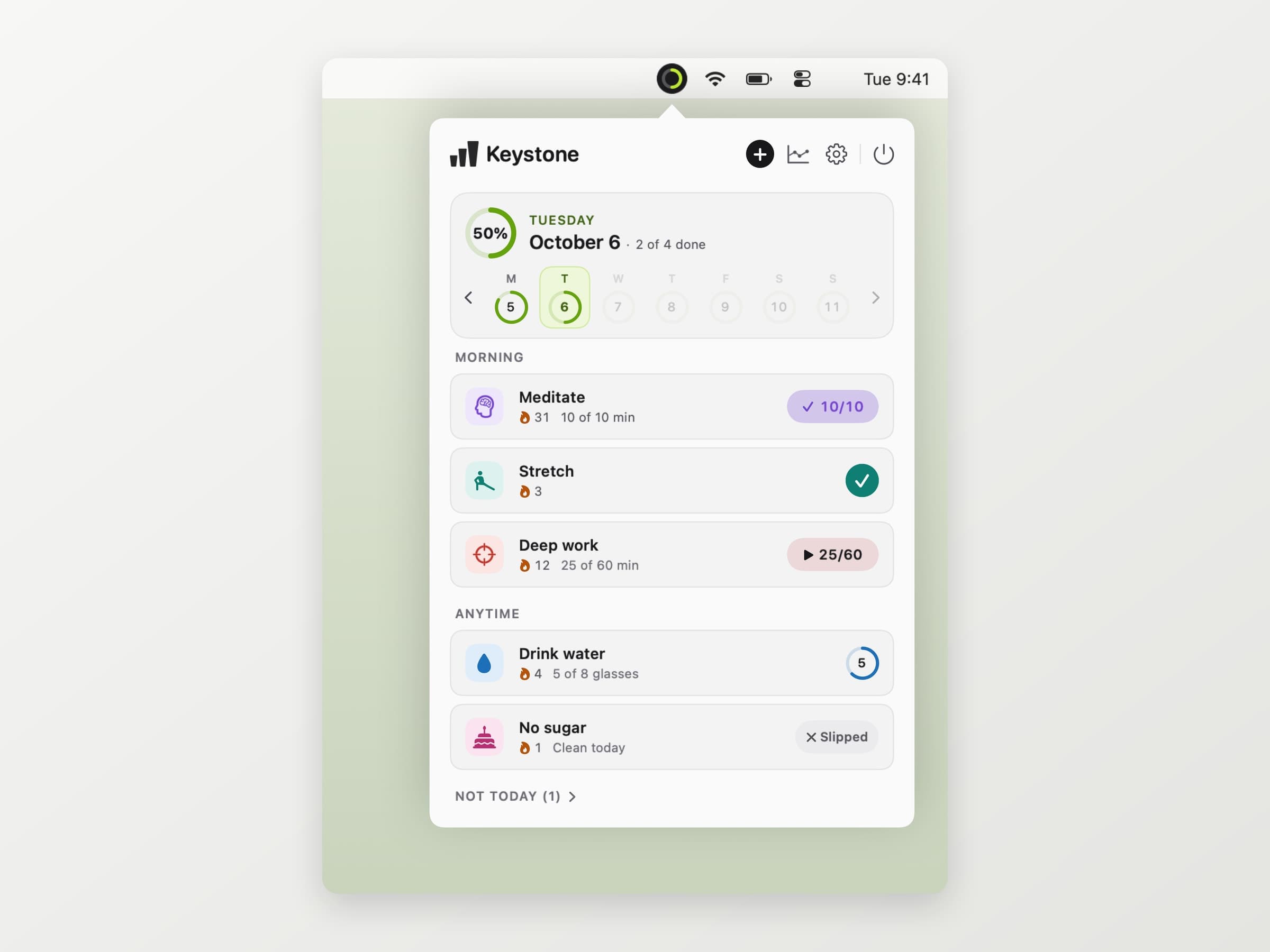
The top of the popover is the day: a ring with a percentage, the date and "3 of 6 done". Under it sits a week strip with a small ring per day, so a weekday you missed is visible without opening anything. Click an earlier day and the list switches to it - forgetting to log yesterday is fixed where you noticed it.
Habits are grouped by when you do them - morning, afternoon, evening or anytime - and each kind has its own control:
- A tick habit is one click.
- A count adds one per click, toward a target like eight glasses.
- A minutes habit fills toward its target. Mark it as timed and it gets a start button and a live clock, which is what you want for deep work at the desk. Leave it untimed for the things you do away from the Mac - a walk, an evening of reading - and it is one click when you are back.
- An avoid habit, like no sugar, is kept by default and only changes when you log a slip.
Habits that are not due today fold into a "Not today" row at the bottom. The popover works from the keyboard too: arrows to move, Space to tick, the number keys for the first nine rows.
Schedules, and streaks that forgive
A habit runs every day, on days you pick, a number of times a week, or every few days, with an optional end date for a thirty-day challenge.
The streak rules are where Keystone is deliberately lenient. A streak counts the days a habit was due. A day it was not scheduled, a day you skipped on purpose, and a day on a break are all neutral: they do not extend the streak and they do not break it. Today is not counted as missed until it is over. A three-times-a-week habit keeps its streak in weeks, so a Monday off is not a failure as long as the week comes good.
Take a break in Settings covers holidays and illness: until the date you set, or until you end it, no day counts as missed and reminders stay quiet. If you work past midnight, the day can start at any hour up to 05:00, so a late session is not split across two days.
One habit up close
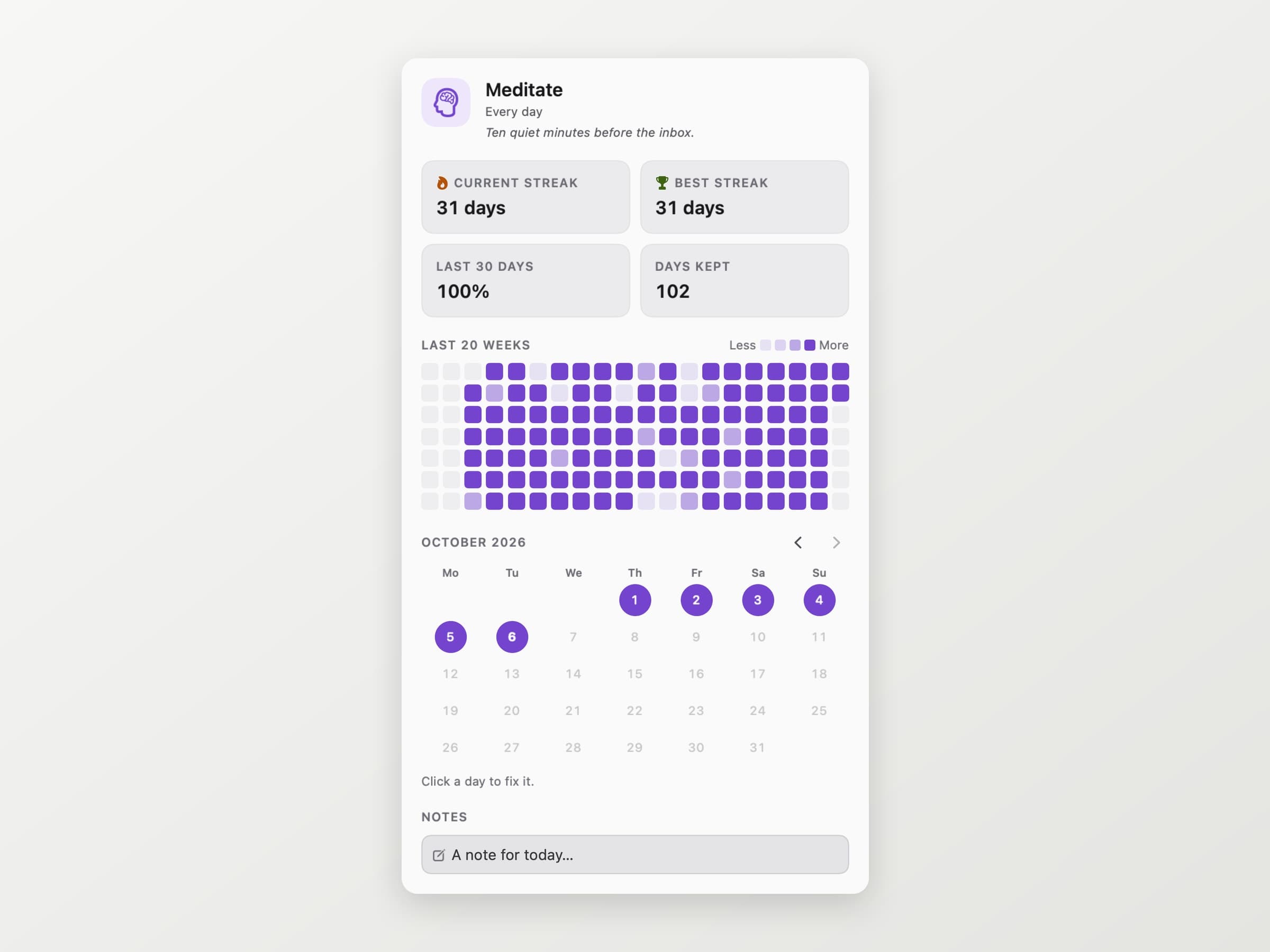
Clicking a habit opens its page: current and best streak, how much of the last thirty days you kept, a twenty-week map and a month calendar where any past day can be corrected with a click. A note per day sits underneath, for the "why did this slip" that is obvious this week and forgotten by the next.
Reminders, and the Overview window
Each habit can carry up to three reminder times, and a reminder only arrives on a day the habit is due and not done yet. The banner carries its own buttons - Done, +1 or Start timer depending on the habit, In an hour and Skip today - so answering it never means opening the app. An evening check-in can list what is still open, only if something is, and a weekly summary says how much of the week you kept. Quiet hours keep all of it out of the night.
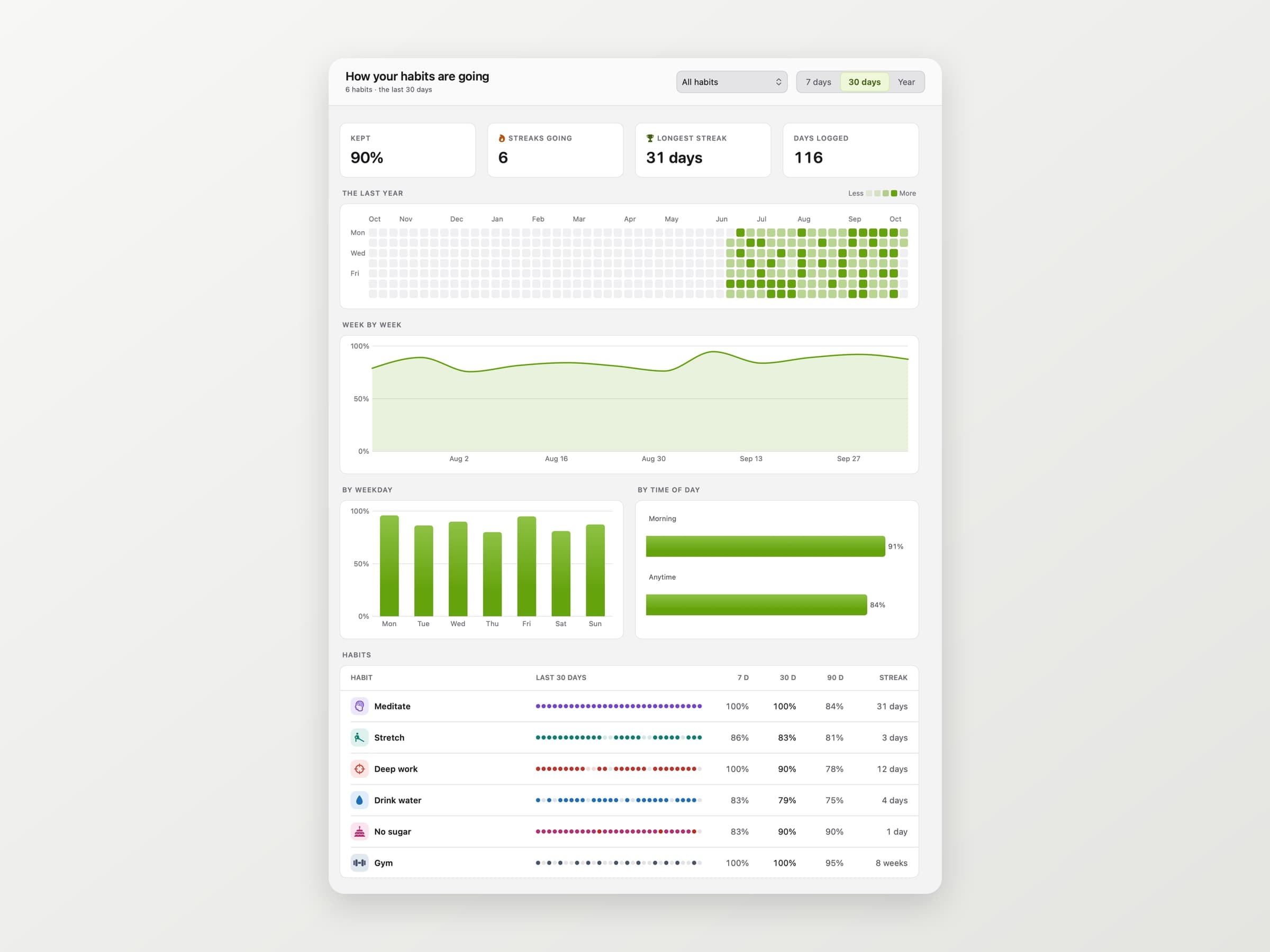
The popover is for today. The Overview window is for the question you ask after a month: which weekdays slip, whether evening habits hold up as well as morning ones, and how each habit compares over seven, thirty and ninety days.
Widgets and Shortcuts
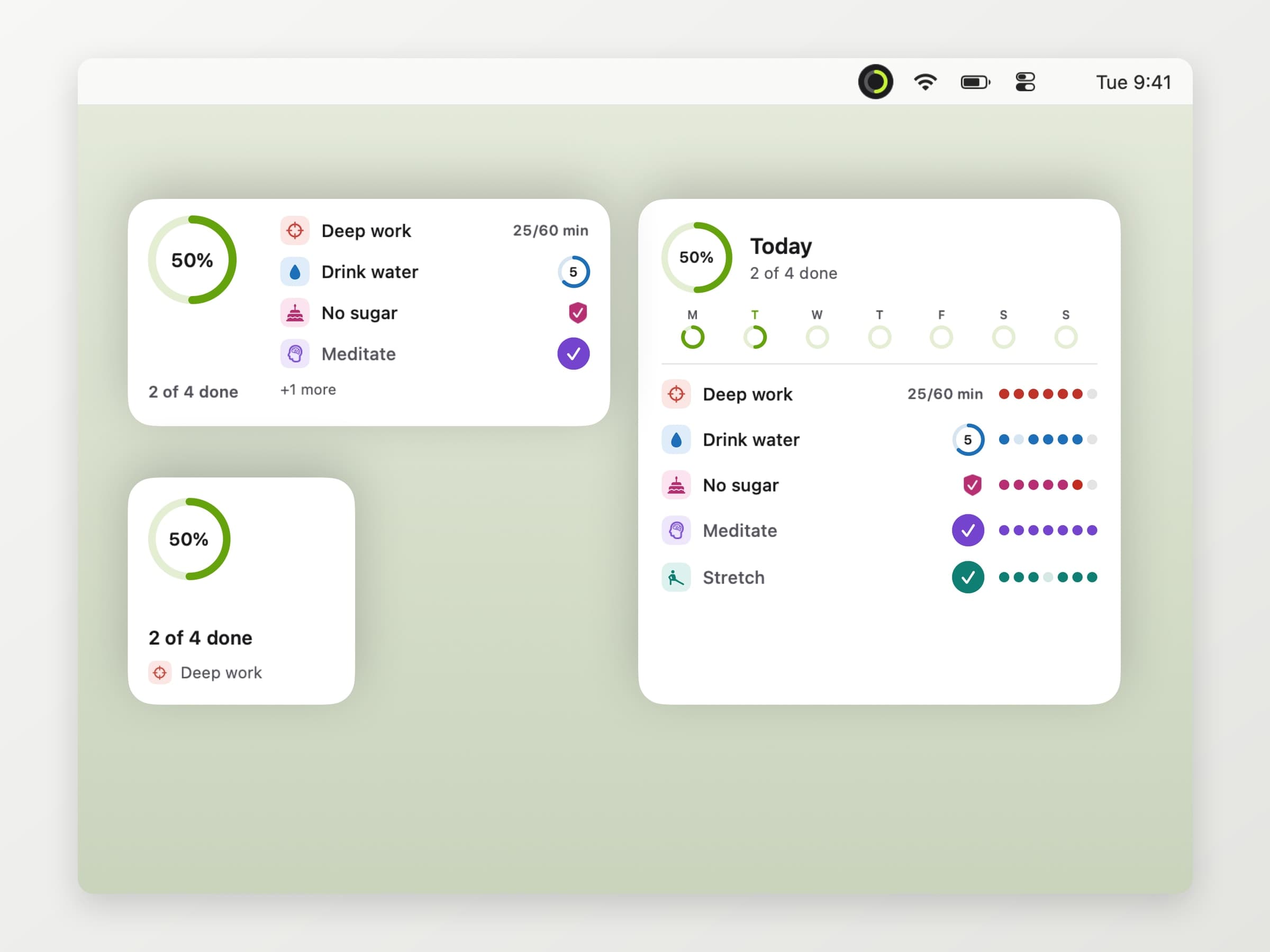
There are desktop widgets in three sizes. The small one is the ring and what is next; the medium and large ones list habits with buttons that tick or count straight from the desktop, and the large one adds the last seven days of each. Shortcuts gets three actions - Complete Habit, Log to Habit and Today's Progress - which also run from Spotlight and Siri.
What it deliberately does not do
There is no phone app and no sync. Your habits live on one Mac, which is a real limit: a run logged nowhere is a run Keystone does not know about. There is no Apple Health import either, and no account, no badges and no feed.
It asks for one permission, notifications, and works without it. The app is sandboxed, signed and notarised. History can be exported as a CSV for a spreadsheet or as a full backup that imports on another Mac. The only network traffic goes to our own servers - license checks, updates, config, and anonymous usage and crash diagnostics.
What it costs, and what else to look at
Keystone runs on macOS 14 or later, on Apple Silicon and Intel, and takes about 12 MB. It is pay what you want with a suggested price of $4.99, which includes paying nothing, and it is a one-time purchase - the license is permanent whichever amount you pick. The full specification is on the Keystone page.
If water is the habit you keep missing, Aqumi is built around that one alone, with presets and a goal, covered in a water reminder app for Mac. If the habit is getting up from the desk at all, that is Recess. There is a wider shelf in the best menu bar apps for Mac.