What Time Machine is actually good at
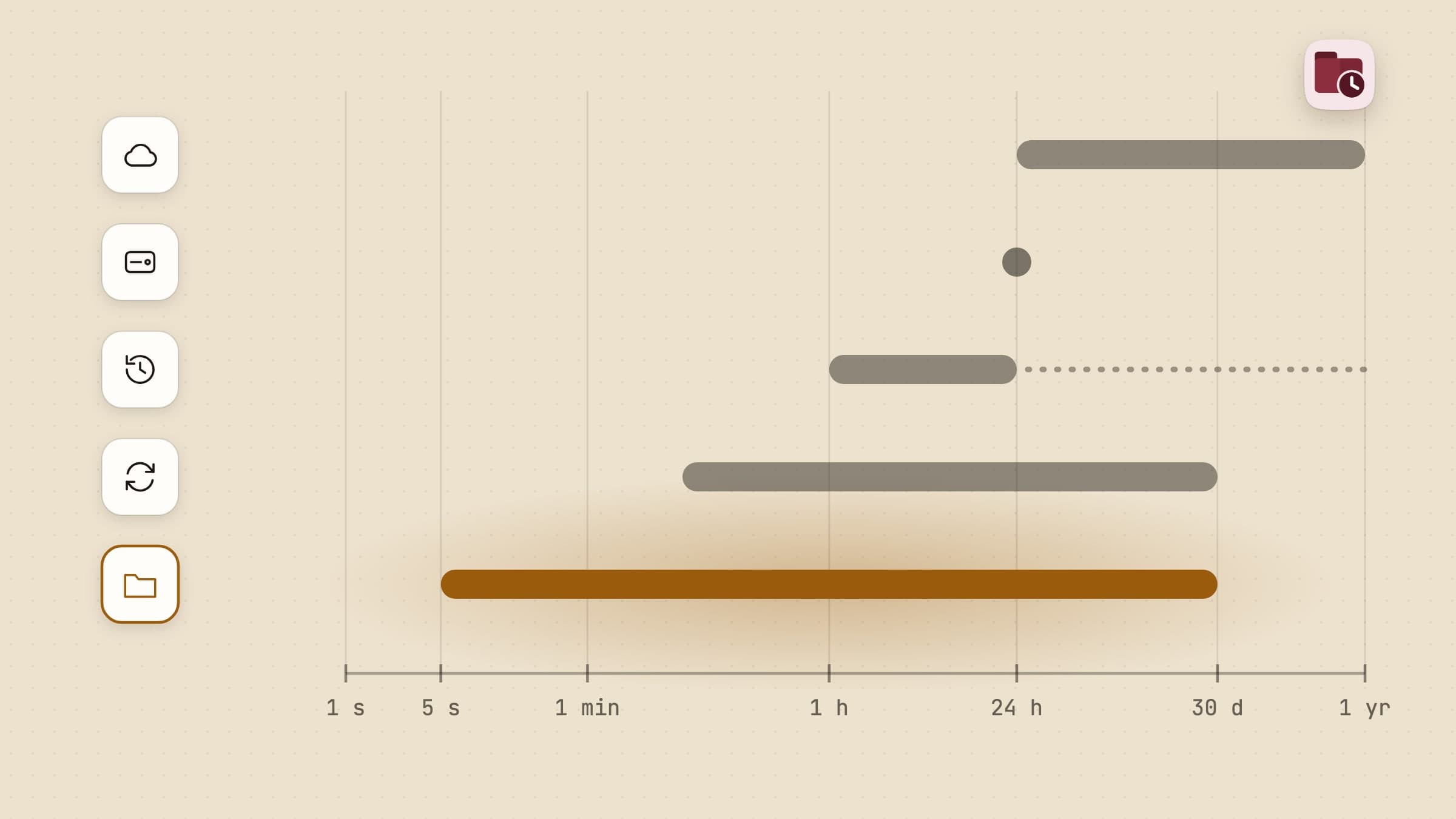
Time Machine is Apple's backup for the whole Mac, built into macOS since Mac OS X 10.5 Leopard shipped on 26 October 2007, and it is free. You plug in a disk, open System Settings > General > Time Machine, choose the disk, and from then on it keeps hourly backups for the past day, daily backups for the past month and weekly backups for every month before that, deleting the oldest ones only when the disk is full. After the first full copy, only changed files are copied. Apple's own guide is Back up your Mac with Time Machine.
The thing no other tool on this page does as well is the bad day. When a Mac dies, is stolen or is replaced, Migration Assistant restores apps, user accounts, files, folders and settings from a Time Machine backup onto a new or erased Mac, even during setup. Apple warns that it can take hours, but nobody has to remember what was installed.
The backup can live on a USB or Thunderbolt disk, on another Mac on the network, or on a NAS that supports Time Machine over SMB. Backups can be encrypted with a password, either at setup or later from the Finder for a local disk, and you can rotate several backup disks. On an APFS startup disk it also keeps hourly local snapshots, so an hour-old file can often come back with the backup disk unplugged.
Apple recommends a backup disk at least twice the size of your Mac, and that is the only real cost. If you do not back up at all today, set up Time Machine first: it is the backup everyone should keep. The Time Machine alternatives for Mac below are for the jobs it was not built for, and most run next to it.
Why people go looking anyway
It can fail without saying so. In January 2026, Howard Oakley of The Eclectic Light Company showed a Time Machine gap of about 20 hours with no error messages and no warning, and contrasted it with Carbon Copy Cloner, which reports errors "loud and clear". In February, Rui Carmo found that two Macs on macOS 26 Tahoe had made no backups for about two months, with no notification.
Backups stall, and network backups break. An Apple Community thread about backups stalling near 80 percent on macOS 15.0.1 Sequoia started in October 2024 and ran to 141 replies. On a network disk, the "cannot be reliably restored" alert asks you to erase the history and start a new backup, and Western Digital says a damaged backup bundle cannot be repaired with Disk Utility. AirPort Time Capsule owners hit a Tahoe 26.2 bug that filled their disks, and macOS 27 ends Time Capsule support altogether.
It is everything or nothing, in one room. Time Machine has an exclusion list but no way to say "back up only these folders". It has no cloud destination either, so the backup disk usually sits next to the Mac it protects, and forum advice for fire and theft is a second tool.
An hour is a long time. Time Machine backs up hourly at most; since macOS 13 Ventura you can also pick daily, weekly or manual. A file you save at 10:05 and break with a save at 10:20 may have no copy of the 10:05 version anywhere, because no hourly backup or snapshot ran in between, and files in iCloud Drive that macOS has moved to the cloud to save space are skipped, not downloaded, at backup time.
What macOS already does for free
Besides Time Machine, macOS has three smaller safety nets.
Versions is the per-document history inside many Mac apps. A version is saved every hour, or more often when you are making many changes, plus when you open, save or rename a document, and File > Revert To > Browse All Versions brings one back or restores a copy. Versions only exist in apps that support them, they cover one document at a time, and the versions of an iCloud Drive document stay on the Mac that made them: they do not sync to your other Macs, and copying the file to another disk leaves them behind.
Local snapshots are Time Machine's own: roughly one an hour of the startup
disk, kept 24 hours, plus one of the last successful backup and one before each
macOS update, taken only when the disk has plenty of free space. Setting Time
Machine's frequency to Manually deletes them, and tmutil listlocalsnapshots /
lists them.
iCloud Drive's Recently Deleted keeps deleted files for 30 days, and what comes back is the file's last-saved version only. iCloud Drive keeps no version history on the server, so a file you saved over is not in Recently Deleted at all.
Between them, the built-in route covers a deleted file, the last day of the startup disk and documents in apps that keep Versions. It does not cover a folder of mixed files you broke at 10:20.
Retrace: a copy seconds after each save, for the folders you work in
Retrace keeps a version history of the folders you choose, on your Mac: a copy of each file a few seconds after you stop editing it, a timeline of every change, a way to compare two versions, and a rewind that puts a whole folder back to a moment and can be undone. It is $4.99 once, with a 30-day trial, and it comes from the Mac App Store or our site. From our site the trial needs no card and no email, and one license covers up to 3 Macs. It is a sandboxed app for macOS 14 or later and never asks for Full Disk Access. Your files never leave the Mac: Retrace sends anonymous usage counts and crash reports, and the version from our site also checks its license and updates online.
Retrace is not a backup. Its history sits on the same disk as the files it protects, so a dead drive takes the history with it. It is the layer for "I need this folder as it was twenty minutes ago", next to Time Machine.
A copy seconds after you save, not once an hour
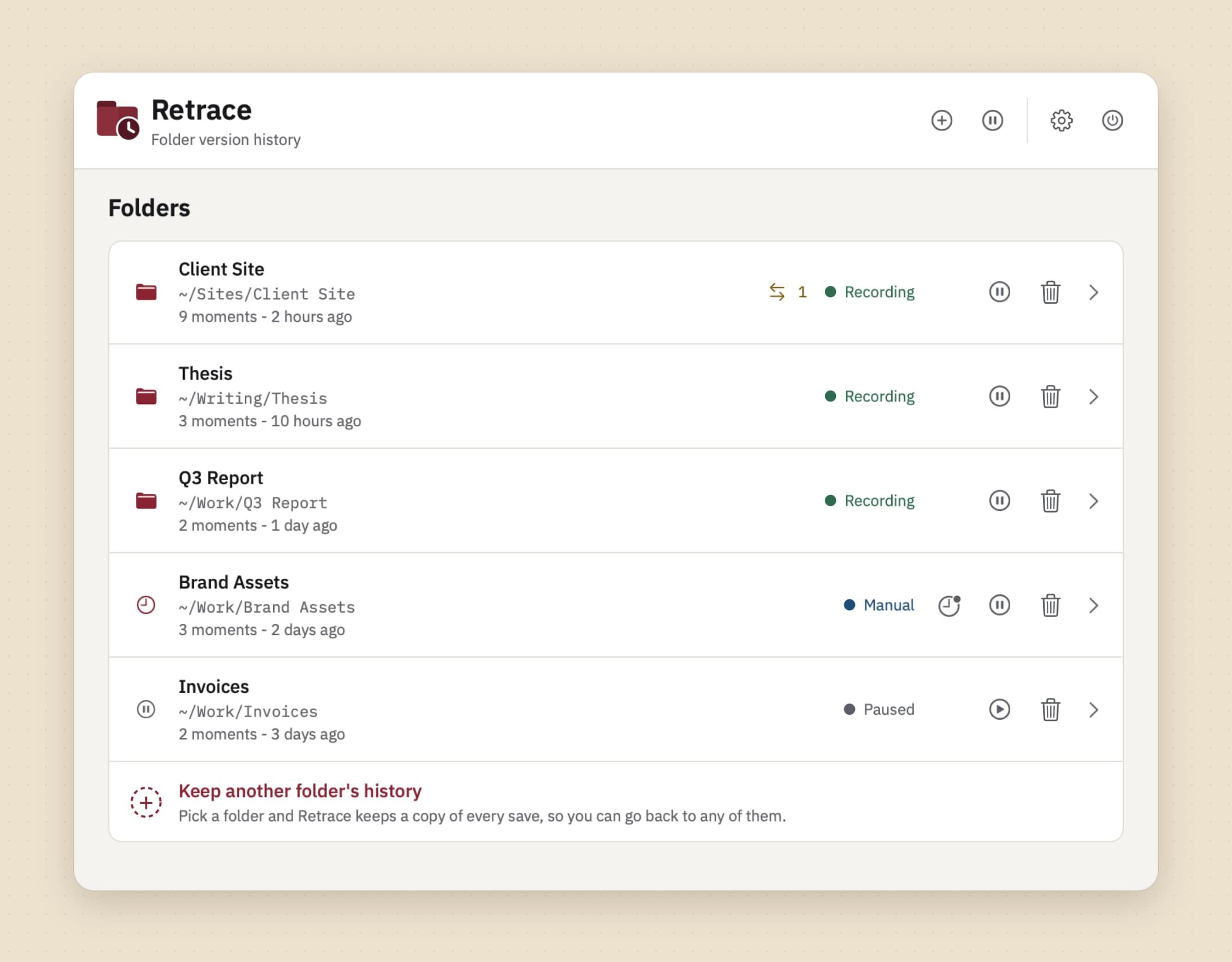
You pick the folders: right-click one in Finder and choose History > Enable history, or use Keep a folder's history… in the window. From then on, Retrace watches every file in that folder and its subfolders, waits until a file has been quiet for about ten seconds, and saves a copy. A big file can wait up to a minute. If something lands on top of a file, such as a download or a sync, the timeline marks it Replaced. A folder set to Record only when I ask gets a version only when you press Take a snapshot now, also on a quick panel at Control-Option-Command-S.
Each copy is an APFS clone that shares its data with the original, so it costs almost nothing until the file changes. Retrace keeps everything for 24 hours, then one version per hour for 7 days, one per day for 30 days and one per week after that, up to the limit set in Keep history for: 1 month, 3, 6, 1 year (the default) or Forever. Each folder has a disk budget, Automatic by default (5 GB or a tenth of your free space, whichever is smaller), or a fixed size up to 50 GB, or No limit. Some versions are never thinned out: the newest 10 of every file, versions you mark Keep this one forever, named moments, snapshots and the last copy of a deleted file.
The honest limits: Retrace keeps history only while it is running, and Open at login is off until you switch it on; after a gap it catches up with how files look then, not with every save. It watches only folders on the Mac's own disk, so external drives, network shares and the iCloud Drive folder are out, and files that exist only in the cloud are skipped, never downloaded.
Put a whole folder back to a moment, and undo it
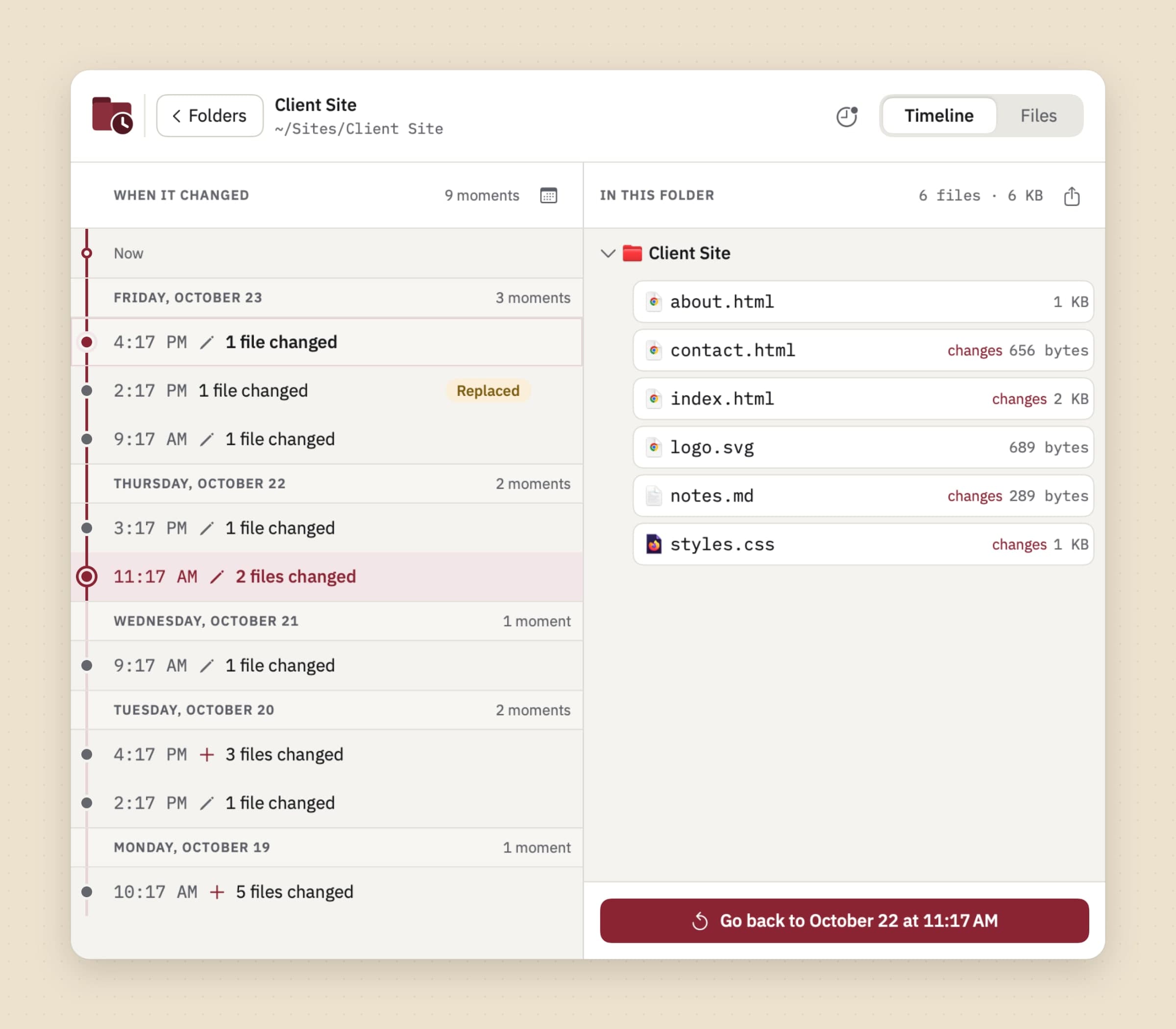
A folder's Timeline tab lists every moment it changed, newest first, in day bands. Saves within a minute of each other are one moment, and each moment says what happened to which files: added, edited, replaced, deleted or renamed. Pick one, and the right side shows every file as it was then. Name this moment gives it a label, and a named moment is kept for good. Go to a day jumps the list to a date on a calendar.
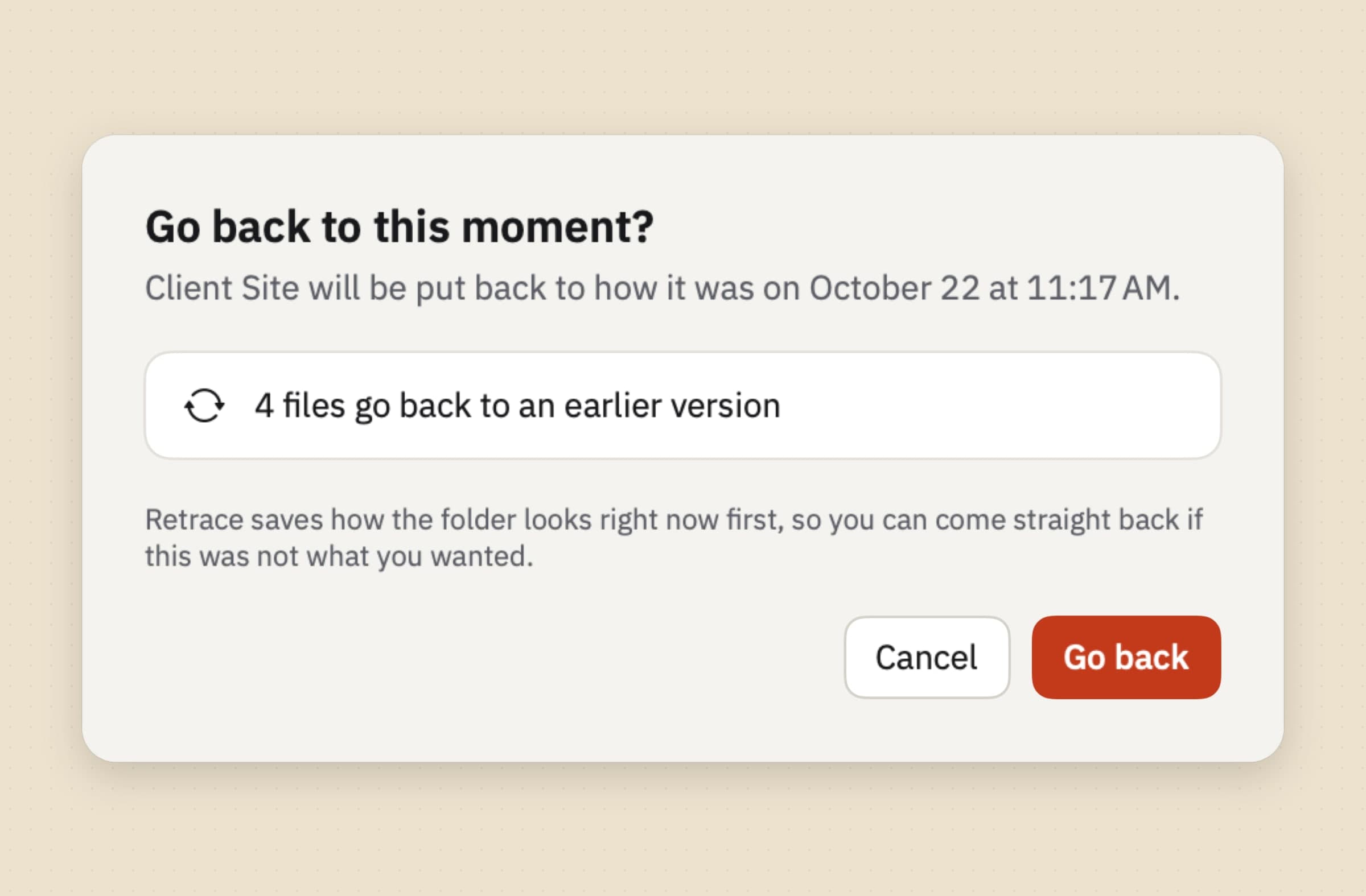
Go back puts the whole folder back to that moment in one step. Edited files return to their earlier content, deleted files come back, and files added since go to the Trash rather than being erased. Before it changes anything, Retrace saves how the folder looks right now, so if the rewind was a mistake you go straight back, and that state is kept for 30 days. For one file, Restore as a copy puts the old version beside the current one, and Replace the original saves the current file as a version first. Export folder as it was here… copies the folder at that moment somewhere else.
The honest limit: a rewind reaches only what Retrace recorded. A folder added yesterday has no history from last week, and hours when Retrace was closed have no moments to go back to.
Compare two versions before you restore anything
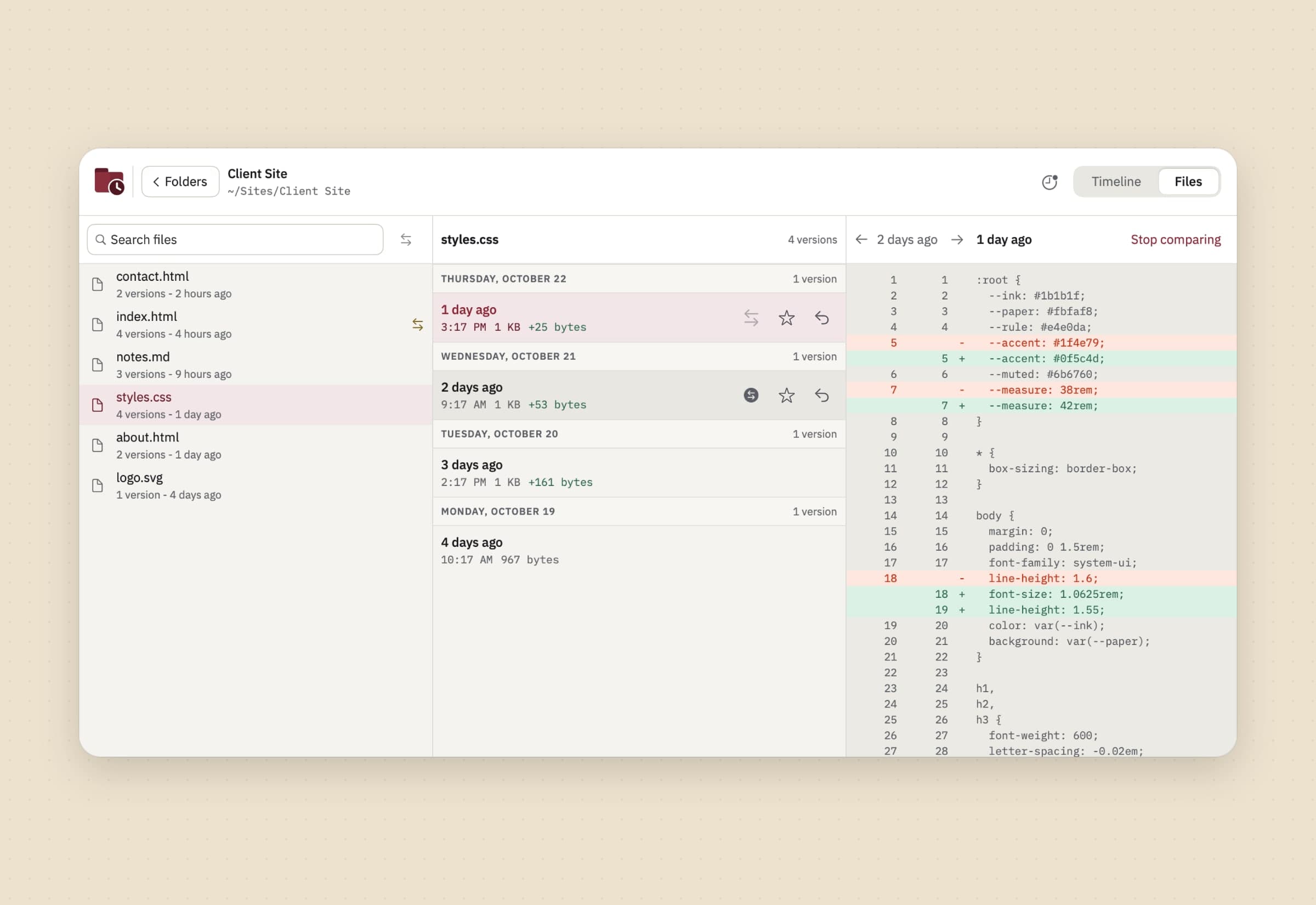
The Files tab lists every file in a folder that has history, with how many versions it has and when it last changed. Select one and its versions appear by day, with their size and how many bytes each added or removed. Compare with this compares the selected version with another one.
The comparison fits the file. Text and code get a line-by-line diff, up to 5 MB or 50,000 lines. Images can be compared by swiping, fading between them or showing only the pixels that differ. PDFs list the pages that changed and whether the page count did. Office documents, video and audio open side by side in Quick Look, and any other file gets a summary of how much changed. Open a copy opens a scratch copy of a version in its own app.
The honest limit: a comparison shows you what changed, it does not merge. To take one paragraph from an old version and keep the rest, you open a copy and paste it across yourself.
Find the version by what it said
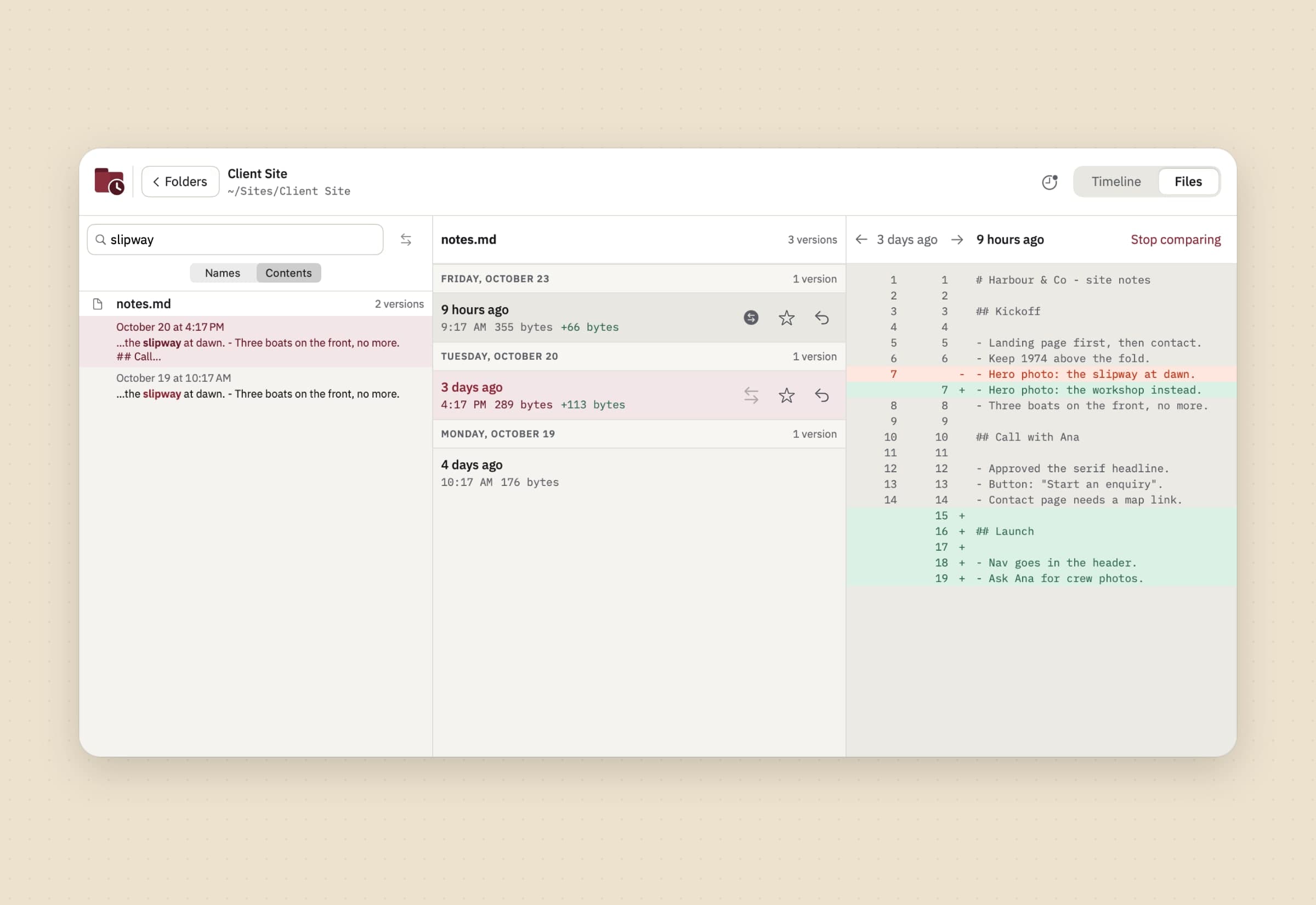
Often you remember what a file said, not when. The Files tab search has two scopes. Names filters files by name, and Contents finds every saved version whose text held the words you type, with the match shown in context and the date of each version, so the version that still had the paragraph you deleted is one click away. The index stays on your Mac, and Search inside files in Settings turns it off.
The honest limit: content search reads plain text, PDFs (the first 200 pages), RTF, Word and OpenDocument text files. It does not read Pages, Numbers or Keynote documents, it does not recognise text in images, and it skips files over 20 MB.
Time Machine vs Retrace, feature by feature
| Time Machine | Retrace | |
|---|---|---|
| Price | Free, built into macOS | $4.99 once, 30-day trial; a license from our site covers up to 3 Macs |
| What it covers | The whole Mac, minus exclusions and macOS system files | Folders you pick on the startup disk |
| Where the copies live | External disk, another Mac or a NAS over SMB, plus 24 hours of local snapshots | The same disk, inside the app's own storage |
| Survives a dead disk or a stolen Mac | Yes, if the backup disk is elsewhere | No |
| How often | Hourly by default; daily, weekly or manual since Ventura | A few seconds after each save, while Retrace runs |
| How far back | Hourly for a day, daily for a month, weekly until the disk is full | Every version for a day, hourly for a week, daily for a month, weekly up to a limit you set |
| Restore a whole Mac | Yes, with Migration Assistant | No |
| Restore a folder | Restores selected items to their original location | Rewinds the folder to a moment, and the rewind can be undone |
| Compare versions | Finder windows along a timeline; Browse All Versions in apps that support it | Line-by-line diff for text, swipe or fade for images, changed pages for PDFs, Quick Look side by side for the rest |
| Search old versions | Browse by date | By name or by the words a version held |
| Encryption | Encrypted backups with a password | No separate encryption; the history stays on the Mac's own disk |
| Cloud-only iCloud files | Skipped until downloaded | Skipped, never downloaded |
Time Machine wins everything that involves losing the Mac: a copy on another device, a whole-system restore, encryption and a long history, for free. Retrace wins the working day inside a folder: a copy seconds after each save, an undoable rewind, comparisons and search. The usual answer is both.
Other alternatives worth knowing
Carbon Copy Cloner 7 from Bombich Software and SuperDuper! 4 from Shirt Pocket are the answer to "back at work today". Both copy a whole disk to another one, on a schedule if you want. Carbon Copy Cloner is $49.99 once for every computer in one household, with a 30-day trial; version 7.2.2 keeps snapshot history with a Snapshot Browser and a Snapshot Comparison Browser, and reports errors loudly. SuperDuper! is $43.95 per user and free for full erase-and-copy backups, with scheduling and Smart Update in the paid version; 4.0.10 from 8 October 2026 runs on macOS 14 or later. SuperDuper! makes clones, not a history of versions.
Arq 7 from Arq Backup is the offsite answer with your own storage behind it: a cloud bucket, an SFTP server or a NAS, with end-to-end encryption and an open format. It is $59.99 once per computer with a year of updates, then $25 a year, or Arq Premium at $69.99 a year for 5 computers with 1 TB of storage included. It runs on Mac and Windows, with a 30-day trial.
Backblaze Computer Backup is the offsite answer with nothing to set up: unlimited data from one computer for $99 a year, $9 a month or $189 for two years, with a 15-day trial that needs no card. Old versions are kept 30 days by default, a year at no extra cost if you ask, or forever for $0.006 per GB a month on files older than a year.
Kopia and restic are free and open source, for technical users who want encrypted backups to almost any storage. Kopia has a desktop app as well as a command line; restic is command line only.
None of these is a version history of the folder you are working in. Every backup needs free disk space, and how to free up disk space on a Mac covers that, including removing apps with Unroot. The best Mac utility apps puts Retrace beside our other tools.
When Time Machine is still the right choice
Keep Time Machine in every case on this page, and rely on it alone if what you fear is losing the Mac, not losing an afternoon. It is the right choice if you want a free backup anyone can restore from, if you will move to a new Mac with Migration Assistant, if your backup has to be encrypted, or if you need folders on external drives or network shares covered, which Retrace cannot watch. It is also enough on its own if you mostly work in apps that keep Versions, and an hour between copies has never cost you anything. Add an offsite tool such as Arq or Backblaze if the disk sits next to the Mac.
Switching from Time Machine
For almost everyone, "switching" means adding a layer. Turning Time Machine off also ends its local snapshots, the 24-hour net on the startup disk.
- Keep Time Machine running, and check in System Settings > General > Time Machine that the latest backup is recent. For a second disk or an offsite copy, add Carbon Copy Cloner, SuperDuper!, Arq or Backblaze; nothing imports Time Machine's history, so each starts with a fresh first backup.
- Install Retrace from the Mac App Store or our site, and grant the two optional permissions in onboarding: your home folder, so a right-click in Finder can start history with no extra step, and the Finder extension.
- Pick the folders you work in: a project, a thesis, a client site. Use Finder's History > Enable history or Keep a folder's history…. The folders must be on the Mac's own disk and not inside your Library, and Retrace's first pass records everything already in them.
- Switch on Open at login in Settings, so Retrace is always recording.
- Look at Settings > Storage after a few days to see what each folder's history costs on disk, and change the budget there.
- Name a moment or take a snapshot before anything risky, such as a big find-and-replace.
Setup takes about ten minutes, and nothing needs exporting. How to recover an overwritten file on a Mac walks through every Retrace screen. And if the real trouble is a messy Downloads folder rather than a lost version, Sweep files it by plain rules, as how to auto-sort files on a Mac shows and Hazel alternatives for Mac compares.
Side by side
| Tool | Answers | Copy lives | Granularity | Cost |
|---|---|---|---|---|
| Time Machine | My Mac died | External disk, another Mac or NAS, plus local snapshots | Hourly by default | Free |
| Versions and iCloud Drive Recently Deleted | One document, one deleted file | The Mac, and iCloud for 30 days | Hourly or on save, per document | Free |
| Carbon Copy Cloner 7 | Back at work today | A second disk, with snapshots | Scheduled | $49.99 once |
| SuperDuper! 4 | Back at work today | A clone on a second disk | Scheduled | $43.95 once, free for full copies |
| Arq 7 | Fire, theft, flood | Your cloud bucket, SFTP or NAS | Scheduled | $59.99 per Mac, or $69.99 a year |
| Backblaze | Fire, theft, flood | Backblaze's cloud | Automatic, whole Mac | $99 a year |
| Kopia, restic | Fire, theft, flood, for technical users | Storage you choose | Scheduled | Free |
| Retrace | I broke this folder 20 minutes ago | The same disk, same Mac | A few seconds after each save | $4.99 once |
Pick by what fails. If the disk dies or the Mac is stolen, you need a copy somewhere else: Time Machine to a disk, plus Arq or Backblaze outside the building. To be working again quickly on a new disk, it is Carbon Copy Cloner or SuperDuper!. If what fails is a folder, a find-and-replace that went too far or a file you saved over, you need the copy from twenty minutes ago, and that is where Retrace beats every tool here. Most people should run Time Machine plus one other.
Prices and features checked on 30 October 2026.


