What Sunsama is actually good at
Sunsama is a daily planner for professionals that turns planning into a ritual. Each morning it walks you through yesterday's leftovers, pulls in work from your other tools, adds up the planned time and warns you when the day holds more than your threshold, then lets you timebox each task onto your calendar. A daily shutdown closes the evening, and a weekly review looks back at your objectives and the week's time per day. Summay, Inc. makes it, and its weekly changelog was last updated on 2 November 2026.
Its reach is the strongest part. Sunsama connects to about 20 tools, including Google Calendar, Outlook, Asana, Jira, Linear, Notion, Todoist, Gmail, Slack and Microsoft Teams, plus Zapier, and it works with Google, Outlook, iCloud and CalDAV calendars, where a timeboxed task becomes a real event. Press X on a task and it is auto-scheduled into open time inside your working hours. On the Mac there is a menu bar item, a floating Focus Bar with a timer, Command-Shift-A to add a task from anywhere, and Sunny, an AI assistant that can move tasks and draft the day.
Sunsama Pro costs $17 a month billed yearly ($204 a year) or $22 billed monthly, after a 14-day trial with no card, and there is no free plan. It runs as a desktop app on macOS 13 Ventura or later, Windows and Linux, on iPhone, iPad and Android, and in the browser. The desktop app is built on Electron and downloaded from Sunsama's site, not the Mac App Store.
If your work lives in Jira, Asana and Slack, you plan on more than one computer, and a guided morning and evening routine keeps you on track, Sunsama is the obvious choice. The Sunsama alternative for Mac this page is about, Tideline, does none of that.
Why people go looking anyway
The price, with no free plan. At $17 to $22 a month, Sunsama costs more than most apps it is compared with, and nothing stays free after the trial. AlternativeTo reviewers called it "overpriced" in December 2024 and "pretty expensive" in 2023, while still finding the routine worth it.
No offline mode. Sunsama is an account-based cloud service, with servers on Google Cloud and data stored in the United States. A request for an offline mode in the desktop app has been open since June 2020 with 231 votes; in July 2026 one user learned there was no offline support when the whole app failed to load.
Planning by hand every morning. The ritual is the product, and for some people it is too much structure. Comparison posts from October 2026 report users who want the tool to lay out the day instead of building it by hand. Sunsama's answer is Autoplan, an agent in beta that drafts the plan from a brain dump.
A thin phone app. Reviewers describe the iPhone app as basic, and setup has to happen on a computer first. Tideline does not fix this one: it has no phone app at all.
What macOS already does for free
Calendar and Reminders cover the basics at no cost. Calendar blocks time when you drag an event across an hour, Reminders repeats tasks with a notification, and both sync over iCloud.
What they do not do is plan. A time block stays where you dropped it when a meeting lands on top of it, a reminder does not know how long it takes, and nothing tells you at four o'clock that two tasks will not fit before the end of your day. You become the scheduler every time something moves.
Tideline: your tasks lay themselves out between your meetings
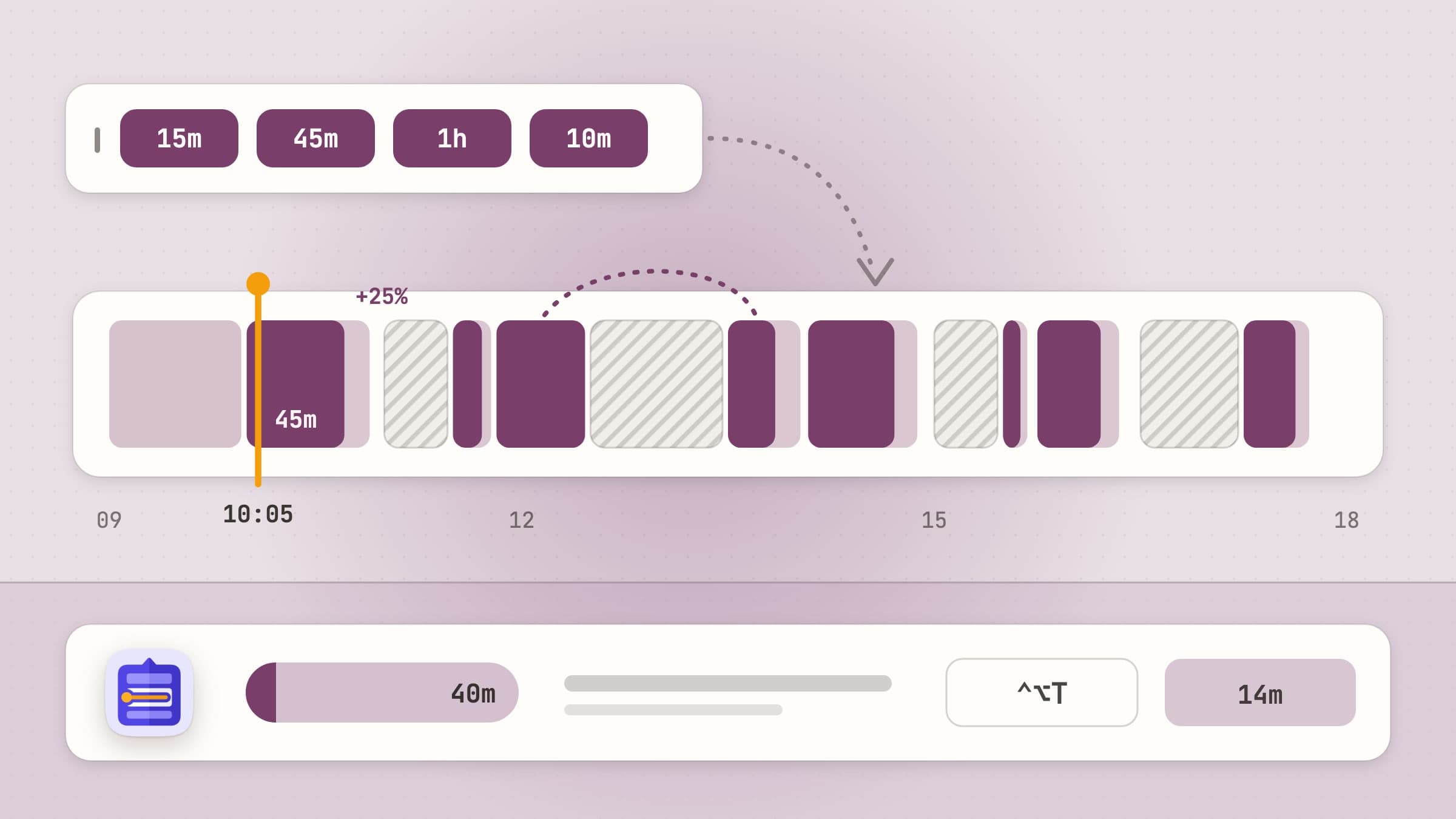
Tideline is a native macOS day planner that lives in the menu bar. You keep an ordered list of today's tasks, each with a length, and Tideline lays the list into the free gaps between the meetings in your calendar, inside your working hours, every time something changes. It costs $11.99 once, with a 30-day free trial that needs no card and no email, runs on macOS 14 or later on Apple silicon and Intel Macs, works in English, Turkish, German, Spanish and French, and was made with ADHD and time blindness in mind.
The whole queue flows into the gaps, every time
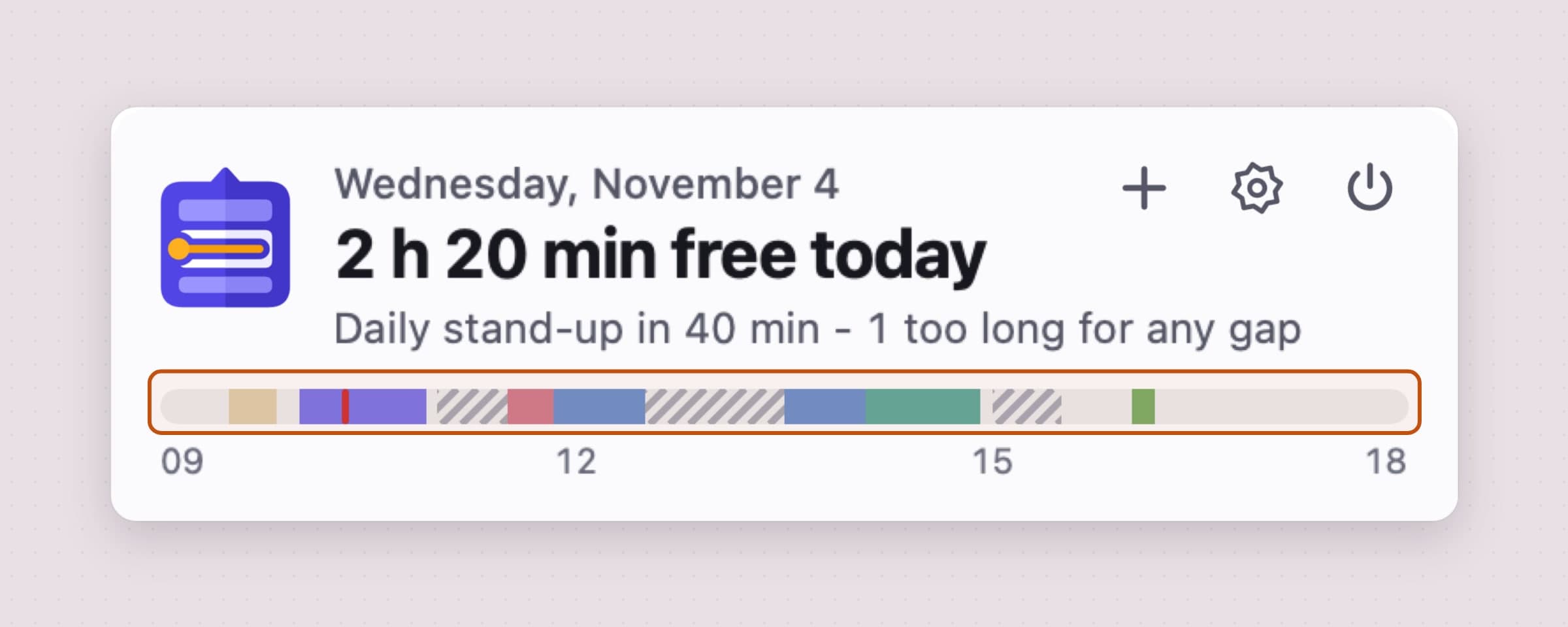
Tideline never asks you to drag a task onto an hour. You put tasks in order, and they fill the free gaps between your meetings in that order; a long task can be split around a meeting, shown as part 1 of 2 and part 2 of 2. Meetings come from the calendars you pick, shown as striped blocks with a Join button for Zoom, Google Meet, Microsoft Teams or Webex links. Add a task, finish early, run over or get a new invitation, and the rest of the queue lays itself out again.
The header says how much of the day is still free and when the next meeting starts, a day bar from your first hour to your last draws the whole plan, and a row counts the tasks that don't fit today, with Move to tomorrow beside it. Type a time, as in "standup at 9:30", and that task is pinned there.
Sunsama auto-schedules the task you press X on and shifts the timeboxes next to one that changed; Tideline lays out the whole list on every change. The honest limit: Tideline plans one day at a time, with tomorrow and a parked list beside it, and has no week view, no projects and no backlog folders.
A whole list on one line, in plain words, from any app
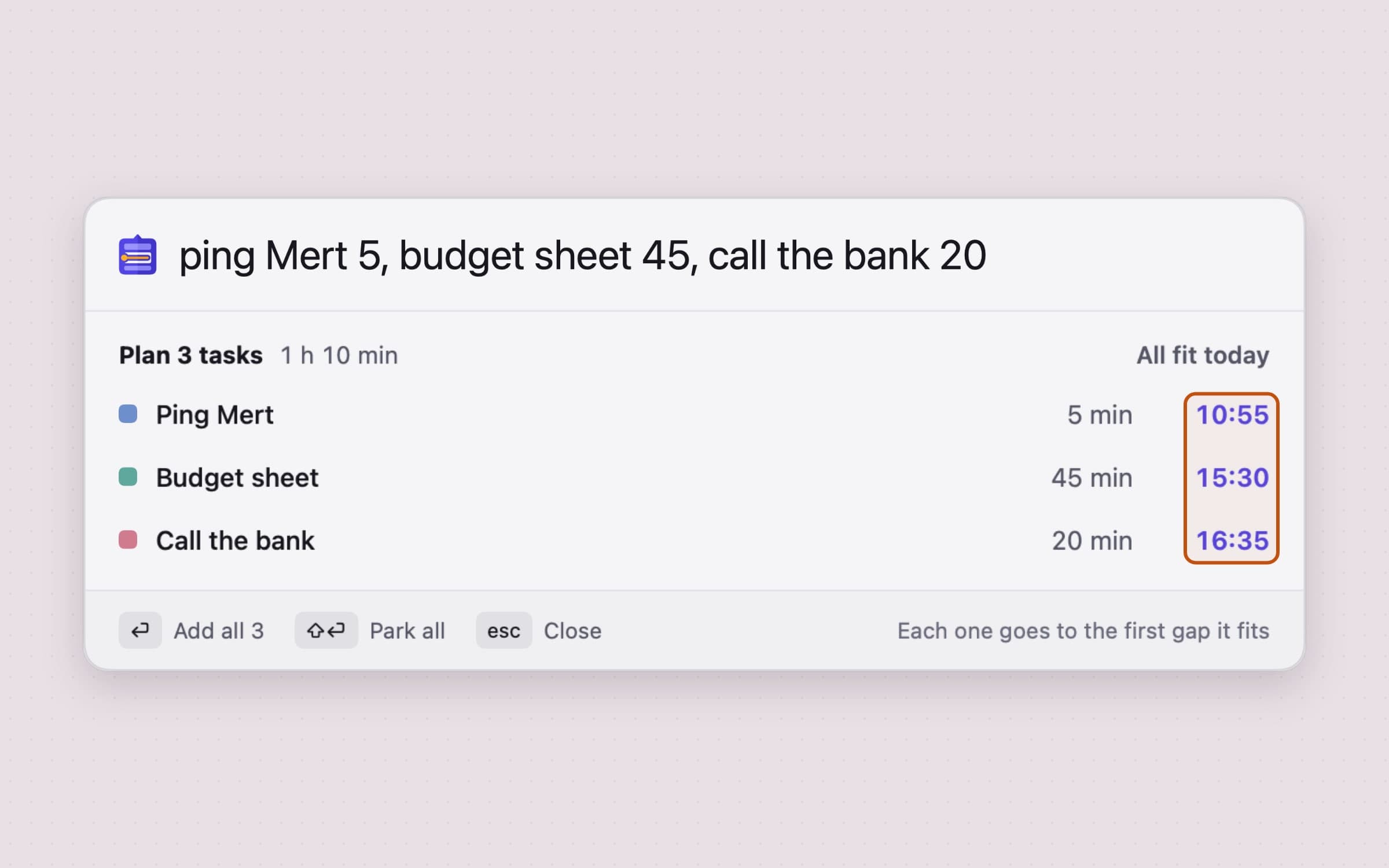
Getting a list out of your head should take one line. Type "mail 15, report 45, call the bank 10" and you get three tasks: commas, semicolons, new lines and "then" split them, up to 12 at a time. Before Return a preview shows each task's length and start time, or Doesn't fit. Return adds them all as one undo step; Shift-Return parks them.
The same field reads days, times and repeats in five languages at once: "tomorrow at 3 dentist", "morgen um 10 Zahnarzt 30 Min", "demain à 14h30 réunion 45 min", "daily" or "every tue". Control-Option-T, which you can change, opens the field in a small panel over any app.
Sunsama's Command-Shift-A window is filled field by field: channel, planned time, start date. The honest limit: Tideline's reader is a fixed parser, not AI, so it will not draft a day from a paragraph the way Sunsama's Autoplan or Sunny can.
Estimates come with a buffer, because most of us guess short
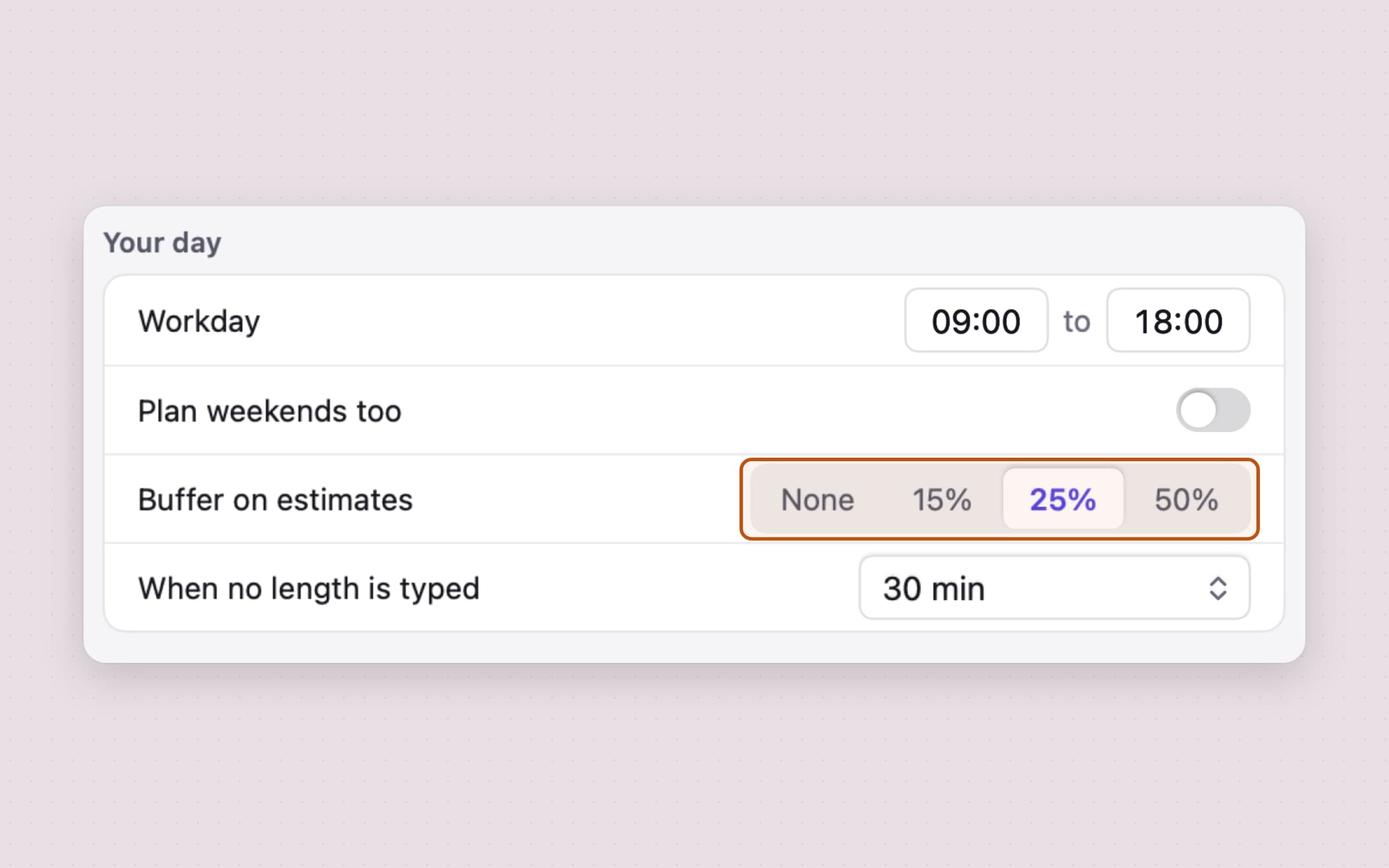
A plan built on optimistic numbers breaks by eleven. Tideline adds a buffer to every estimate before placing the task, 25% by default, so a 45-minute task takes 55 minutes of your day; you can pick none, 15%, 25% or 50%. A task typed without a length gets 30 minutes, also a setting. Your working hours, 09:00 to 18:00 unless you change them, are the walls the plan stays inside, with weekends off unless you turn on Plan weekends too.
Sunsama adds up the planned times you give it instead, and warns when the total passes your threshold.
The honest limit: Tideline does not track how long tasks really took and has no analytics or weekly review, so it cannot tell you whether 25% is right for you. Sunsama's time breakdown can.
A heads-up before meetings and before the day ends
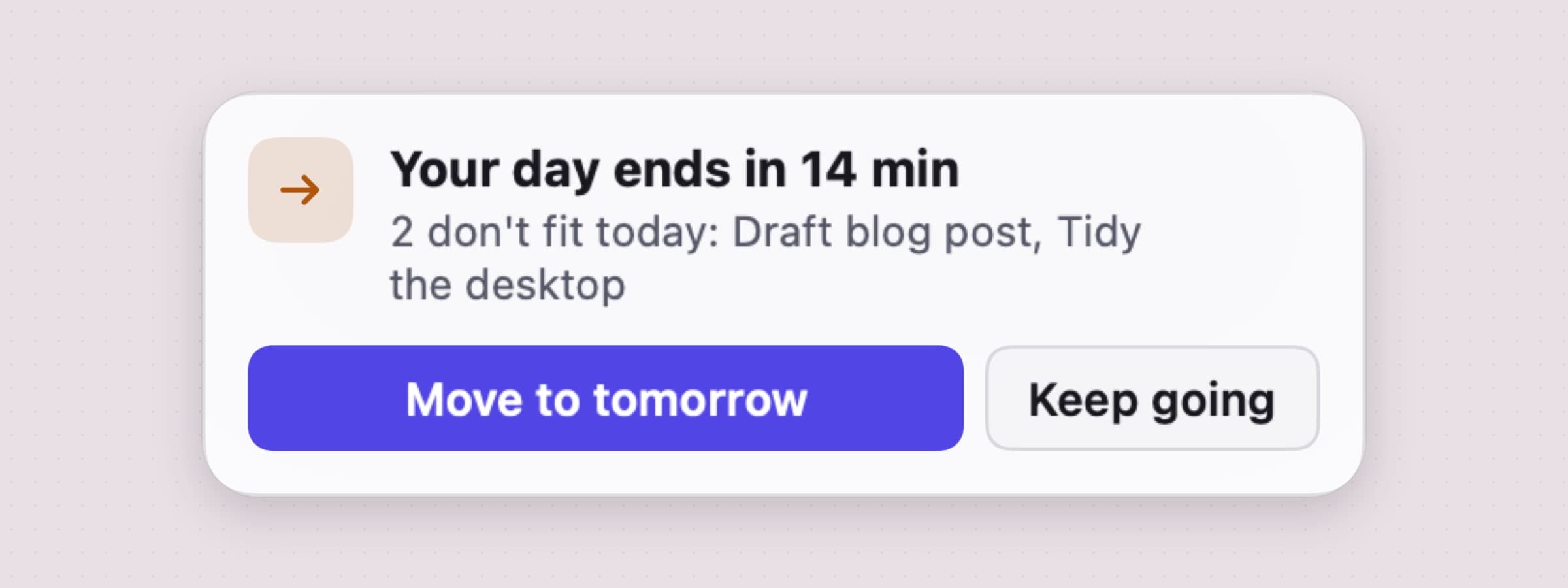
Time blindness is not noticing the hour pass, so Tideline keeps the hour in view. The menu bar shows the task you are on with the minutes left as a pill that fills as time runs down, "+7m" in orange when it runs over, and "Stand-up in 40m" before an event. A small heads-up card slides into the top right of the screen without taking focus and without notification permission.
Five minutes before a meeting the card names it, says which task pauses there, and offers Join and Remind me in 2 min. Fifteen minutes before your day ends it lists what doesn't fit and offers Move to tomorrow or Keep going. Both lead times are settings, and each card can be turned off.
Nothing is ever overdue. Unfinished work leaves today when the day turns over at 04:00, so a late night still counts, and waits the next morning in a band that says "2 left over from yesterday", with Add to today or Park them. A missed repeating task is skipped, not stacked.
Sunsama's menu bar item can show the focused task and its timer too. The honest limit: Tideline's cards appear only while the Mac is awake and Tideline is running, and they never reach a phone or a watch.
One price, no account, and the plan stays on your Mac
Tideline is $11.99 once, less than one month of Sunsama billed monthly, and there is no account. The plan is two files in the app's own folder on your Mac, meetings come from the Mac's Calendar app, which already holds your iCloud, Google or Exchange accounts, and Tideline sends your tasks and events nowhere. It goes online for license and update checks, its app settings, crash reports and a few anonymous usage events, never with a task.
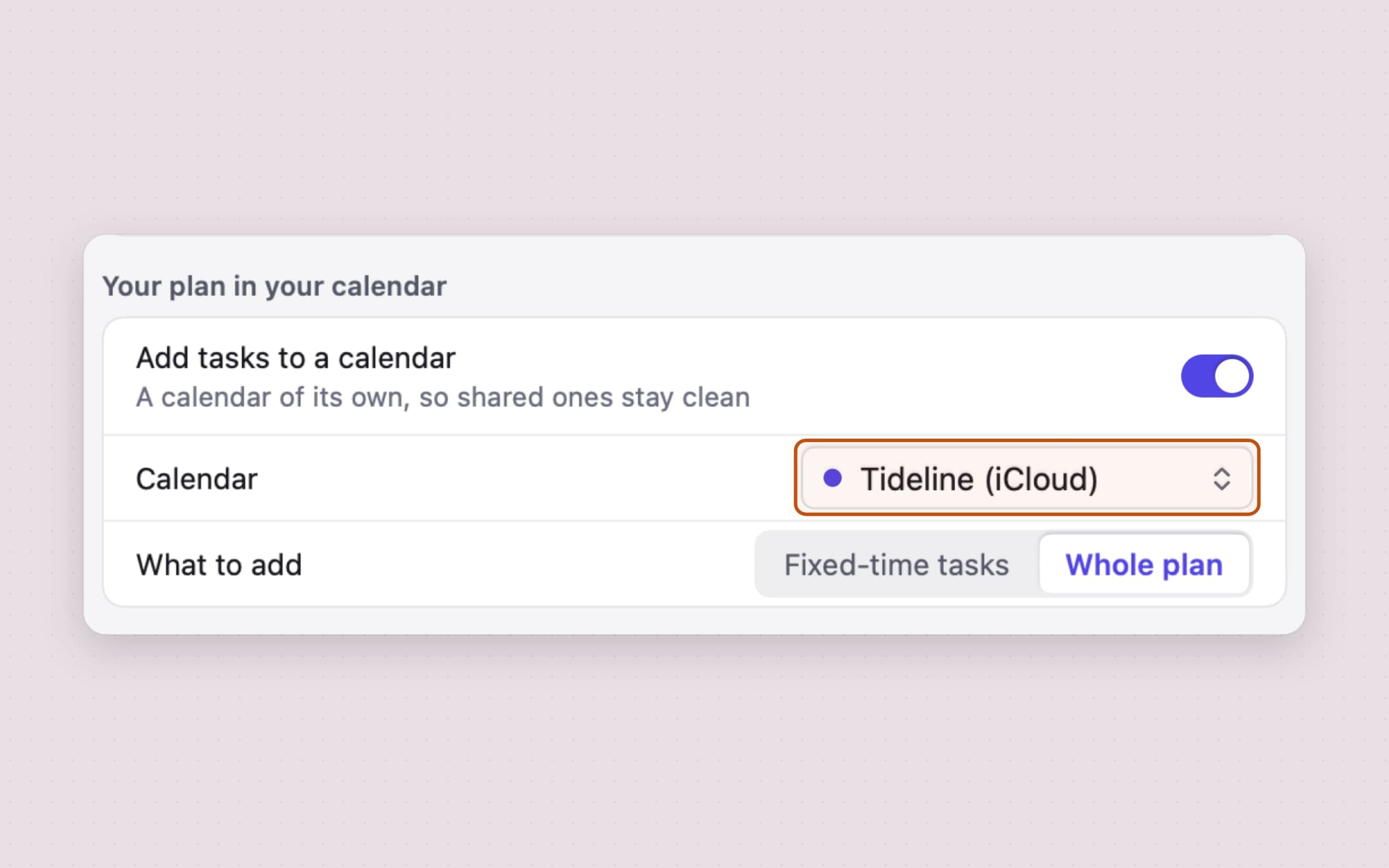
To see the plan on your phone, turn on Add tasks to a calendar. Tideline then creates its own calendar named Tideline, never a shared one, and adds the fixed-time tasks or the whole plan; the events move when the plan changes. It never edits or deletes your events.
The honest limit: there is no sync between Macs, no iPhone, iPad or web app, no team planning, no integrations with Todoist, Asana, Notion, Jira, Gmail or Slack, and no Reminders import. Each Mac has its own plan.
Sunsama vs Tideline, feature by feature
| Sunsama | Tideline | |
|---|---|---|
| Price | $17 a month billed yearly, $22 monthly; 14-day trial, no free plan | $11.99 once, 30-day trial |
| Platforms | Mac (macOS 13+), Windows, Linux, iPhone, iPad, Android, web | Mac only, macOS 14 or later |
| Mac app | Desktop app built on Electron, from Sunsama's site | Native menu bar app |
| Placing tasks around meetings | Press X to auto-schedule a task; nearby timeboxes shift on conflicts or early finishes | The whole queue lays itself into the gaps on every change |
| Estimates | Your planned times, with a workload warning over a threshold | A 25% buffer by default, 30 minutes when no length is typed |
| Adding tasks | Quick-add window with fields; Sunny AI | Several tasks on one line in plain words, five languages; Control-Option-T |
| Guided planning | Daily planning, shutdown and weekly review; Autoplan in beta | None; the plan builds itself as you type |
| Unfinished tasks | Roll over to the next day at midnight | Wait next morning with Add to today or Park them |
| Integrations | About 20, including Asana, Jira, Notion, Gmail, Slack, plus Zapier | None; reads the Mac's calendars only |
| Calendar writing | Timeboxes become events on your Google, Outlook, iCloud or CalDAV calendar | Optional, to its own Tideline calendar |
| Time analytics | Daily and weekly time use | None |
| Account and data | Cloud account, data on Google Cloud in the US, no offline mode | No account; the plan is stored on the Mac |
Sunsama wins on reach and ritual: every platform, integrations, analytics, a guided morning and evening, and an AI assistant. Tideline wins on a working day run from one Mac: a plan that rearranges itself around meetings, a buffer on every guess, a list typed in one line, and a price paid once.
Other alternatives worth knowing
Morgen is the closest like-for-like swap: Google, Outlook, Apple and Fastmail calendars in one app, tasks from Notion, ClickUp, Linear or Todoist as time blocks, and an AI planner that reshuffles the day on conflicts. It runs on Windows, macOS, Linux, phones and the web, for $15 a month billed yearly or $30 monthly, with a 14-day trial and no card.
Akiflow suits work that arrives in many inboxes: it gathers tasks from your tools into one inbox, with a daily planning ritual, time blocking and a Cmd-K bar that takes natural language. Pro is $19 a month billed yearly or $34 monthly, after a 7-day trial that needs a card.
Tiimo is a visual planner built for ADHD and autism, with timers, routines and AI that turns a brain dump into a day. Its free plan is on iPhone and Android, Pro is a subscription priced by region, and the Mac app needs macOS 15 and Apple silicon. The best Mac apps for ADHD compares more of the field.
Structured draws the day as a timeline next to your calendar, is free for the core planner and sells Pro by subscription or for life; its Mac app needs macOS 15. If one task at a time suits you better, Anchored keeps a single task in the menu bar.
For a task system with projects rather than a day plan, start with Plexus and the OmniFocus alternatives for Mac; the productivity apps for Mac roundup and the best menu bar apps for Mac sort the wider field.
When Sunsama is still the right choice
Stay with Sunsama if your tasks come from Jira, Asana, Linear, Notion, Gmail or Slack and you want them in one daily list without copying. Stay if you also work on Windows or Linux, plan from your phone, or share a workspace with a team. Stay if the morning planning, evening shutdown and weekly review are the habit that works for you, or you want time analytics and an AI assistant. And stay if your timeboxes should be real events on your work calendar, where colleagues see them.
Switching from Sunsama
- Export your data. In Sunsama, Settings, Account Management, Export my data saves a copy before you cancel; Tideline has no import, so this is for your records.
- Set your hours. In Tideline's Settings, General, set your Workday and the Buffer on estimates; 25% is a fair start.
- Pick your calendars. Grant calendar access, then choose under Show events from which calendars tasks flow around. Google or Outlook accounts must be added to the Mac's Calendar app.
- Type today's list in one line, with a length after each task, and check the preview before Return. Park anything without a day.
- Recreate what repeats by typing "daily", "weekdays", "every tue" or "monthly" after a task.
- Turn on Add tasks to a calendar only if you want the plan on your phone or visible to colleagues.
Integrations, channels, objectives and your Sunsama history do not carry over. Setup takes about ten minutes; trusting the plan to rearrange itself takes a few days. The guide how to plan your day on a Mac around your meetings walks through Tideline in more detail.
Side by side
| Tool | How it plans | Mac app | Platforms | Cost |
|---|---|---|---|---|
| Sunsama | Guided daily ritual, timeboxing with auto-schedule | Desktop app, macOS 13+ | Mac, Windows, Linux, phones, web | $17 a month billed yearly |
| Morgen | Unified calendars, tasks as time blocks, AI planner | Desktop app | Mac, Windows, Linux, phones, web | $15 a month billed yearly |
| Akiflow | Universal inbox, rituals, time blocking | Desktop app | Desktop, phones, web | $19 a month billed yearly |
| Tiimo | Visual planner for ADHD and autism | macOS 15, Apple silicon | iPhone, iPad, Watch, Mac, Android, web | Free plan; Pro by subscription |
| Tideline | A task queue that flows between meetings, with a buffer | Native menu bar app, macOS 14+ | Mac only | $11.99 once |
Pick by what fails. If the day falls apart because your work is scattered across tools and devices, a connected planner like Sunsama, Morgen or Akiflow is the fix. If it falls apart because meetings keep knocking your plan over and you never re-plan, a queue that rearranges itself on one Mac is.
Prices and features checked on 4 November 2026.


