What Posture Pal is actually good at
Posture Pal is the app that made AirPods posture tracking a thing. Jordi Bruin, who publishes as Good Snooze, launched it on the iPhone in March 2022 and brought it to the Mac with macOS Sonoma in 2023. It reads the motion sensors in AirPods (3rd generation), AirPods Pro, AirPods Max and Beats Fit Pro, and tells you when your head drops. No camera, no extra hardware, and your music keeps playing.
It is also the friendliest. When you slouch on the Mac, a small character appears at the edge of the screen, left, right or in the middle, after a warning sound, grows if you stay slumped and smiles when you sit back up. Pro adds a giraffe, a monkey and an alpaca to choose from, custom colours, custom sensitivity and twelve app icons. It has daily goals, timed sessions from 5 to 60 minutes and Shortcuts, on the iPhone a widget, Live Activities and the Dynamic Island, and alerts can vibrate the phone, reach an Apple Watch or lower the music while you slouch.
One listing covers both platforms: iPhone on iOS 17 or later and Mac on macOS 14 or later. The download is free. Posture Pal Pro is $19.99 once, and the same store page sells subscriptions at $24.99 a year, $6.99 a month and $3.99 a week. Version 2.3 arrived on 21 October 2026, the US listing has 294 ratings at 4.4, and the app is in 24 languages, including German, Turkish, Spanish and French.
If you want posture tracking on your iPhone and your Mac in one purchase, and you like a character on screen, Posture Pal is the obvious choice, and of the Posture Pal alternatives for Mac on this page only AirPosture also runs on the iPhone.
Why people go looking anyway
Alerts that fire at the wrong time. Mac reviews on the US App Store, which average 3.0 from 10 ratings against 4.4 for the whole listing, describe alerts while sitting straight and silence while hunched (2023), and a giraffe that appeared whatever the posture (2024). One reviewer found AirPods Pro 2 set it off constantly where AirPods 3 had worked, and BGR noted in July 2026 that results vary across AirPods models.
Too sensitive for a working day. Looking down to eat, or bending to pick something up, counts as a slouch. Cult of Mac had to turn the sensitivity down after too many pop-ups. An alert that cries wolf gets ignored, and then switched off.
A character that covers part of the screen. The on-screen companion is the charm of the app, and for some people the problem: a Product Hunt reviewer found it annoying because it sits on top of what they were working on.
From a $4.99 unlock to subscriptions. In 2023 the Mac version was a one-time $4.99 unlock, and the free version stopped after ten minutes a session. Today the listing sells a $19.99 Pro unlock next to weekly, monthly and yearly plans, and a Mac buyer in 2023 was left stuck after paying and asked for a refund.
One limit applies to every AirPods posture app on the Mac, this one included: it reads the angle of your head, not your shoulders. Macwelt noticed that rounded shoulders with a forward neck go unnoticed, and that is physics, not a bug.
What macOS already does for free
Nothing, for posture. macOS uses the AirPods' head tracking for spatial audio and nothing else; there is no setting that watches how you sit, and Screen Time counts minutes, not angles. The free route is a habit: raise the screen so its top edge sits at eye level, and set a timer to check yourself every half hour, for as long as you keep noticing it.
Poise: a Mac posture coach that learns your upright and asks for little
Poise reads the same AirPods sensors and does the whole job on the Mac: a ring in the menu bar, a fog that rises from the bottom of the screen while your head hangs, a measure of how tired your neck is, and a three-minute neck break the AirPods count rep by rep. It is $11.99 once, with a 30-day trial that needs no card and no email, and it runs on macOS 14 or later. It works with AirPods Pro, AirPods (3rd generation and later), AirPods Max and Beats with head tracking.
It learns how you sit upright, so a normal glance is not a slouch
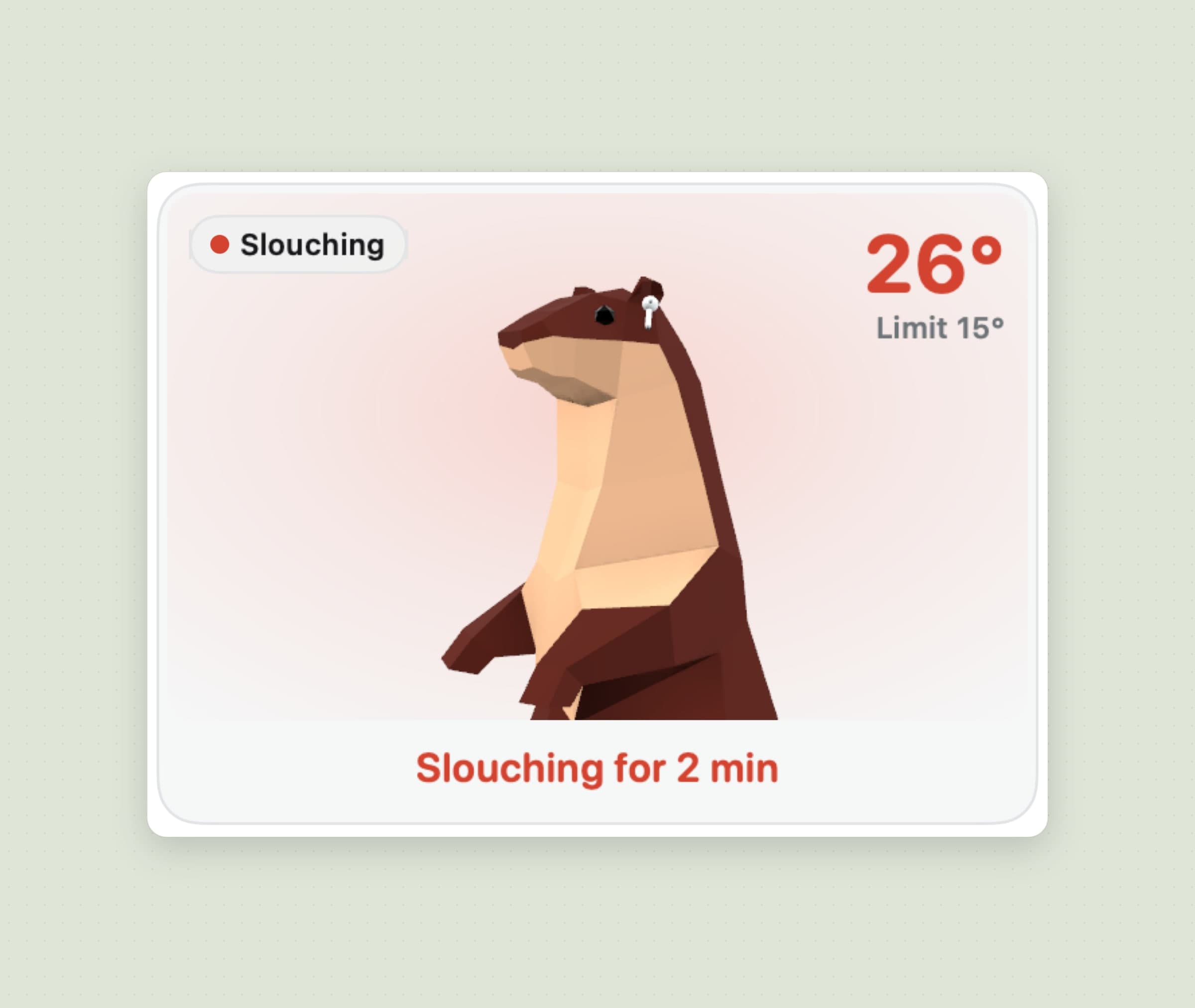
Poise does not ask you to hold a pose. It learns your upright while you work: the first estimate comes after about two minutes of tracking, no alerts fire until then, and, unless you calibrated by hand, for the first five minutes after the AirPods go in it moves freely both ways. After that it only rises, and only when you sit clearly taller than it thought. Each pair of AirPods keeps its own upright, and a manual Calibrate is there if you want one.
A slouch is a drop held, not a moment. The default Balanced sensitivity counts a head 15 degrees below your upright for 15 seconds; Gentle is 20 degrees for 30 seconds and Strict 10 degrees for 8 seconds, and a custom setting goes from 6 to 35 degrees and 3 to 120 seconds. You have to come back 5 degrees past the line to count as recovered, so the state does not flicker.
The honest limit: Poise reads the head too. Shoulders that round while your head stays level are invisible to it, and nothing is measured at all without supported headphones; AirPods 1 and 2 and most Beats report no head motion.
A fog instead of a pop-up, and quiet when you are on a call
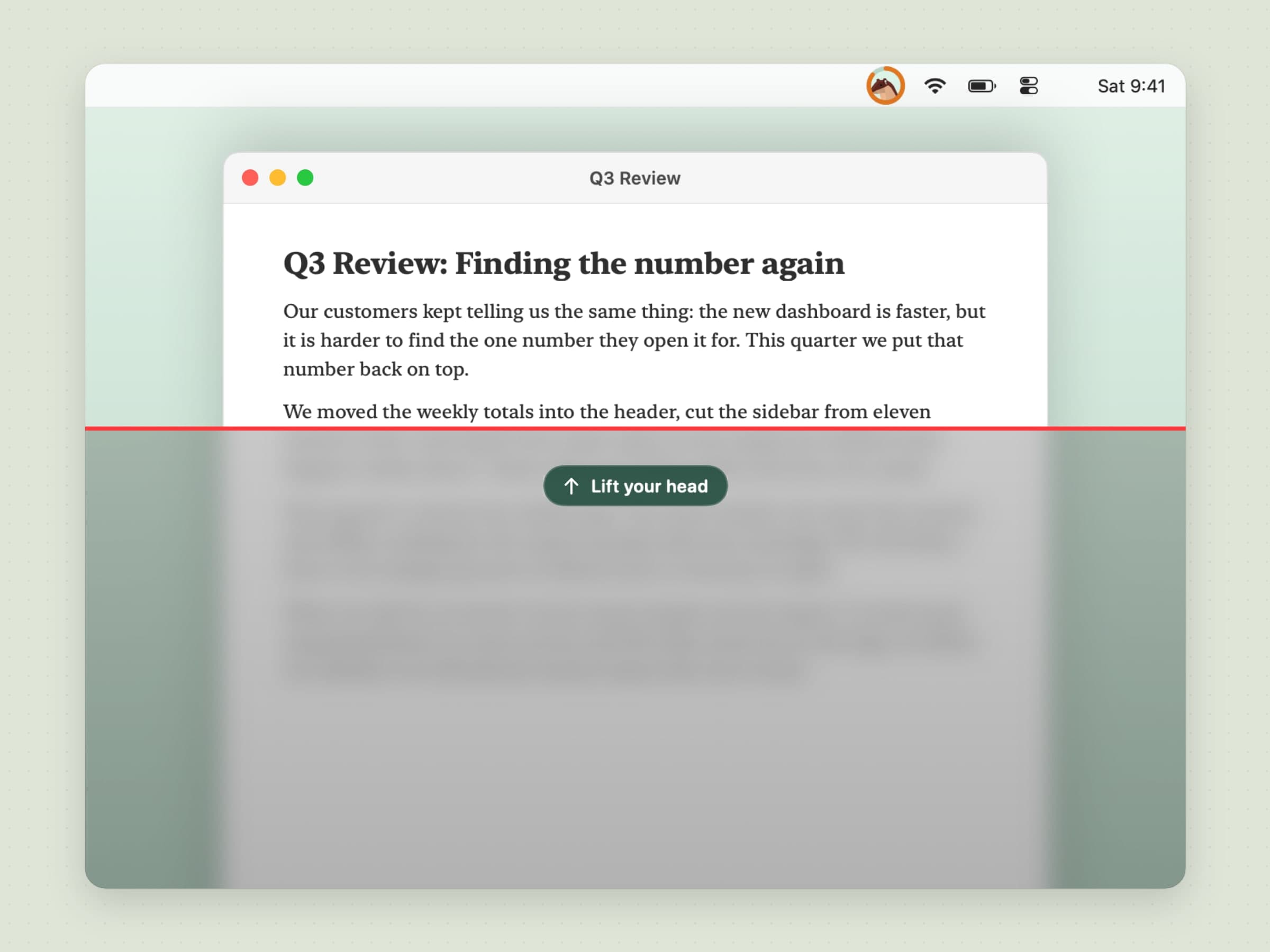
Poise's alert is the screen itself. A short grace after the line is crossed, a fog starts at the bottom of the display and climbs: 30 percent of the screen just past the limit, the whole screen 20 degrees past it. It blurs what is under it, draws a red line at its edge and shows one pill, Lift your head. Lift it and the fog drains in about a second and a half. Clicks go straight through, so you are never locked out of your work, and the fog is kept out of screen sharing.
The ring in the menu bar does the quiet part all day. It fills clockwise as your head drops, half full at the limit and full at twice the limit, green turning amber and then coral. How fast it rises has Gentle, Normal and Firm, a sound is there if you want one (off by default, a voice saying "Lift your head" or a tone), and Fade the screen when I slouch turns the fog off altogether.
Keep quiet holds the fog, the sound and the break reminder while Zoom, Microsoft Teams, FaceTime or Webex is in front, and you can add any app, a browser included. Counting carries on, so the day's numbers stay true.
The honest limit: a call is recognised by the app in front, not by the microphone, so a call in a browser tab is only caught if you add the browser. Full screen counts as quiet only if you turn that on.
It tracks how tired your neck is, and offers a break before it aches
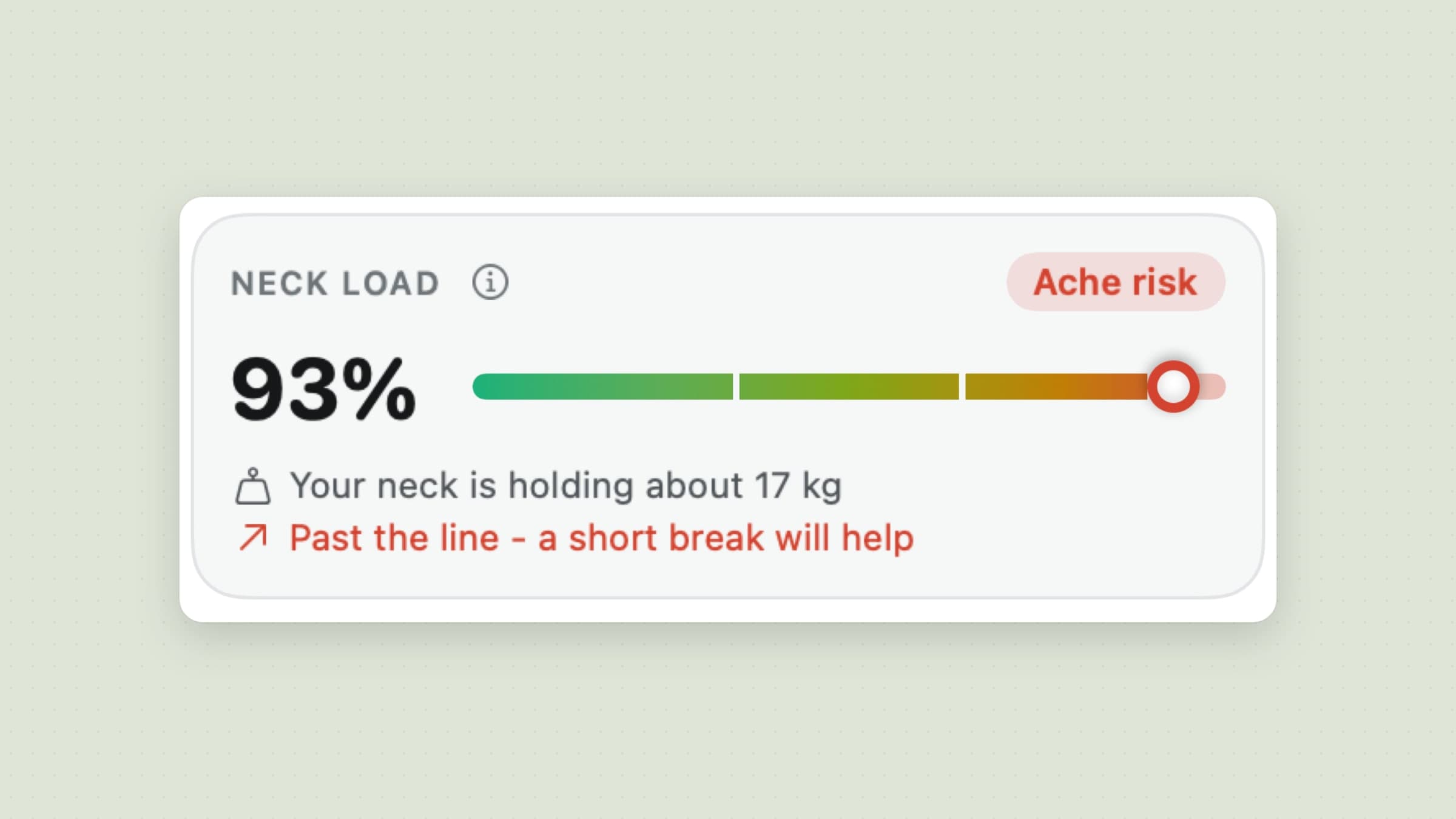
Poise keeps a Neck load that builds faster the further your head drops, and shows what your neck is holding in kilograms, from about 5 kg upright to about 27 kg at 60 degrees, using figures from a 2014 study of head angle and neck strain. Holding still for a long time adds to it; sitting upright and moving lets it recover, and stepping away does too. It reads Fresh, Building, Tired or Ache risk.
When the load passes the level set in Offer a break (Early, When it's tired or Late), Poise offers a neck break: a notification with Start and In 20 min, at most two of them, never during a call.
The honest limit: the kilograms are an estimate from one model, and Poise says so next to them: not medical advice.
A three-minute neck break that your AirPods count
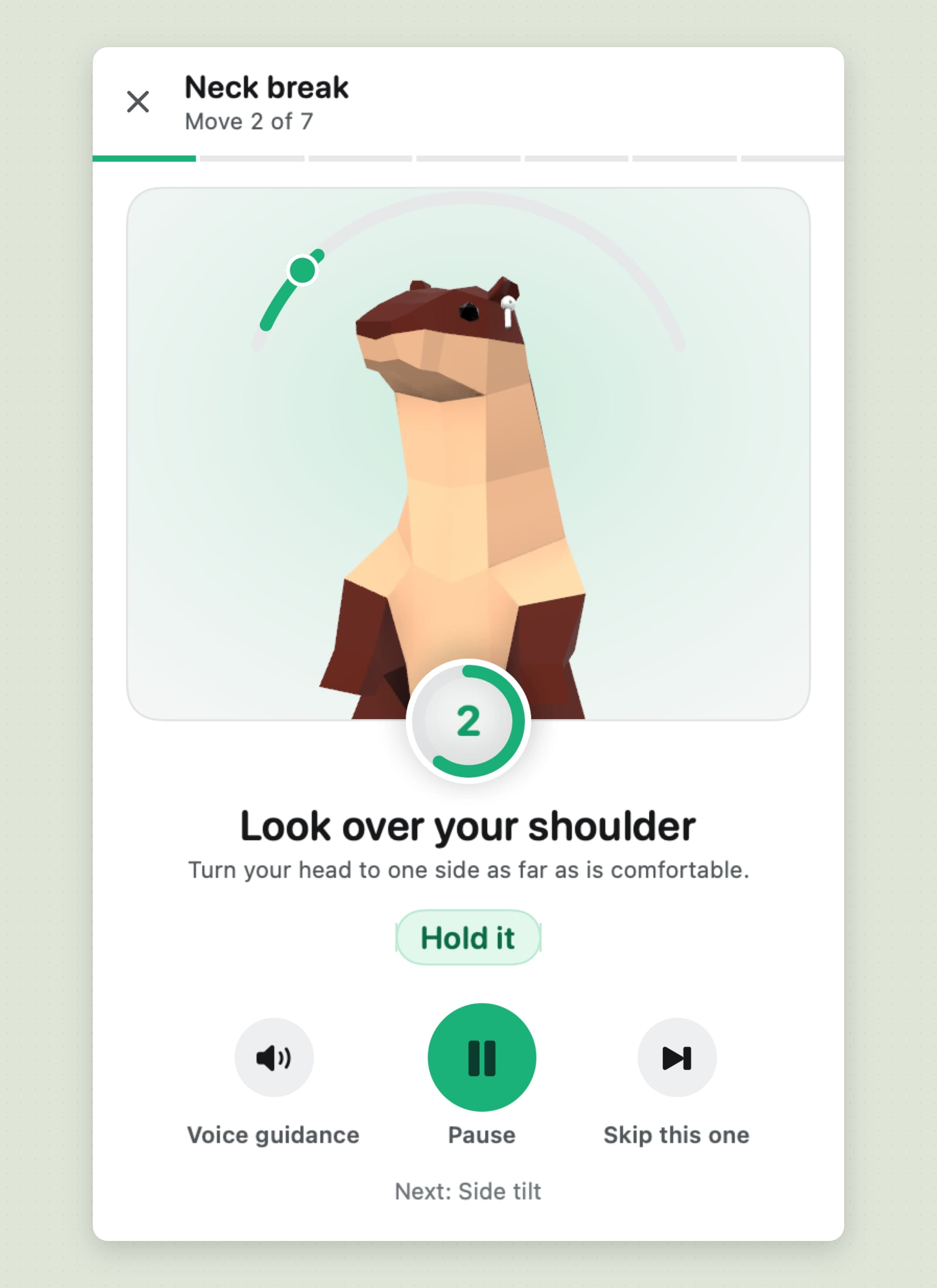
Poise's Neck break is seven moves in about three minutes: look down and up, look over your shoulder, side tilt, a diagonal look, an upper back stretch, chin tucks and shoulder rolls. For each one the otter shows the move, a dial shows where your head is, and a rep counts only when you reach the target and hold it; every counted rep gets a tap on the trackpad and, with voice guidance on, a spoken "Good". Voice guidance reads the moves out, so you can do it with your eyes closed.
If a move is not reached in 15 seconds it starts again, and if the AirPods drop out the break carries on by the clock. Doing at least half the reps counts the break in your statistics, and finished moves take some of the load off.
The honest limit: shoulder rolls are timed, a chin tuck counts once your head holds level rather than when the tuck is detected, and the break is the same seven moves each time.
Today, a week and a month, a weekly summary, a widget and Shortcuts
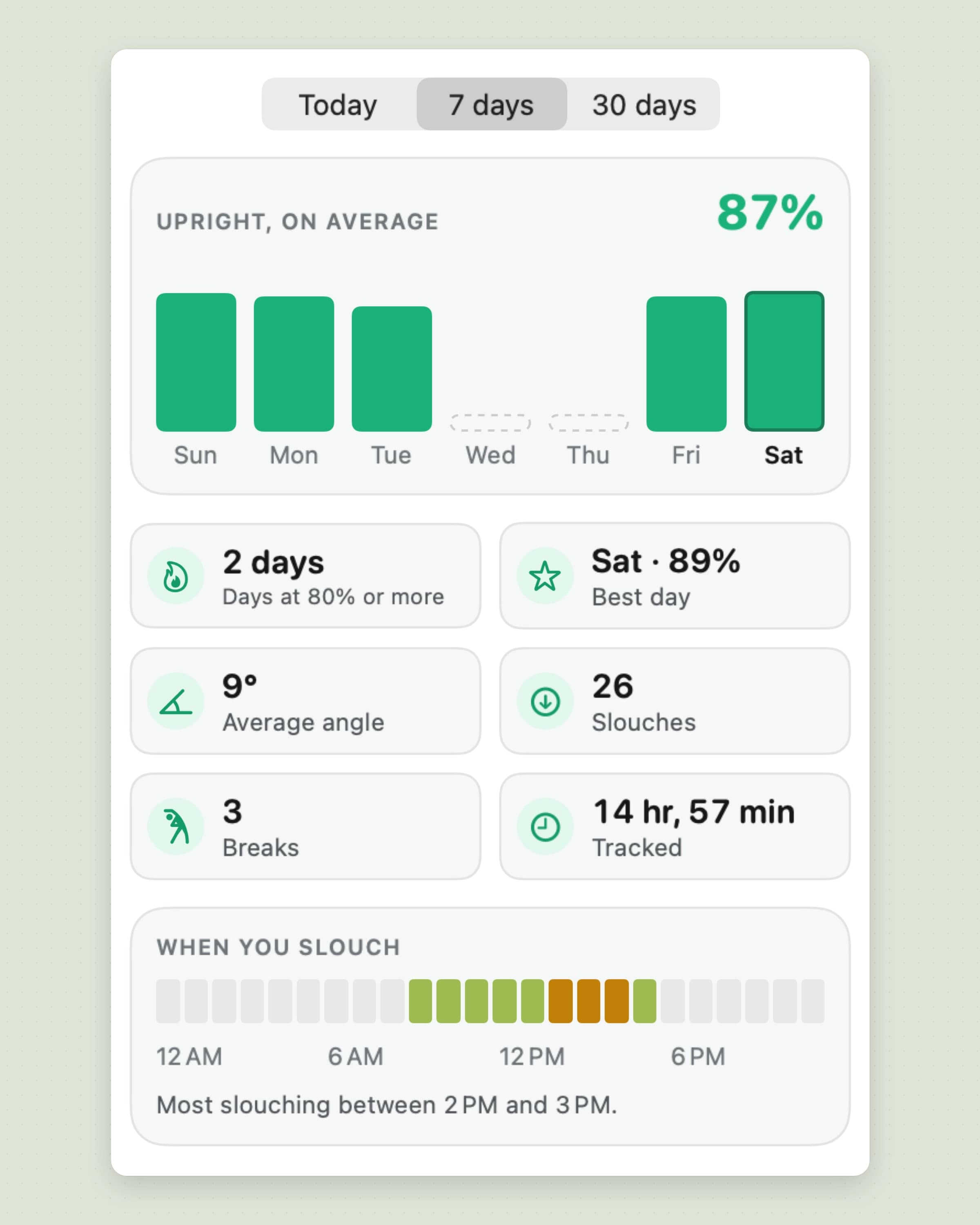
Statistics shows Today, 7 days and 30 days: the share of tracked time you were upright, a bar per day, days at 80 percent or more, your best day, average angle, slouches, breaks and time tracked, and When you slouch, a strip across the day that names your worst hour. A weekly summary arrives as a notification on the first morning of the week, a widget in two sizes shows today's posture, and Shortcuts can pause and resume Poise, start a neck break, calibrate or read today's score. Head angles never leave the Mac: there is no account, and history is 60 days of files on your disk.
The honest limit: there is no export, no iPhone app and no Apple Watch alert. Poise itself goes online for licence and update checks, its app settings, crash reports and a few anonymous usage events, never an angle or a score.
Posture Pal vs Poise, feature by feature
| Posture Pal | Poise | |
|---|---|---|
| Price | Free download; Pro $19.99 once, or $24.99 a year, $6.99 a month, $3.99 a week | $11.99 once, 30-day trial |
| Platforms | iPhone (iOS 17+) and Mac (macOS 14+) | Mac only, macOS 14 or later |
| Headphones | AirPods (3rd gen), AirPods Pro, AirPods Max, Beats Fit Pro | AirPods (3rd gen and later), AirPods Pro, AirPods Max, Beats with head tracking |
| Finding your upright | No calibration described beyond sensitivity presets (custom in Pro) | Learned while you work, per pair; manual calibration optional |
| What counts as a slouch | Head tilt past the sensitivity, with an alert delay | A drop past a limit held for a set time, three presets or custom |
| Alert on the Mac | A character that grows at the screen edge, with sound | A fog rising from the bottom, a menu bar ring, optional sound |
| Alerts elsewhere | Phone vibration, notifications, Apple Watch, lower the music | None |
| During calls | Not described | Quiet while a call app is in front |
| Neck strain and breaks | Not described | Neck load with a break offer, a 3-minute neck break counted rep by rep |
| History | Session details, daily goals | Today, 7 and 30 days, a weekly summary, 60 days kept |
| Widget and Shortcuts | Widget, Live Activities, Shortcuts | Widget in two sizes, Shortcuts |
| Languages | 24 | 5 |
Posture Pal wins on reach and charm: the iPhone, the Apple Watch, the characters and 24 languages. Poise wins on the Mac working day: an upright it learns, alerts that wait for a held slouch, quiet during calls, the neck load and a break that checks you did it.
Other alternatives worth knowing
AirPosture on the App Store, by Relja Bulajic, runs on iPhone and in the Mac menu bar on macOS 14 or later, gives a 0-100 posture score with history, a weekly report and iCloud sync, and is free for two hours a day; Premium is about $7.99 a month, $39.99 a year or $79.99 for life. A separate free, open-source menu bar app shares the name.
SitTall is $5.99 once on the Mac App Store, native to the Mac, with no camera, no account and no cloud, but it works only with AirPods Pro 2 or AirPods 4 with active noise cancellation.
Nekoze is free on the Mac App Store and uses the webcam instead of AirPods, so it works with any headphones or none, and it collects no data. The cost is the camera being on while you work.
If what you want is breaks for your eyes and body rather than for your neck, Recess is the break reminder, with the 20-20-20 rule for your eyes, compared in Time Out alternatives for Mac, and Aqumi keeps the water side of a desk day. The wider field is sorted by sensor in the best posture apps for Mac.
When Posture Pal is still the right choice
Stay with Posture Pal if you want posture tracking on your iPhone as well as your Mac, for walking or for the sofa, or alerts on an Apple Watch. Stay if you like the characters, if a subscription or the free version suits how you use it, or if you need a language other than English, Turkish, German, Spanish or French. And if its alerts already match how you sit, there is nothing to fix.
Switching from Posture Pal
- Check your headphones. AirPods Pro, AirPods (3rd generation and later), AirPods Max and Beats with head tracking work; AirPods 1 and 2 do not.
- Install Poise and allow Motion & Fitness, and notifications if you want the break offers.
- Wear the AirPods and work as usual for about two minutes while Poise learns your upright. Use Calibrate only if you want to set it by hand.
- Pick a sensitivity in Posture: Balanced is the default; move to Gentle if you look down a lot for work.
- Add your call apps to Keep quiet in Alerts, a browser included if you take calls in a tab.
- Choose when to offer a break in Exercises, and try one neck break so the moves are familiar.
Posture Pal's history and goals do not carry over, and Poise has no iPhone side, so keep Posture Pal on the phone if you use it away from the desk. Setup takes about ten minutes. The slouch reminder guide walks through Poise in more detail, and desk health apps for Mac covers the rest of a desk day.
Side by side
| Tool | Sensor | Best at | Platforms | Cost |
|---|---|---|---|---|
| Posture Pal | AirPods | iPhone and Mac in one, with characters | iPhone and Mac, macOS 14+ | Free; Pro $19.99 or from $3.99 a week |
| AirPosture (App Store) | AirPods | A posture score with history and sync | iPhone and Mac, macOS 14+ | Free 2 h a day; from $7.99 a month |
| SitTall | AirPods Pro 2 or AirPods 4 ANC | One price, no account or cloud | Mac, macOS 14+ | $5.99 once |
| Nekoze | Webcam | Any headphones or none | Mac | Free |
| Poise | AirPods | A Mac work day: the fog, neck breaks, quiet calls | Mac, macOS 14+ | $11.99 once |
Pick by what fails. If you need it on your phone, Posture Pal is the one that goes there. If your headphones have no head tracking, only a camera app will work. If the alerts are what drive you mad, either firing for a glance or covering your work, look for one that learns your upright, waits for a held slouch and stays quiet during calls.
Prices and features checked on 29 October 2026.


